BDD

BDD 101: Gherkin By Example

Gherkin is learned best by example. Whereas the previous post in this series focused on Gherkin syntax and semantics, this post will walk through a set of examples that show how to use all of the language parts. The examples cover basic Google searching, which is easy to explain and accessible to all. You can find other good example references from Cucumber and Behat. (Check the Automation Panda BDD page for the full table of contents.)

As a disclaimer, this post will focus entirely upon feature file examples and not upon automation through step definitions. Writing good Gherkin scenarios must come before implementing step definitions. Automation will be covered in future posts. (Note that these examples could easily be automated using Selenium.)

A Simple Feature File

Let’s start with the example from the previous post:

Feature: Google Searching
  As a web surfer, I want to search Google, so that I can learn new things.
  
  Scenario: Simple Google search
    Given a web browser is on the Google page
    When the search phrase "panda" is entered
    Then results for "panda" are shown

This is a complete feature file. It starts with a required Feature section and a description. The description is optional, and it may have as many or as few lines as desired. The description will not affect automation at all – think of it as a comment. As an Agile best practice, it should include the user story for the features under test. This feature file then has one Scenario section with a title and one each of GivenWhenThen steps in order. It could have more scenarios, but for simplicity, this example has only one. Each scenario will be run independently of the other scenarios – the output of one scenario has no bearing on the next! The indents and blank lines also make the feature file easy to read.

Notice how concise yet descriptive the scenario is. Any non-technical person can easily understand how Google searches should behave from reading this scenario. “Search for pandas? Get pandas!” The feature’s behavior is clear to the developer, the tester, and the product owner. Thus, this one feature file can be shared by all stakeholders and can dispel misunderstandings.

Another thing to notice is the ability to parameterize steps. Steps should be written for reusability. A step hard-coded to search for pandas is not very reusable, but a step parameterized to search for any phrase is. Parameterization is handled at the level of the step definitions in the automation code, but by convention, it is a best practice to write parameterized values in double-quotes. This makes the parameters easy to identify.

Additional Steps

Not all behaviors can be fully described using only three steps. Thankfully, scenarios can have any number of steps using And and But. Let’s extend the previous example:

Feature: Google Searching
  As a web surfer, I want to search Google, so that I can learn new things.
  
  Scenario: Simple Google search
    Given a web browser is on the Google page
    When the search phrase "panda" is entered
    Then results for "panda" are shown
    And the related results include "Panda Express"
    But the related results do not include "pandemonium"

Now, there are three Then steps to verify the outcome. And and But steps can be attached to any type of step. They are interchangeable and do not have any unique meaning – they exist simply to make scenarios more readable. For example, the scenario above could have been written as Given-When-Then-Then-Then, but Given-When-Then-And-But makes more sense. Furthermore, And and But do not represent any sort of conditional logic. Gherkin steps are entirely sequential and do not branch based on if/else conditions.

Doc Strings

In-line parameters are not the only way to pass inputs to a step. Doc strings can pass larger pieces of text as inputs like this:

Feature: Google Searching
  As a web surfer, I want to search Google, so that I can learn new things.
  
  Scenario: Simple Google search
    Given a web browser is on the Google page
    When the search phrase "panda" is entered
    Then results for "panda" are shown
    And the result page displays the text
      """
      Scientific name: Ailuropoda melanoleuca
      Conservation status: Endangered (Population decreasing)
      """

Doc strings are delimited by three double-quotes ‘”””‘.  They may fit onto one line, or they may be multiple lines long. The step definition receives the doc string input as a plain old string. Gherkin doc strings are reminiscent of Python docstrings in format.

Step Tables

Tables are a valuable way to provide data with concise syntax. In Gherkin, a table can be passed into a step as an input. The example above can be rewritten to use a table for related results like this:

Feature: Google Searching
  As a web surfer, I want to search Google, so that I can learn new things.
  
  Scenario: Simple Google search
    Given a web browser is on the Google page
    When the search phrase "panda" is entered
    Then results for "panda" are shown
    And the following related results are shown
      | related       |
      | Panda Express |
      | giant panda   |
      | panda videos  |

Step tables are delimited by the pipe symbol “|”. They may have as many rows or columns as desired. The  first row contains column names and is not treated as input data. The table is passed into the step definition as a data structure native to the language used for automation (such as an array). Step tables may be attached to any step, but they will be connected to that step only. For good formatting, remember to indent the step table and to space the delimiters evenly.

The Background Section

Sometimes, scenarios in a feature file may share common setup steps. Rather than duplicate these steps, they can be put into a Background section:

Feature: Google Searching
  As a web surfer, I want to search Google, so that I can learn new things.
  
  Background:
    Given a web browser is on the Google page

  Scenario: Simple Google search for pandas
    When the search phrase "panda" is entered
    Then results for "panda" are shown

  Scenario: Simple Google search for elephants
    When the search phrase "elephant" is entered
    Then results for "elephant" are shown

Since each scenario is independent, the steps in the Background section will run before each scenario is run, not once for the whole set. The Background section does not have a title. It can have any type or number of steps, but as a best practice, it should be limited to Given steps.

Scenario Outlines

Scenario outlines bring even more reusability to Gherkin. Notice in the example above that the two scenarios are identical apart from their search terms. They could be combined with a Scenario Outline section:

Feature: Google Searching
  As a web surfer, I want to search Google, so that I can learn new things.
  
  Scenario Outline: Simple Google searches
    Given a web browser is on the Google page
    When the search phrase "<phrase>" is entered
    Then results for "<phrase>" are shown
    And the related results include "<related>"
    
    Examples: Animals
      | phrase   | related       |
      | panda    | Panda Express |
      | elephant | Elephant Man  |

Scenario outlines are parameterized using Examples tables. Each Examples table has a title and uses the same format as a step table. Each row in the table represents one test instance for that particular combination of parameters. In the example above, there would be two tests for this Scenario Outline. The table values are substituted into the steps above wherever the column name is surrounded by the “<” “>” symbols.

Scenario Outline section may have multiple Examples tables. This may make it easier to separate combinations. For example, tables could be added for “Planets” and “Food”. Each Examples table is connected to the Scenario Outline section immediately preceding it. A feature file can have any number of Scenario Outline sections, but make sure to write them well. (See Are Multiple Scenario Outlines in a Feature File Okay?)

Be careful not to confuse step tables with Examples tables! This is a common mistake for Gherkin beginners. Step tables provide input data structures, whereas Examples tables provide input parameterization.

Tags

Tags are a great way to classify scenarios. They can be used to selectively run tests based on tag name, and they can be used to apply before-and-after wrappers around scenarios. Most BDD frameworks support tags. Any scenario can be given tags like this:

Feature: Google Searching
  As a web surfer, I want to search Google, so that I can learn new things.
  
  @automated @google @panda
  Scenario: Simple Google search
    Given a web browser is on the Google page
    When the search phrase "panda" is entered
    Then results for "panda" are shown

Tags start with the “@” symbol. Tag names are case-sensitive and whitespace-separated. As a best practice, they should be lowercase and use hyphens (“-“) between separate words. Tags must be put on the line before a Scenario or Scenario Outline section begins. Any number of tags may be used.

Comments

Comments allow the author to add additional information to a feature file. In Gherkin, comments must use a whole line, and each line must start with a hashtag “#”. Comment lines may appear anywhere and are ignored by the automation framework. For example:

Feature: Google Searching
  As a web surfer, I want to search Google, so that I can learn new things.
  
  # Test ID: 12345
  # Author: Andy
  Scenario: Simple Google search
    Given a web browser is on the Google page
    When the search phrase "panda" is entered
    Then results for "panda" are shown

Since Gherkin is very self-documenting, it is a best practice to limit the use of comments in favor of more descriptive steps and titles.

Writing Good Gherkin

This post merely shows how to use the Gherkin syntax. The next post will cover how to write good Gherkin feature files.

BDD 101: The Gherkin Language

As mentioned in the previous post, behavior scenarios are the cornerstone of BDD. Each scenario is the formalized specification of a single behavior of a product or feature. Scenarios are both the requirements for the feature as well as the test cases. This post will show how to write behavior scenarios in Gherkin feature files. (Check the Automation Panda BDD page for the full table of contents.)

Introducing Gherkin

Gherkin is the domain-specific language for writing behavior scenarios. It is a simple programming language, and its “code” is written into feature files (text files with a “.feature” extension). The official Gherkin language standard is maintained by Cucumber, one of the most prevalent BDD automation frameworks. Most other BDD frameworks use Gherkin, but some may not conform 100% to Cucumber’s language standards.

Gherkin scenarios are meant to be short and to sound like plain English. Each scenario has the following structure:

  1. Given some initial state
  2. When an action is taken
  3. Then verify an outcome

A simple feature file example is shown below, with keywords in bold:

Feature: Google Searching
  As a web surfer, I want to search Google, so that I can learn new things.
  
  Scenario: Simple Google search
    Given a web browser is on the Google page
    When the search phrase "panda" is entered
    Then results for "panda" are shown

As you can see, it reads intuitively. Even non-technical people can understand it.

The Feature section has a title and a description, which are both used only for documentation purposes. When the feature is tied to an Agile user story, it is good practice to put the user story in the description. The Feature section has one or more Scenario sections, each with a unique title.

Each scenario is essentially a test case. The Given-When-Then format concisely frames the behavior under test. Each Given, When, or Then line is called a step. Steps must appear in the order of Given->When->Then and are executed sequentially. The Given step sets up the expected state before the main actions take place (like loading the Google home page). The When step contains the actions for exercising the behavior under test (running a Google search), and the Then step verifies that the behavior was successful (seeing the results page). The English-y phrase following the step keyword is a description of what the step will do, written by the test author. This description is linked to a step definition (a method/function that implements the operations for the step) in the automation code base using string or regular expression matching. (Feature files apart from step definitions are basically manual test case procedures.) Good steps are declarative in that they state what should happen at a high level, and not imperative because they shouldn’t focus on direct, low-level instructions.

Gherkin Keywords

Every programming language has its keywords, and Gherkin is no different. The table below explains how each keyword is used in the official Gherkin language. Note that some BDD frameworks may not be fully compliant. Cucumber provides a decent Gherkin language reference for its implementation.

Keyword Purpose
Feature
  • section denoting product or feature under test
  • contains a one-line title
  • contains extra lines for description
  • description should include the user story
  • may have one Background section
  • may have multiple Scenario and Scenario Outline sections
  • should be one Feature per feature file
Scenario
  • section for a specific behavior scenario
  • contains a one-line title
  • contains multiple Given, When, and Then steps
  • each type of step is optional
  • step order matters
  • each scenario runs independently
Given
  • step to define the preconditions (initial state or context)
  • should put the product under test into the desired state
  • may be parameterized
When
  • step to define the action to be performed
  • may be parameterized
Then
  • step to define the expected result from the action taken by When
  • may be parameterized
And
  • an additional step added to a Given, When, or Then
  • used instead of repeating Given, When, or Then
  • example: Given-Given-When-Then = Given-And-When-Then
  • associated with the immediately preceding step
  • order matters
But
  • functions the same as And, but might be easier to read
  • interchangeable with And
Background
  • a section of Given and And statements to run before each scenario
  • does not have a title or description
  • only one Background for each Feature section
Scenario Outline
  • a templated scenario section
  • uses “<” and “>” to identify parameter names
  • followed by Examples tables that provides parameter values
  • may have more than one Examples tables
  • parameters are substituted when the tests run
Examples
  • a section to provide a table of parameter values for a Scenario Outline
  • each table row represents a combination of values to test together
  • may have any positive number of rows
|
  • table delimeter used for Examples tables and step tables
  • use the escape sequence “\|” to use pipe characters as text within a column
“””
  • doc string delimiter for passing large text into a step
  • doc strings may be multi-line
@
  • prefix for a tag: @
  • tags may be placed before Feature or Scenario sections
  • tags are used to filter scenarios
#
  • prefix for a comment line
  • comments are not read by the Gherkin parser

The next post will walk through several Gherkin examples to show how to write good scenarios.

BDD 101: Introducing BDD

Series Overview

BDD 101 is a blog series to teach the basics of behavior-driven development. It is both a “getting started” guide for BDD beginners, as well as a best-practice reference for pros. I wrote this series for anyone involved in the daily duties of software development: developers, testers, scrum masters, product owners, and managers. The content in this series comes from my experiences using BDD for many projects. It focuses on Gherkin-based specification, and test automation will be a major theme. If this series is for you, then let’s dive in!

The BDD 101 table of contents is given on the Automation Panda BDD page. Note that some articles in the series were posted months apart and will not all appear together using the “previous” and “next” article arrows.

The Big BDD Picture: The main goals of BDD are collaboration and automation.

What is a Behavior?

behavior is how a product or feature operates. It is defined as a scenario of inputs, actions, and outcomes. A product or feature exhibits countless behaviors. Identifying behaviors individually brings clarity and simplicity. It also helps explain how behaviors are related. Below are examples of behaviors:

  • Logging into a web page
  • Clicking links on a navigation bar
  • Submitting forms
  • Making successful service calls
  • Receiving expected errors

Separating individual behaviors makes it easy to define a system without unnecessary repetition. For example, there may be multiple ways to navigate to the same page.

Nav Behaviors

Search from a text field and searching directly from URL parameters both lead to the same results page.

What is BDD?

Behavior­-Driven Development (BDD) is a test­-centric software development process that grew out of Test-­Driven Development (TDD). It has been around since roughly the mid-2000s. BDD focuses on clearly identifying the desired behavior of a feature from the very start. Behaviors are identified using specification by example: behavior specs are written to illustrate the desired behavior with realistic examples, rather than being written with abstract, generic jargon. They serve as both the product’s requirements/acceptance criteria (before development) and its test cases (after development). Gherkin is one of the most popular languages for writing formal behavior specifications – it captures behaviors as “Given-When-Then” scenarios. With the help of automation tools, scenarios can easily be turned into automated test cases. Anybody from engineers to product owners can write BDD scenarios, since they are just English phrases. BDD keeps developers focused on delivering precisely what the product owner wants. It also expedites testing. As such, BDD pairs nicely with Agile Software Development.

Quick Points

  • BDD is specification by example.
    • When someone says “BDD”, immediately think of “Given-When-Then”.
  • BDD focuses on behavior first.
    • Behavior scenarios are the cornerstone of BDD.
  • BDD is a refinement of the Agile process, not an overhaul.
    • It formalizes acceptance criteria and test coverage.
  • BDD is a paradigm shift.
    • Behaviors become the team’s main focus.

The Origins of BDD

The following quote comes from an article entitled Introducing BDD, written by Dan North (the “Father of BDD”) in March 2006:

I had a problem. While using and teaching agile practices like test-driven development (TDD) on projects in different environments, I kept coming across the same confusion and misunderstandings. Programmers wanted to know where to start, what to test and what not to test, how much to test in one go, what to call their tests, and how to understand why a test fails.

The deeper I got into TDD, the more I felt that my own journey had been less of a wax-on, wax-off process of gradual mastery than a series of blind alleys. I remember thinking “If only someone had told me that!” far more often than I thought “Wow, a door has opened.” I decided it must be possible to present TDD in a way that gets straight to the good stuff and avoids all the pitfalls.

My response is behaviour-driven development (BDD). It has evolved out of established agile practices and is designed to make them more accessible and effective for teams new to agile software delivery. Over time, BDD has grown to encompass the wider picture of agile analysis and automated acceptance testing.

12 Awesome Benefits

BDD improves the development process in a dozen ways:

Inclusion Anyone can write BDD scenarios, because they are written in plain English. Think of The Three Amigos.
Clarity Scenarios focus specifically on the expected behavior of the product under development, resulting in less ambiguity for what to develop.
Streamlining Requirements = acceptance criteria = test cases. Modular syntax expedites automation as well.
Shift-Left Test case definition inherently becomes part of grooming.
Artifacts Scenarios form a collection of test cases. Any tests not automated can be added to a known automation backlog.
Automation BDD frameworks make it easy to turn scenarios into automated tests.
Test­-Driven Most BDD frameworks can run scenarios to fail until the feature is implemented.
Code Reuse “Given-When­-Then” steps can be reused between scenarios.
Parameterization Steps can be parameterized. For example, a step to click a button can take in its ID.
Variation Using parameters, example tables make it easy to run the same scenario with different combinations of inputs.
Momentum Scenarios become easier and faster to write and automate as more step definitions are added.
Adaptability Scenarios are easy to rewrite as the products and features change.

Testing Recommendations

Since BDD focuses on actual feature behavior, behavior specs are best for higher-level, functional, black box tests. For example, BDD is great for testing APIs and web UIs. Gherkin excels for acceptance testing. However, behavior specs would be overkill for unit tests, and it is also not a good choice for performance tests that focus on metrics and not pass/fail results. Read more about this in the article BDD 101: Unit, Integration, and End-to-End Tests.

Next Steps

Lost yet? Don’t worry – this first post presented a lot of information. Things will make much more sense after learning how to write Gherkin test scenarios, which will be covered in the next post in this 101 series.

Should Gherkin Steps Use First-Person or Third-Person?

The Gherkin language allows the tester to write their own steps.  This is a blessing (for flexibility) and a curse (for poor grammar).  Although misspellings and out-of-place capitalization don’t affect the functionality of test scenarios, mixed point of view may cause ambiguity.  Consider the following two examples:

    Given I am at the Google search page
    When I search for “panda”
    Then I see web page links for “panda”
    Given the browser is at the Google search page
    When the user searches for “panda”
    Then web page links for “panda” are shown

Both scenarios do the same thing: they run a basic Google search.   However, the first one is written in first-person narrative, while the second one is written in third-person narrative.  What happens when we mix the steps together?

    Given I am at the Google search page
    When the user searches for “panda”
    Then I see web page links for “panda”

That scenario is confusing.  Am I the user, or is the user a different person?  Should there be a second browser for the user?  Why do I see what the user sees?  The English is poorly written due to the mixed point of view.

This may seem like a trivial example, but consider a project with multiple tests.  Gherkin scenarios will reuse steps.  Steps with different points of view will clash.  Therefore, all Gherkin scenarios for a project should use one point of view.

So, which point of view is better?  There is no definitively correct answer, but my strong conviction is that all Gherkin steps should use third-person perspective.  Third-person perspective is entirely generic and can expressively name any user or system component.  First-person semantically limits the expressive coverage of a step by forcing presumptions of who the speaker is.  For example, if “I” am a user, what profile or privileges do I have?  And are those attributes of who “I” am applicable when the step is used in other contexts?  It may be easier to write Gherkin scenarios in first-person perspective because it helps the author to frame himself or herself in the context of the user, but it makes the steps less reusable.  Even worse, first-person perspective can cause steps to be misunderstood.  As a workaround, scenarios could add an extra “Given” step to explicitly frame the context of the first person (such as, “Given I am an administrator, When …”), but this requires an extra step that would be unnecessary with third-person perspective.  Personally, I just don’t see the advantage to first-person point of view in Gherkin.  And I would definitely reject code reviews that mixed the point of view either way.

As techies, we can look to the humanities for one more reason to use third-person point of view in Gherkin. In middle school, in high school, and in college, every teacher emphasized time and time again that essays must be written in third-person perspective.  Every slip of “I think” and “I believe” and “you know” was dinged.  Why?  Third-person presents a more objective, more formal, and more powerful writing style.  Gherkin is meant to be expressive, so let’s write it like we mean it.

Gherkin Syntax Highlighting in Notepad++

Notepad++ is an excellent text editor for Windows. It is free, lightweight, feature-rich, and extendable. It can handle just about any programming language out there. I use it all the time, especially for config files and quick edits that don’t require a bulky IDE. Seriously, if you don’t have it, download it now. (Not a Windows user? Check out Gherkin Syntax Highlighting in Atom.)

One of the nifty features in Notepad++ is User Defined Language, which allows users to customize the syntax highlighting for any language. This is invaluable if you use an obscure language or even create your own. To access this feature, simply navigate to the Language menu option, go to User Defined Language near the bottom, and choose Define your language…. From there, you can create new user language and set stylers for keywords, operators, and other language facets. Stylers can set font color, size, and style. Users can also import and export UDLs as XML files for sharing. Since the highlighting doesn’t rely upon a context-free grammar, it has its limits. For example, keywords may still be highlighted when not actually being used as keywords in the language. Nevertheless, it’s better than nothing.

Since I do a lot of behavior-driven test automation development, I created a UDL for Gherkin. You can download it from the Automation Panda Github repository – the file is named gherkin_npp_udl.xml. Import it into Notepad++ through the User Defined Language window, and you’re ready to go! If you download my UDL file from GitHub, make sure to download it as a raw XML file.

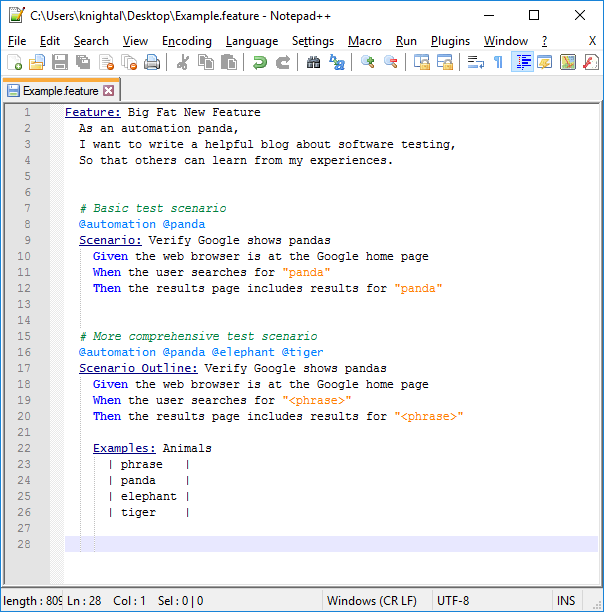
Below is a screen shot of an example feature file:

npp_gherkin
An example feature file using my Notepad++ UDL for Gherkin

(Note: These instructions are based on NotePad++ 7.9.1.)