Selenium WebDriver is the most popular open source package for Web UI test automation. It allows tests to interact directly with a web page in a live browser. However, using Selenium WebDriver can be very frustrating because basic interactions often lack robustness, causing intermittent errors for tests.
The Basics
One such vulnerable interaction is clicking elements on a page. Clicking is probably the most common interaction for tests. In C#, a basic click would look like this:
webDriver.FindElement(By.Id("my-id")).Click();
This is the easy and standard way to click elements using Selenium WebDriver. However, it will work only if the targeted element exists and is visible on the page. Otherwise, the WebDriver will throw exceptions. This is when programmers pull their hair out.
Waiting for Existence
To avoid race conditions, interactions should not happen until the target element exists on the page. Even split-second loading times can break automation. The best practice is to use explicit waits before interactions with a reasonable timeout value, like this:
const int timeoutSeconds = 15;
var ts = new TimeSpan(0, 0, timeoutSeconds);
var wait = new WebDriverWait(webDriver, ts);

wait.Until((driver) => driver.FindElements(By.Id("my-id")).Count > 0);
webDriver.FindElement(By.Id("my-id")).Click();
Other Preconditions
Sometimes, Web elements won’t appear without first triggering something else. Even if the element exists on the page, the WebDriver cannot click it until it is made visible. Always look for the proper way to make that element available for clicking. Click on any parent panels or expanders first. Scroll if necessary. Make sure the state of the system should permit the element to be clickable.
If the element is scrolled out of view, move to the element before clicking it:
new Actions(webDriver)
    .MoveToElement(webDriver.FindElement(By.Id("my-id")))
    .Click()
    .Perform();
Last Ditch Efforts
Nevertheless, there are times when clickable elements just don’t cooperate. They just can’t seem to be made visible. When all else fails, drop directly into JavaScript:
Do this only when absolutely necessary. It is a best practice to use Selenium WebDriver methods because they make automated interaction behave more like a real user than raw JavaScript calls. Make sure to give good reasons in code comments whenever doing this, too.
Final Advice
This article was written specifically for clicks, but its advice can be applied to other sorts of interactions, too. Just be smart about waits and preconditions.
Note: Code examples on this page are written in C#, but calls are similar for other languages supported by Selenium WebDriver.
Warning #1: This post has nothing to do with software development or testing. It is purely a post for my own pleasure.
Warning #2: SPOILER ALERT!This post is full of ’em.
The Legend of Zelda: Breath of the Wild is one of my favorite video games. Ever. I’ve been playing it regularly on my Wii U since Christmas, and I just beat the main quest. I redeemed all four Divine Beasts, found all 120 shrines, recovered all memories, and got a majority of the Korok seeds and Hyrule Compendium. It was truly the (virtual) adventure of a lifetime! In celebration of finally beating the game, I’m going to retrospect on what I loved about it so much.
What’s It About?
If you don’t know what this game is about, watch this:
Here’s the story: You, as a young man named Link, wake up in a cave with no memory about yourself or your past. As you explore the world and recover your memories, you discover that the kingdom of Hyrule was destroyed 100 years ago by the evil Calamity Ganon. Princess Zelda has sealed Ganon inside Hyrule Castle since then, but her power is weakening. You, along with four other “champions,” fought together to defeat Ganon but failed, and you yourself were nearly killed. Your main mission is to explore the land to strengthening yourself, recover lost memories, and reawaken four divine beasts. Then, you need to storm the castle to defeat Ganon, rescue Zelda, and bring a lasting peace to Hyrule.
How I Played
When BOTW was first announced as an open-world adventure, I immediately shut out all news and reviews aside from official trailers. I adamantly did not want any spoilers whatsoever. I wanted to fully explore the game on my own. And, truth be told, it was totally worth it.
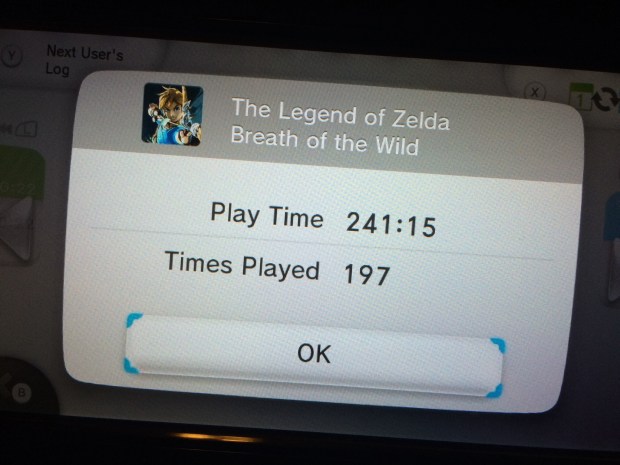
When I play video games, I tend to be a completionist. I like to leave no stone unturned, and I take time to power up as much as possible before big challenges. As a result, my progress rate in BOTW was rather slow, but I feel like I didn’t miss out on anything. Even then, there are still side quests left incomplete and Korok seeds left unfound. All told, I spent 241 hours on a single save file.
My total playtime after defeating Ganon.
After completing the Great Plateau and fully restoring the Sheikah Slate, my main approach to exploration was to look for shrines in a new area using the binoculars, make a mad rush for the shrine to claim a safety post, and then thoroughly search the surrounding areas for new stuff. I literally went around blind because I didn’t know where to find the Divine Beasts. Here’s roughly the path I took:
Scoured Necluda for shrines for a while.
Went to Zora’s Domain and reclaimed Vah Ruta.
Went to the Great Hyrule Forest but couldn’t take the Master Sword.
Found the Ancient Tech Lab in Akkala.
Criss-crossed Hyrule Field and got blown up by Guardians.
Climbed Mount Lanayru and OH CRAP THERE’S A DRAGON!
Cross-dressed my way through the Gerudo Desert and reclaimed Vah Nabooris.
Froze my butt off in the Gerudo Highlands.
Rode through Lake Hylia and Faron.
Took wings in Tabantha and reclaimed Vah Medoh.
Set my butt on fire on Death Mountain and reclaimed Vah Rudania.
Decided to freeze my butt off again, but this time in Hebra.
Stormed Hyrule Castle, kicking butt and taking names.
For combat, I really preferred nimble melee combat. I favored single-handed weapons and spears. I got pretty good with arrows, too, and I would often try to sneak around as an archer before wailing on enemies with a sword.
Guardians – ruining Link’s day, every day.
I did not purchase the DLC, and I probably won’t anytime soon. Why? I simply don’t have time. I didn’t feel like the game was lacking without the DLC, though it looks like it adds some cool content.
What I Loved
The open world was breathtaking. The scenery was truly beautiful, and the whole game was completely explorable. Except for the very edges of the map, there were no invisible walls: if it was there, you could climb it or jump it.
It’s just wild.
As the player, you chose the order of events. In other Zelda games, as in most adventure games, the main quest is completely linear. The player must complete events in a certain order to progress. However, in BOTW, after fully restoring the Sheikah Slate, you can make up your own adventure. The divine beasts are recommended but not required. You can even attempt to fight Ganon immediately after stepping off the Great Plateau (though the King’s ghost rightfully says that would be foolish). If I were to play it again, I’d probably do this order: Necluda/Faron, Great Hyrule Forest, Zora’s Domain, Death Mountain, Tabantha, and Gerudo Desert.
The non-linear unfolding of memories made the story so much more engaging. Until you beat the main quest, you really don’t know everything that happened in the past. You find out bits and pieces about Link, Zelda, and the Champions all throughout the quest. The flashbacks become wonderful rewards for progression.
The Sheikah. My favorite race in BOTW are the Sheikah. They are bona fide ninjas with Jōmon stylistics. They’re the underdog good guys who help Link. They made the greatest technology in Hyrule. And for once, the Sheikah are a living, thriving people group. I loved running around Hyrule wearing the Sheikah armor in honor of the Sheikah.
I want a man bun like that.
The Gorons are hilarious. If the Sheikah are my #1, then the Gorons are my #2. They’re very friendly people with priceless facial expressions.
This slideshow requires JavaScript.
The music was elegantly serene. It always perfectly complemented the location. From the piano taps while crossing the fields on horseback, to the rambunctious trombones of Goron City, to the violins of Hateno Village that could move you to tears, the music was on point.
Sheikah technology is so cool. Link is running around Hyrule with a mobile phone. The only thing it can’t do is make phone calls!
So, somehow, Hyrule regressed after 10,000 years?
Cooking. I love cooking. The fact that it’s in a Zelda game is incredible. ‘Nuff said.
Iron Chef Link!
Favorite Moments
Meeting the Sheikah monk at the end of every shrine. I loved how each monk had a unique name and pose. I also loved how the blue light would shatter as the monk blessed you with the Spirit Orb.
Every time was a special encounter.
The first horse. Taming, riding, and domesticating my first horse blew my mind. (Remember, I had no spoilers, not even horses.) I still have my first horse, a brown one with a white butt who I named Buttercup.
Look at mah horse – mah horse is amazing!
The first Lynel defeat. I felt UNSTOPPABLE.
This is not easy.
The first blood moon. I panicked because I had no idea what was happening.
Discovering the Great Skeleton in Hebra. It’s in a secret, beautiful cavern under a mountain peak.
Defeating Master Kohga. I delighted in sending him straight down to hell where he belonged. I had zero tolerance for the Yiga Clan.
Finding Gorons in Gerudo Town. They don’t even know how they got it!
It must be the gems.
Building Tarrey Town. Tarrey town is the place where all the races come together to build a productive new settlement together in peace. Everyone gets along. You can find some of the best goods in Hyrule there. It’s also the antithesis of the Great Calamity’s destruction: rather than finding previous towns decimated into ruins, Tarrey Town is the face of the new Hyrule rising from the ashes.
Finding the Hylian Shield. From the beginning, I hoped that the Hylian shield would be available somewhere in the game. I didn’t find it until the end of the game, but when I did, the shield was righteous.
Zelda’s face at the end of the game. #worthit
How is she 117 years old?
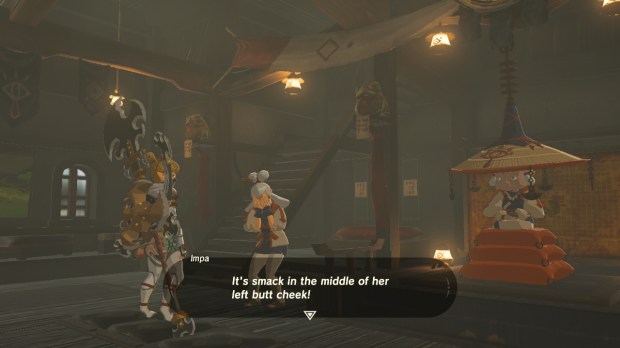
Finding out the location of Paya’s birthmark. Paya is probably my favorite character in the game. She’s a sweet, innocent Sheikah lass with a monster crush on Link. She will tell you she got her name from a papaya-seed-shaped birthmark somewhere on her body, but she won’t say where. I spent the whole game wondering where that birthmark was. Forget defeating Ganon and saving the princess, I just wanted to know. After finally completing the heirloom shrine in Kakariko Village (which was my last shrine because I overlooked the diary), Impa finally tells you.
And now we know.
Some Critique
Although BOTW is marvelous, there were a few things I felt could have been improved. These critiques do not in any way mean that the game was poor.
It rains too much in Hyrule. Wanna go climbing? Nope – it’s a slip ‘n slide. Need to cook some food on-the-go? Sorry – flame goes out. Stuck waiting for time to pass? No sitting by a fire. Trying to explode a powder keg on some Bokoblins? Not today. And let’s just hurl some lighting bolts at you while you cross an open field, too. The rain does nothing but block your progress. My biggest frustration was climbing: I couldn’t explore the areas I wanted to go, and I couldn’t pass the time with a fire. Coming back later would be a hassle because I had already climbed high to get there, so I was effectively stuck. It would have been nice to have some sort of item to climb in the rain.
The weapons break too easily. The game mechanic of weapons breaking is pretty clever because it forces the player to always try new weapons. However, it feels like they break too soon. Weapon durability is a significant problem early in the game, because the player has very few inventory slots and strong weapons are hard to find. Later in the game, this is less of an issue. I think some better balancing could have been done.
There was no fishing rod. For being such an outdoorsy game, I was truly surprised that there were no fishing rods in BOTW. Link hunts deer with bows and arrows, but he needs to use bombs to catch fish? This struck me as strange and, to a small extent, thwarted the immersive feeling of surviving in the wild. A fishing rod may have been challenging to implement, but I think it could have been possible as a key item like the glider.
I craved more story points. Much of my gameplay narrative shifted between Divine Beast sagas and open exploration. At times, I felt like there was too much to explore without enough reward. I found myself avoiding enemy hideouts late in the game because I simply didn’t need their weapons or spoils. Having more memories to discover would have been awesome, though I suppose that’s what the DLC is for.
Behind the Scenes
Nintendo released a 4-part video series entitled The Making of The Legend of Zelda: Breath of the Wild that’s really cool. Video links are below.
Final Impression
I love The Legend of Zelda: Breath of the Wild. I can’t wait to see where Nintendo takes the franchise from here!
People are heavily opinionated about Behavior-Driven Development. I frequently hear opponents say things like this:
Why would I use a BDD test framework instead of a traditional test framework like JUnit, NUnit, or pytest? The extra layer of plain language Gherkin steps gets in the way of the automation code. I can directly write code for those steps instead. BDD frameworks require lots of extra work that just doesn’t seem to add value. My team isn’t doing behavior-driven development practices, anyway.
I can sympathize with these sentiments, especially for those who have participated in projects where BDD was done poorly. Even if a team isn’t doing full behavior-driven development practices, I still assert that BDD test automation frameworks are better than traditional test frameworks for most feature testing (above-unit, black box). Here are reasons why.
Separation of Test Cases from Test Code
Test cases and test code are separate concerns. I should be able to design, discuss, and digest a test case without ever touching code. We describe features in plain language, and so we should also describe tests in plain language. Step definitions are nothing more than the automation behind the test case steps. Traditional test frameworks simply don’t have this separation of concerns, even if test methods are loaded with comments.
Guide Rails
BDD frameworks enforce good structure and layers for automation. There are designated places for test cases, step definitions, and support classes. The framework encourages good practices. Traditional test framework, however, are much more free-form. Programmers can do scary and stupid things with test classes. Functionally, a traditional test framework can still be structured well with layers and support classes, but it’s not required. Based on my experiences seeing less experienced automationeers shoving everything into Frankenstein’ed test methods, I much prefer to have the guide rails of a BDD framework.
Inherent Reusability
Steps are the building blocks of test cases, and test cases almost always have the same steps. BDD frameworks identify the step as a unique concern. One step with its definition can be used by any scenario, and steps can be parametrized for flexibility. This creates a “snowball” effect once enough steps have been developed: new tests may not require any new automation code! Traditional test frameworks simply don’t have this mechanism. It could be implemented by calling functions and classes outside of test classes, but not all automationeers are disciplined to do so, and everyone who does it will do it differently.
Aspect-Oriented Controls
Good frameworks handle cross-cutting concerns automatically. Things like logging, dependency injection, and cleanup shouldn’t interfere with test cases. BDD frameworks provide hooks to insert extra logic for these concerns around steps, scenarios, features, and even the whole test suite. Hooks can squeeze into steps because the framework is structured around steps. For example, hooks can automatically log steps to Extent Reports, instead of forcing programmers to write explicit logging calls in each test method.
The HOOKS, me bucko!
Easier Reviews
Nothing ruins your day like an illegible code review on features you don’t know. You are responsible for providing valuable feedback, but you can’t figure out what’s going on in the short amount of time you can dedicate to the review. Good Gherkin, however, makes it easy. A reviewer can review the test case apart from any code first to make sure it is a good test case. At this level, the reviewer could even be a non-technical person like a product owner. Then, the reviewer can either send the test case back with suggestions or, if the test case passes muster, dig deeper into the automation code.
Easier Onboarding
It can be hard to onboard new team members. They have so much to learn about the product, the code base, and the team practices. If tests are written using a BDD framework, then newbies can learn the features simply by reading the behavior specs. New automationeers likewise can rely on existing steps both for reuse and for examples as they develop new tests.
Other Reasons?
I’m sure there are other benefits to BDD frameworks, but these are the big ones for me. It’s an opinionated thing. Feel free to add comments below!
This year at PyCon 2018, I gave a talk entitled “Behavior-Driven Python” in which I showed how to use the behave framework for test automation. I then wrote a companion article on Opensource.com. Here’s the link:
In Gherkin, is it good or bad practice to have multiple Scenario Outlines with Examples tables in one feature file?
The short answer is yes, it is perfectly fine to have multiple Scenario Outlines within one feature file.
However, the unspoken concern with this question is the potential size of the feature file. If one Feature has multiple Scenario Outlines with large feature tables, then the feature file could become unreadable. Remember, Gherkin is a specification language, not a programming language. A feature file should look more like a meaningful behavior example than a giant wall of text or a low-level test script. Make sure to follow good Gherkin guidelines:
Follow the Golden Gherkin Rule: Treat other readers as you would want to be treated.
Follow the Cardinal Rule of BDD: One scenario, one behavior.
Write declarative steps, not imperative ones.
Try to limit the number of steps in each scenario to single digits.
Use only a few rows and columns per example table.
Use, but don’t abuse, the templating facet of Scenario Outlines!
There were tons of great talks at PyCon 2018 – more than I could attend in person – that are now available on the PyCon 2018 YouTube channel. This post has links to my favorites. Enjoy!
By the Numbers: Python Community Trends in 2017/2018 (Dmitry Filippov, Ewa Jodlowska) – At the end of 2017, the Python Software Foundation teamed up with JetBrains to conduct an official Python Developers Survey. Data science is taking Python by storm, and Python 3 now has majority adoption. There are tons of other cool statistics, too!
How Netflix does failovers in 7 minutes flat (Amjith Ramanujam) – That speed at that scale is mind-blowing. This is a fascinating talk, even for non-engineers!
Solve Your Problem With Sloppy Python (Larry Hastings) – “If you ever start writing a shell script, delete it and write a Python script instead.” This talk is a jovial reminder that Python is a powerful tool, even for hack-n-slash jobs.
The AST and Me (Emily Morehouse-Valcarcel) – Emily gives a great overview of the inner workings of the Python language. This talk is a must-see for anyone into compiler theory.
Dataclasses: The code generator to end all code generators (Raymond Hettinger) – Dataclasses are new data structures to Python to generate classes based on specs.
Pipenv: the Future of Python Dependency Management (Kenneth Reitz) – Pipenv is a new tool that makes pip, Pipfile, and virtualenv easier to use together. Kenneth gives a good overview of Python packaging and why pipenv is awesome.
Type-checked Python in the real world (Carl Meyer) – Sometimes, I wish Python had static typing. Now, it can! Facebook has done some innovative things to make it possible.
Beyond Unit Tests: Taking Your Testing to the Next Level (Hillel Wayne) – Property tests + contracts = integration tests. Hillel gives a fantastic strategy for making tests smarter.
“WHAT IS THIS MESS?” – Writing tests for pre-existing code bases (Justin Crown) – This is a pragmatic guide to adding new tests to old code. Now, you’ll never procrastinate on your tests again!
Demystifying the Patch Function (Lisa Roach) – Mocking is a great practice for limiting scope in unit tests. Whether using unittest.mock or other patching/mocking packages, this is a great talk for learning why and how to do mocking in unit tests!
Automating Code Quality (Kyle Knapp) – One of Python’s most beloved traits is its elegance. Maintaining high standards of code quality can be challenging for large projects, though. Kyle shows how to use existing tools to drive higher quality.
Keynote (Ying Li) – [35:07] – Ying is a software security engineer at Docker. In her keynote, she urged all people involved in technology to learn the basics of security. Definitely watch the video recording – she used a fun story to illustrate her points.
Keynote: The People and Python (Qumisha Goss) – [1:07:35] – “Q” is a librarian at the Detroit Public Library who taught herself Python so she could teach coding classes to kids. She shared the highs and lows of her experiences, especially in light of many disadvantages her students had. My favorite takeaway was to “cultivate greatness in others.”
The main reason I went to PyCon 2018 was to deliver a talk entitled “Behavior-Driven Python” about behave, one of Python’s most popular BDD test automation frameworks. One of my major professional goals for 2018 was to speak at a conference – and any conference would do. Fortunately for me, PyCon accepted my proposal, and Piper Companies in Raleigh graciously footed the bill! The video recording for my talk is linked below. It also has a GitHub example project and a companion article. (I’ll write a separate article with links to other talks I enjoyed.)
The Destination
PyCon 2018 was held in Cleveland, Ohio. I had never been to Cleveland before, and I found the downtown area to be charming. Everything I needed was within walking distance: the Huntington Convention Center where the conference was held, the DoubleTree by Hilton on Lakeside Ave where I stayed, the skyline, the city hall, the Rock and Roll Hall of Fame, the Great Lakes Science Center, and Lake Erie itself.
“FREE” stamp sculpture next to city hall.
The Huntington Convention Center, where PyCon 2018 took place.
Interesting shot on a bridge near the Rock and Roll Hall of Fame.
Cleveland has a nice skyline.
I flew into Cleveland on the evening of Thursday, May 10. Unfortunately, I missed the opening reception because my Frontier Airlines flight was delayed. (I guess I got what I paid for.) When I arrived, I had only one destination in mind: Great Lakes Brewing Company. Great Lakes has been one of my favorite breweries since I first started drinking craft beer in college. I boarded the Red Line train at the airport and rode it directly to the Ohio City station, where their pub is located. The food and beer did not disappoint!
GLBC Brats and Pierogies
Delayed flights are never fun.
The Red Line
Great Lakes Brewing Company
GLBC Flight Set
Great Lakes Brewing Company
Ohio City
The First Morning
PyCon 2018 had three major phases: tutorials from May 9-10, talks and events from May 11-13, and sprints from May 14-17. I attended only from May 11-13 for the “main” part of the conference. I really didn’t know what to expect, but I was blown away by what I found.
The first thing I did on the first day was registration. I showed up at about 8am to get my badge and my conference t-shirt. The volunteers also handed me a “swag bag,” pre-populated with a map and some random goodies. Since I had my backpack, I didn’t think I would need an extra bag – boy, was I wrong!
The main conference area was an expo hall full of companies and organizations giving away endless freebies, much to my naive surprise. (This was nothing like the last conference I attended, PyData Carolinas 2016.) The major stalls were Microsoft, Amazon (AWS), Google, Facebook/Instagram, LinkedIn, Anaconda, O’Reilly, and Heroku. Others included the Python Software Foundation, Django Girls, JetBrains, Elasticsearch, ChowNow, Yelp, Patreon, Squarespace, Linode, platform.sh, PostgreSQL, Nylas, DigitalOcean, DataDog, Cactus, Six Feet Up, OfferUp, Twilio, Nexmo, Okta, Pluralsight, Zapier, Bloomberg, Shopify, PyBee, EdgeDB, Anvil, and others I can’t remember. Over the three days of main events, I talked with people at nearly every stall to learn about what they do and to score that dank swag. I walked away with twelve t-shirts, five pairs of socks, laminated Python guides, a JetBrains yo-yo, a Google puzzle, Yelp gloves, a Facebook earbuds case, an OfferUp water bottle, a couple koozies, and a countless number of stickers.
All the swag!
The welcome banner at my hotel
The expo hall entrance
The talks in Grand Ballroom A. Mine was Friday at 12:10pm!
The Django Pony at the Django Girls table!
Setting up the expo hall
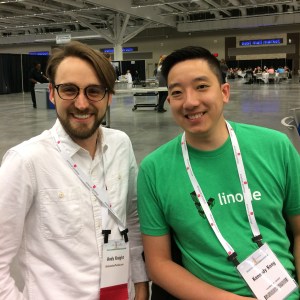
While waiting for the first keynote address, I ran into Kenneth Reitz at the Python Software Foundation table. Kenneth is the original author of requests and pipenv. It was a pleasure to meet him in person. He also interviewed me for his PyCon 2018 podcast! My segment is at 19:11.
I was about to go to the keynote address when I walked by the O’Reilly stall and discovered a book signing: Harry J.W. Percival was scheduled to give away free signed copies of the second edition of his book, Test-Driven Development with Python. I got my “golden ticket,” waited in line, skipped the keynote, and scored that dankest swag of the conference. O’Reilly was giving out other books throughout the conference, but as a Software Engineer in Test, this one was the big kahuna for me. #worthit
The O’Reilly book signing
Kenneth Reitz (left) and the Automation Panda (right)
My talk, “Behavior-Driven Python,” was scheduled at 12:10pm in Grand Ballroom A. I wasn’t terribly nervous because I had given this sort of talk many times, but I was worried that I would run out of time. Before speakers give their talks, they go to the “green room” where they test projector cables and meet the “runner” who will take them to the auditorium. I got to meet other speakers, which made me feel more comfortable. My talk got off to a delayed start due to some technical difficulties with the projector, but I think it went really well. The ballrooms could each seat several hundred people, and it looked like my talk was fairly well attended. A number of people asked me questions afterwards. Then, I ended up having lunch with a new friend I met named Gabriel, too!
The Rest of Day 1
I spent the rest of the afternoon attending talks, which can be mentally exhausting after too much. However, at the end of the day, I got to spend some sweet time with my dear friend Kennedy from college. Kennedy reached out to me before the conference to let me know that he would be there. I ran into him each day, but we got to spend the most time together sitting outside Ballroom A just catching up on life. We hadn’t seen each other since 2010 at RIT. Kennedy is really getting into software infrastructure and DevOps-like work. It was such a blessing to see him there.
My bro Kennedy sports that Linode shirt like a boss!
Dinner was another fortuitous blessing. ChowNow invited me to dinner and drinks at TownHall. I met their chief product officer, their engineers, and their recruiters. We talked a lot about test automation. They’re in a very similar situation as my current company, PrecisionLender: a hundred people and growing, realizing their need for automated feature tests, and discovering how hard it is to build an automation solution themselves or find someone who can. They were really great people doing awesome things, and I can’t wait to see them grow.
ChowNow also had a fun giveaway challenge. To enter, one needed to hit a REST API endpoint, which then returned further instructions. It was a bit of a puzzle – I got confused for the first few minutes, but after a hearty facepalm I figured out the challenge and successfully submitted my entry. (Python REPL and requests FTW!) The grand prize was an iPad Pro, but I won the consolation prize of $20 in ChowNow bucks. Not bad.
The Second Day
For me, Day 2 at PyCon was almost entirely about talks. The morning keynotes were really inspiring: Ying Li told a great story modeled after the Wizard of Oz about how everyone plays a part in security, and Qumisha Goss shared how she inspires kids at the Detroit public library to get into coding with Python. There were more talks I wanted to attend than I could. I learned about sloppy Python, developing arcade-style games, statistics on Python users, Appium, and compiler tools.
In the expo hall, my most memorable conversation was at the Python Bytes / Talk Python To Me table. These are major Python podcasts. Julian Sequeira of PyBites told me all about the #100DaysOfCode in Python, which I really want to try so I can learn about things beyond my domain. He then introduced me to Brian Okken, who wrote Python Testing with pytest and runs the Test and Code podcast. We talked quite a bit about testing practices and frameworks. I almost convinced him of BDD’s benefits, and he tried to convince me that unit testing is waste. It was a great conversation, and I really want to learn more about Brian’s pragmatic testing perspective.
Julian championing the Sceptre of Python!
That evening, Instagram invited me to dinner. I thought it would be drinks and appetizers at a bar, like with ChowNow. Oh, no, it was … Let me tell the story. Before PyCon started, Instagram invited me to join them for a special dinner. I think they invited me because I was a speaker. Instagram provided promo codes for a free Lyft to Crop Bistro, one of the best restaurants in the city. It resides in an old bank: marble columns and fresco paintings on the walls. When I arrived, the hostess walked me to the back, down the stairs, through the kitchen, and into the bank’s old vault, which had been converted into a private party room. They served a full three-course meal with a full bar, and it was damn good. That ribeye steak… I met a lot of great people, too. I talked with Instagram’s release manager at length about struggles with test automation. I also got to chat with a number of their engineers (many of whom were from China), as well as other Pythonistas who were invited. It was a wonderful event, and I truly thank Instagram for the invitation.
Instagram Cookie
Crop Bistro
A 3-Course Meal!
The Vault at Crop Bistro
Also, I want to say that the weather in Cleveland was pretty darn cold! Daily temperatures were in the 50s, while at the same time in Raleigh, they were in the 90s. I froze my ears off walking from the hotel to the convention center!
The Third Day
At the Instagram dinner, I met a few guys who help organize Python conferences. They encouraged me to submit proposals to PyGotham and PyOhio. So, when I woke up on Day 3, I did! Hopefully, my proposals will be accepted.
The Job Fair
Representing PrecisionLender! Someone asked me about the four values on the back of the shirt.
The main event in the morning was the Poster expo / Job Fair. However, since I had already met most of the companies, I spent most of my time at the Rock and Roll Hall of Fame instead. I’m a huge fan of rock music. The museum had awesome exhibits with really cool memorabilia. I even got to vote for new inductees – I voted for Iron Maiden! I headed back to PyCon for the afternoon talks, but then I skipped out of the finale to finish seeing all of the Rock and Roll Hall of Fame exhibits before the museum closed.
Aerosmith’s Set
Angus Young’s Stage Outfit
Cliff Burton’s Bass Guitar (Metallica)
Chinese Lunch
Outside the Rock and Roll Hall of Fame
The Beatles entry in the Hall of Fame
My original dinner plan was to visit another local brewery. PyCon was hosting an event dinner at the Great Lakes Science Center, but I didn’t register in time to get a ticket. Nevertheless, my friend Kennedy offered me his meal ticket since he was returning home that afternoon. Hashtag-BLESSED. The museum was so cool. My favorite part was the NASA Glenn Visitor Center – they had one of the Apollo Skylab capsules! Many of us Pythonistas built a really tall tower out of wood blocks that we had to knock down once dinner was ready. The food was excellent, too: steak, salmon, mac ‘n cheese, green beans, and cheesecake for dessert.
Delicious Dinner
Apollo Capsule from Skylab
Apollo Capsule from Skylab
Block Tower!
Inside the Mercury Capsule
Mercury Capsule
My (Delta) direct flight home left on time Monday morning. I could barely fit all the swag into my suitcase! I caught a cold while attending the conference, but thankfully it didn’t take effect until I was back home.
Major Takeaways
So much happened at PyCon 2018. Even though I was doing stuff nonstop for three days, there was still so much more there to do. It will take me a few weeks to fully process everything. Here were my major takeaways:
I accomplished my goals. Before going to PyCon, I set three major goals for myself: (1) get a pulse on the state and direction of Python, (2) establish rapport in the community, and (3) become inspired to pursue greater work. CHECK! I met a lot of great people who all love using Python. A number of people really enjoyed my talk. I learned how so many groups, from top-tier Silicon Valley companies to local user orgs, are using Python to do cool stuff. There are also now just as many data scientists as web developers using Python. Seeing Python used in so many different domains really inspired me to learn more about those domains in which my knowledge is limited. I feel like I have more work to do after the conference than I did to prepare for it!
The Python community is so welcoming and friendly. When PyCon’s banner says, “For the community, by the community,” it’s true. This conference was about people much more than it was about programming. I was initially afraid that I would be lonely because I didn’t know anyone, but once I got there, everyone was outgoing; even me! Python is a language for everyone from beginners to experts, and there was no sense of elitism whatsoever at the conference. The atmosphere reminded me very much of freshman orientation week at RIT, when total strangers would strike up conversations and bestow well-wishes at every turn.
All companies have major test automation struggles. There is a universal awareness of the need for good testing, but there is also universal struggle to develop reliable feature tests at scale. Knowing that companies like Facebook/Instagram and ChowNow have problems similar to companies where I have worked gives me boosted motivation as a Software Engineer in Test to keep going!
Never write shell scripts. Just write Python scripts. Yes! This came from the “sloppy Python” talk. It’s so true. Shell scripting is so low-level and often unreadable. Plus, Python is cross-platform!
Flask is a big deal. Flask is a minimalist Pythonic web framework. It is a lightweight alternative to Django and Pyramid. Everyone was talking about it. O’Reilly was giving away books about it.
Prep for PyCon 2019! I want to return to PyCon very much. Next year, I have a better understanding of the talks, so I can make better proposals. I’ll also check out the open spaces and lightning talks. PyCon 2019 will be back in Cleveland, too!
What’s Next?
I feel like I have so much more to learn! Here’s what’s next for me:
Watch videos for all the talks I missed.
Come up with a personal professional development plan.
Warning: If you are new to BDD, then I strongly recommend reading the BDD 101 series before trying to use the behave framework.
Overview
behave is a behavior-driven (BDD) test framework that is very similar to Cucumber, Cucumber-JVM, and SpecFlow. BDD frameworks are unique in that test cases are not written in raw programming code but rather in plain specification language that is then “glued” to code. The “behavior specs” help to define what the behavior is, and steps can be reused by multiple test cases (or “scenarios”). This is very different from more traditional frameworks like unittest and pytest. Although behave is not an official Cucumber variant, it still uses the Gherkin language (“Given-When-Then”) for behavior specification.
Test scenarios are written in Gherkin “.feature” files. Each Given, When, and Then step is “glued” to a step definition – a Python function decorated by a matching string in a step definition module. The behave framework essentially runs feature files like test scripts. Hooks (in “environment.py”) and fixtures can also insert helper logic for test execution.
behave is officially supported for Python 2, but it seems to run just fine using Python 3.
Since behave is an opinionated framework, it has a very opinionated project structure. All code must be located under a directory named “features”. Gherkin feature files and the “environment.py” file for hooks must appear under “features”, and step definition modules must appear under “features/steps”. Configuration files can store common execution settings and even override the path to the “features” directory.
Note: Step definition module names do not need to be the same as feature file names. Any step definition can be used by any feature file within the same project.
An example project named behavior-driven-python located in GitHub shows how to write tests using behave. This section will explain how the Web tests are designed.
The top layer in a behave project is the set of Gherkin feature files. Notice how the scenario below is concise, focused, meaningful, and declarative:
@web @duckduckgoFeature: DuckDuckGo Web Browsing
As a web surfer,
I want to find information online,
So I can learn new things and get tasks done.
# The "@" annotations are tags # One feature can have multiple scenarios
# The lines immediately after the feature title are just commentsScenario: Basic DuckDuckGo Search
Given the DuckDuckGo home page is displayed
When the user searches for "panda"Then results are shown for "panda"
Each scenario step is “glued” to a decorated Python function called a step definition. Step defs can use different types of step matchers and can also take parametrized inputs:
from behave import *
from selenium.webdriver.common.keys import Keys

DUCKDUCKGO_HOME = 'https://duckduckgo.com/'

@given('the DuckDuckGo home page is displayed')
def step_impl(context):
  context.browser.get(DUCKDUCKGO_HOME)

@when('the user searches for "{phrase}"')
def step_impl(context, phrase):
  search_input = context.browser.find_element_by_name('q')
  search_input.send_keys(phrase + Keys.RETURN)

@then('results are shown for "{phrase}"')
def step_impl(context, phrase):
  links_div = context.browser.find_element_by_id('links')
  assert len(links_div.find_elements_by_xpath('//div')) > 0
  search_input = context.browser.find_element_by_name('q')
  assert search_input.get_attribute('value') == phrase
The “environment.py” file can specify hooks to execute additional logic before and after steps, scenarios, features, and even the whole test suite. Hooks should handle automation concerns that should not be exposed through Gherkin. For example, Selenium WebDriver setup and cleanup should be handled by hooks instead of step definitions because after hooks always get run despite failures, while steps after an abortive failure will not get run.
from selenium import webdriver

def before_scenario(context, scenario):
  if 'web' in context.tags:
    context.browser = webdriver.Firefox()
    context.browser.implicitly_wait(10)

def after_scenario(context, scenario):
  if 'web' in context.tags:
    context.browser.quit()
Test Launch
behave boasts a powerful command line with many options. Below are common use case examples when running tests from the project root directory:
# Run all scenarios in the project
behave

# Run all scenarios in a specific feature file
behave features/web.feature

# Filter tests by tag
behave --tags-help
behave --tags @duckduckgo
behave --tags ~@unit
behave --tags @basket --tags @add,@remove

# Write a JUnit report (useful for Jenkins and other CI tools)
behave --junit

# Don't print skipped scenarios
behave -k
Pros and Cons
Like all BDD test frameworks, behave is opinionated. It works best for black box testing due to its behavior focus. Web testing would be a great use case because user interactions can easily be described using plain language. Reusable steps also foster a snowball effect for automation development. However, behave would not be good for unit testing or low-level integration testing – the verbosity would become more of a hindrance than a helper.
My recommendation is to use behave for black box testing if the team has bought into BDD. I would also strongly consider pytest-bdd as an alternative BDD framework because it leverages all the goodness of pytest.
SpecFlow, a.k.a. “Cucumber for .NET,” is a leading BDD test automation framework for .NET. Created by Gáspár Nagy and maintained as a free, open source project on GitHub by TechTalk, SpecFlow presently has almost 3 million total NuGet downloads. I’ve used it myself at a few companies, and, I must say as an automationeer, it’s awesome! SpecFlow shares a lot in common with other Cucumber frameworks like Cucumber-JVM, but it is not a knockoff – it excels in many ways. Below are five features I love about SpecFlow.
#1: Declarative Specification by Example
SpecFlow is a behavior-driven test framework. Test cases are written as Given-When-Then scenarios in Gherkin “.feature” files. For example, imagine testing a cucumber basket:
Feature: Cucumber Basket As a gardener,
I want to carry many cucumbers in a basket, So that I don’t drop them all.@cucumber-basketScenario: Fill an empty basket with cucumbersGiven the basket is emptyWhen"10" cucumbers are added to the basketThen the basket is full
Notice a few things:
It is declarative in that steps indicate what should be done at a high level.
It is concise in that a full test case is only a few lines long.
It is meaningful in that the coverage and purpose of the test are intuitively obvious.
It is focused in that the scenario covers only one main behavior.
Gherkin makes it easy to specify behaviors by example. That way, everybody can understand what is happening. C# code will implement each step in lower layers. Even if your team doesn’t do the full-blown BDD process, using a BDD framework like SpecFlow is still great for test automation. Test code naturally abstracts into separate layers, and steps are reusable, too!
#2: Context is King
Safely sharing data (e.g., “context”) between steps is a big challenge in BDD test frameworks. Using static variables is a simple yet terrible solution – any class can access them, but they create collisions for parallel test runs. SpecFlow provides much better patterns for sharing context.
Context injection is SpecFlow’s simple yet powerful mechanism for inversion of control (using BoDi). Any POCOs can be injected into any step definition class, either using default values or using a specific initialization, by declaring the POCO as a step def constructor argument. Those instances will also be shared instances, meaning steps across different classes can share the same objects! For example, steps for Web tests will all need a reference to the scenario’s one WebDriver instance. The context-injected objects are also created fresh for each scenario to protect test case independence.
Another powerful context mechanism is ScenarioContext. Every scenario has a unique context: title, tags, feature, and errors. Arbitrary objects can also be stored in the context object like a Dictionary, which is a simple way to pass data between steps without constructor-level context injection. Step definition classes can access the current scenario context using the static ScenarioContext.Current variable, but a better, thread-safe pattern is to make all step def classes extend the Steps class and simply reference the ScenarioContext instance variable.
#3: Hooks for Any Occasion
Hooks are special methods that insert extra logic at critical points of execution. For example, WebDriver cleanup should happen after a Web test scenario completes, no matter the result. If the cleanup routine were put into a Then step, then it would not be executed if the scenario had a failure in a When step. Hooks are reminiscent of Aspect-Oriented Programming.
Most BDD frameworks have some sort of hooks, but SpecFlow stands out for its hook richness. Hooks can be applied before and after steps, scenario blocks, scenarios, features, and even around the whole test run. (Cucumber-JVM, by contrast, does not support global hooks.) Hooks can be selectively applied using tags, and they can be assigned an order if a project has multiple hooks of the same type. Hook methods will also be picked up from any step definition class. SpecFlow hooks are just awesome!
#4: Thorough Outline Templating
Scenario Outlines are a standard part of Gherkin syntax. They’re very useful for templating scenarios with multiple input combinations. Consider the cucumber basket again:
Feature: Cucumber BasketScenario Outline: Add cucumbers to the basketGiven the basket has "<initial>" cucumbersWhen"<some>" cucumbers are added to the basketThen the basket has "<total>" cucumbers
Examples: Counts
| initial | some | total |
| 1 | 2 | 3 |
| 5 | 3 | 8 |
All BDD frameworks can parametrize step inputs (shown in double quotes). However, SpecFlow can also parametrize the non-input parts of a step!
Feature: Cucumber BasketScenario Outline: Use the cucumber basketGiven the basket has "<initial>" cucumbersWhen"<some>" cucumbers are <handled-with> the basketThen the basket has "<total>" cucumbers
Examples: Counts
| initial | some | handled-with | total |
| 1 | 2 | added to | 3 |
| 5 | 3 | removed from | 2 |
The step definitions for the add and remove steps are separate. The step text for the action is parametrized, even though it is not a step input:
[When(@"""(\d+)"" cucumbers are added to the basket")]
public void WhenCucumbersAreAddedToTheBasket(int count) { /* */ }

[When(@"""(\d+)"" cucumbers are removed from the basket")]
public void WhenCucumbersAreRemovedFromTheBasket(int count) { /* */ }
That’s cool!
#5: Test Thread Affinity
SpecFlow can use any unit test runner (like MsTest, NUnit, and xUnit.net), but TechTalk provides the official SpecFlow+ Runner for a licensed fee. I’m not associated with TechTalk in any way, but the SpecFlow+ Runner is worth the cost for enterprise-level projects. It has a friendly command line, a profile file to customize execution, parallel execution, and nice integrations.
The major differentiator, in my opinion, is its test thread affinity feature. When running tests in parallel, the major challenge is avoiding collisions. Test thread affinity is a simple yet powerful way to control which tests run on which threads. For example, consider testing a website with user accounts. No two tests should use the same user at the same time, for fear of collision. Scenarios can be tagged for different users, and each thread can have the affinity to run scenarios for a unique user. Some sort of parallel isolation management like test thread affinity is absolutely necessary for test automation at scale. Given that the SpecFlow+ Runner can handle up to 64 threads (according to TechTalk), massive scale-up is possible.
But Wait, There’s More!
SpecFlow is an all-around great test automation framework, whether or not your team is doing full BDD. Feel free to add comments below about other features you love (or *gasp* hate) about SpecFlow!
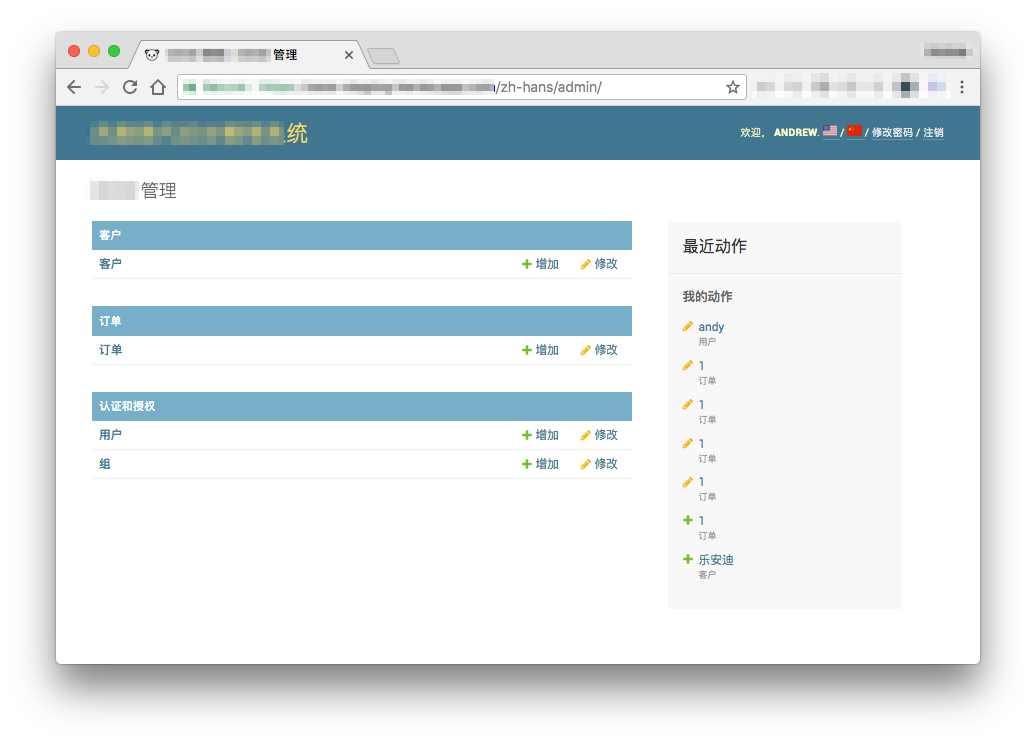
Django is a fantastic Python Web framework, and one of its great out-of-the-box features is internationalization (or “i18n” for short). It’s pretty easy to add translations to nearly any string in a Django app, but what about translating admin site pages? Titles, names, and actions all need translations. Those admin pages are automatically generated, so how can their words be translated? This guide shows you how to do it easily.
Want an internationalized admin site like this? Follow this guide to find out how!
i18n Review
If you are new to translations in Django, definitely read the official Translation page first. In a nutshell, all strings that need translation should be passed into a translation function for Python code or a translation block for Django template code. Django management commands then generate language-specific message files, in which translators provide translations for the marked strings, and finally compile them for app use. Note that translations require the gettext tools to be installed on your machine. Django also provides some advanced logic for handling special cases like date formats and pluralization, too. It’s really that simple!
Initial Setup
A Django project needs some basic config before doing translations, which is needed for both the main site and the admin.
Enabling Internationalization
Make sure the following settings are given in settings.py:
# settings.py

LANGUAGE_CODE = 'en-us'  # or other appropriate code
USE_I18N = True
USE_L10N = True
They were probably added by default. The Booleans could be set to False to give apps with no internationalization a small performance boost, but we need them to be True so that translations happen.
Changing Locale Paths
By default, message files will be generated into locale directories for each app with strings marked for translation. You may optionally want to set LOCALE_PATHS to change the paths. For example, it may be easiest to put all message files into one directory like this, rather than splitting them out by app:
This will avoid translation duplication between apps. It’s a good strategy for small projects, but be warned that it won’t scale well for larger projects.
Middleware for Automatic Translation
Django provides LocaleMiddleware to automatically translate pages using “context clues” like URL language prefixes, session values, and cookies. (The full pecking order is documented under How Django discovers language preference on the official doc page.) So, if a user accesses the site from China, then they should automatically receive Chinese translations! To use the middleware, add django.middleware.locale.LocaleMiddleware to the MIDDLEWARE setting in settings.py. Make sure it comes after SessionMiddleware and CacheMiddleware and before CommonMiddleware, if those other middlewares are used.
Getting automatic translations from context clues is great, but it’s nevertheless useful to have direct URLs to different page translations. The i18n_patterns function can easily add the language code as a prefix to URL patterns. It can be applied to all URLs for the site or only a subset of URLs (such as the admin site). Optionally, patterns can be set so that URLs without a language prefix will use the default language. The main caveat for using i18n_patterns is that it must be used from the root URLconf and not from included ones. The project’s root urls.py file should look like this:
# urls.py

from django.conf.urls.i18n import i18n_patterns
from django.contrib import admin
from django.urls import path

urlpatterns = i18n_patterns(
    # ...
    path('admin/', admin.site.urls),
    # ...

    # If no prefix is given, use the default language
    prefix_default_language=False
)
Limiting Language Choices
When adding language prefixes to URLs, I strongly recommend limiting the available languages. Django includes ready-made message files for several languages. A site would look bad if, for example, the “/fr/” prefix were available without any French translations. Set the available languages using LANGUAGES in settings.py:
# settings.py

from django.utils.translation import gettext_lazy as _

LANGUAGES = [
    ('en', _('English')),
    ('zh-hans', _('Simplified Chinese')),
]
Note that language codes follow the ISO 639-1 standard.
Doing the Translations
With the configurations above, translations can now be added for the main site! The steps below show how to add translations specifically for the admin. Unless there is a specific need, use lazy translation for all cases.
Out-of-the-Box Phrases
Admin site pages are automatically generated using out-of-the-box templates with lots of canned phrases for things like “login,” “save,” and “delete.” How do those get translated? Thankfully, Django already has translations for many major languages. Check out the list under django/contrib/admin/locale for available languages. Django will automatically use translations for these languages in the admin site – there’s nothing else you need to do! If you need a language that’s not available, I strongly encourage you to contribute new translations to the Django project so that everyone can share them. (I suspect that you could also try to manually create messages files in your locale directory, but I have not tested that myself.)
Custom Admin Titles
There are a few ways to set custom admin site titles. My preferred method is to set them in the root urls.py file. Wherever they are set, mark them for lazy translation. It’s easy to overlook them!
from django.contrib import admin
from django.utils.translation import gettext_lazy as _

admin.site.index_title = _('My Index Title')
admin.site.site_header = _('My Site Administration')
admin.site.site_title = _('My Site Management')
App Names
App names are another set of phrases that can be easily missed. Add a verbose_name field with a translatable string to every AppConfig class in the project. Do not simply try to translate the string given for the name field: Django will yield a runtime exception!
from django.apps import AppConfig
from django.utils.translation import gettext_lazy as _

class CustomersConfig(AppConfig):
    name = 'customers'
    verbose_name = _('Customers')
Model Names
Models are full of strings that need translations. Here are the things to look for:
Give each field a verbose_name value, since the identifiers cannot be translated.
Mark help texts, choice descriptions, and validator messages as translatable.
Add a Meta class with verbose_name and verbose_name_plural values.
Look out for any other strings that might need translations.
Here is an example model:
from django.db import models
from django.core.validators import RegexValidator
from django.utils.translation import gettext_lazy as _

class Customer(models.Model):
    name = models.CharField(
        max_length=100,
        help_text=_('First and last name.'),
        verbose_name=_('name'))
    address = models.CharField(
        max_length=100,
        verbose_name=_('address'))
    phone = models.CharField(
        max_length=10,
        validators=[RegexValidator(
            '^\d{10}$',
            _('Phone must be exactly 10 digits.'))],
        verbose_name=_('phone number'))

    class Meta:
        verbose_name = _('customer')
        verbose_name_plural = _('customers')
Run the Commands
Once all strings are marked for translation, generate the message files:
# Generate message files for a desired language
python manage.py makemessages -l zh_Hans

# After adding translations to the .po files, compile the messages
python manage.py compilemessages
Warning: The language code and the locale name may be different! For example, take Simplified Chinese: the language code is “zh-hans”, but the locale name is “zh_Hans”. Notice the underscore and the caps. Locale names often include a country code to differentiate language nuances, like American English vs. British English. Refer to django/contrib/admin/local for a list of examples.
Bonus: Admin Language Buttons
With LocaleMiddleware and i18n_patterns, pages should be automatically translated based on context or URL prefix. However, it would still be great to let the user manually switch the language from the admin interface. Clicking a button is more intuitive than fumbling with URL prefixes.
There are many ways to add language switchers to the admin site. To me, the most sensible way is to add flag icons to the title bar. Behind the scenes, each flag icon would be linked to a language-prefixed URL for the page. That way, whenever a user clicks the flag, then the same page is loaded in the desired language.
It’s pretty easy to make something like this, but it needs a few steps.
Language Code Prefix Switcher
Since URL paths use i18n_patterns, their language codes can be trusted to be uniform. A utility function can easily add or substitute the desired language code as a URL path prefix. For example, it would convert “/admin/” and “/en/admin/” into “/zh-hans/admin/” for Simplified Chinese. This function should also validate that the path and language are correct. It can be put anywhere in the project. Below is the code:
from django.conf import settings

def switch_lang_code(path, language):

    # Get the supported language codes
    lang_codes = [c for (c, name) in settings.LANGUAGES]

    # Validate the inputs
    if path == '':
        raise Exception('URL path for language switch is empty')
    elif path[0] != '/':
        raise Exception('URL path for language switch does not start with "/"')
    elif language not in lang_codes:
        raise Exception('%s is not a supported language code' % language)

    # Split the parts of the path
    parts = path.split('/')

    # Add or substitute the new language prefix
    if parts[1] in lang_codes:
        parts[1] = language
    else:
        parts[0] = "/" + language

    # Return the full new path
    return '/'.join(parts)
Prefix Switch Template Filter
Ultimately, this function must be called by Django templates in order to provide links to language-specific pages. Thus, we need a custom template filter. The filter implementation module can be put into any app, but it must be in a sub-package named templatetags – that’s how Django knows to look for custom template tags and filters. The new filters will be easy to write because we already have the switch_lang_code function. (Separating the logic to handle the prefix from the filter itself makes both more testable and reusable.) The code is below:
# [app]/templatetags/i18n_switcher.py

from django import template
from django.template.defaultfilters import stringfilter

register = template.Library()

@register.filter
@stringfilter
def switch_i18n_prefix(path, language):
    """takes in a string path"""
    return switch_lang_code(path, language)

@register.filter
def switch_i18n(request, language):
    """takes in a request object and gets the path from it"""
    return switch_lang_code(request.get_full_path(), language)
Admin Template Override
Finally, admin templates must be overridden so that we can add new elements to the admin pages. Any admin template can be overridden by creating new templates of the same name under [project-root]/templates/admin. Parent content will be used unless explicitly overridden within the child template file. Since we want to change the title bar, create a new template file for base_site.html with the following contents:
Notice that the whole userlinks block had to be rewritten to fit the flag into place. The static image files for the flags are simply free flag emojis. They are hyperlinked to the appropriate language URL for the page: the switch_i18n filter is applied to the active request object to get the desired language-prefixed path. (Note: In my example code, I removed the “View Site” link because my site didn’t need it.)
Completed View
The admin site should now look like this:
In my project, I chose to put the language prefix switcher code in its own application named i18n_switcher. The files in my project needed for the admin language buttons are organized like this (without showing other files in the project):
As mentioned before, flag icons in the title bar are simply one way to provide easy links to translated pages. It works well when there are only a few language choices available. A different view would be better for more languages, like a dropdown, a second line in the title bar, or even a page footer.
With a bit more polishing, this would also make a nifty little Django app package that others could use for their projects. Maybe I’ll get to that someday.



















 Automation Panda