development

Django Projects in PyCharm Community Edition

JetBrains PyCharm is one of the best Python IDEs around. It’s smooth and intuitive – a big step up from Atom or Notepad++ for big projects. PyCharm is available as a standalone IDE or as a plugin for its big sister, IntelliJ IDEA. The free Community Edition provides basic features akin to IntelliJ, while the licensed Professional Edition provides advanced features such as web development and database tools. The Professional Edition isn’t cheap, though: a license for one user may cost up to $199 annually (though discounts and free licenses may be available).

This guide shows how to develop Django web projects using PyCharm Community Edition. Even though Django-specific features are available only in PyCharm Professional Edition, it is still possible to develop Django projects using the free version with help from the command line. Personally, I’ve been using the free version of PyCharm to develop a small web site for a side business of mine. This guide covers setup steps, basic actions, and feature limitations based on my own experiences. Due to the limitations in the free version, I recommend it only for small Django projects or for hobbyists who want to play around. I also recommend considering Visual Studio Code as an alternative, as shown in my article Django Projects in Visual Studio Code.

Prerequisites

This guide focuses specifically on configuring PyCharm Community Edition for Django development. As such, readers should be familiar with Python and the Django web framework. Readers should also be comfortable with the command line for a few actions, specifically for Django admin commands. Experience with JetBrains software like PyCharm and IntelliJ IDEA is helpful but not required.

Python and PyCharm Community Edition must be installed on the development machine. If you are not sure which version of Python to use, I strongly recommend Python 3. Any required Python packages (namely Django) should be installed via pip.

Creating Django Projects and Apps

Django projects and apps require a specific directory layout with some required settings. It is possible to create this content manually through PyCharm, but it is recommended to use the standard Django commands instead, as shown in Part 1 of the official Django tutorial.

> django-admin startproject newproject
> cd newproject
> django-admin startapp newapp

Then, open the new project in PyCharm. The files and directories will be visible in the Project Explorer view.

PyCharm - New Django Project

The project root directory should be at the top of Project Explorer. The .idea folder contains IDE-specific config files that are not relevant for Django.

Creating New Files and Directories

Creating new files and directories is easy. Simply right-click the parent directory in Project Explorer and select the appropriate file type under New. Files may be deleted using right-click options as well or by highlighting the file and typing the Delete or Backspace key.

PyCharm - Create File

Files and folders are easy to visually create, copy, move, rename, and delete.

Django projects require a specific directory structure. Make sure to put files in the right places with the correct names. PyCharm Community Edition won’t check for you.

Writing New Code

Double-click any file in Project Explorer to open it in an editor. The Python editor offers all standard IDE features like source highlighting, real-time error checking, code completion, and code navigation. This is the main reason why I use PyCharm over a simpler editor for Python development. PyCharm also has many keyboard shortcuts to make actions easier.

PyCharm - Python Editor

Nice.

Editors for other file types, such as HTML, CSS, or JavaScript, may require additional plugins not included with PyCharm Community Edition. For example, Django templates must be edited in the regular HTML editor because the special editor is available only in the Professional Edition.

PyCharm - HTML Editor

Workable, but not as nice.

Running Commands from the Command Line

Django admin commands can be run from the command line. PyCharm automatically refreshes any file changes almost immediately. Typically, I switch to the command line to add new apps, make migrations, and update translations. I also created a few aliases for easier file searching.

> python manage.py makemigrations
> python manage.py migrate
> python manage.py makemessages -l zh
> python manage.py compilemessages
> python manage.py test
> python manage.py collectstatic
> python manage.py runserver

Creating Run Configurations

PyCharm Community Edition does not include the Django manage.py utility feature. Nevertheless, it is possible to create Run Configurations for any Django admin command so that they can be run in the IDE instead of at the command line.

First, make sure that a Project SDK is set. From the File menu, select Project Structure…. Verify that a Project SDK is assigned on the Project tab. If not, then you may need to create a new one – the SDK should be the Python installation directory or a virtual environment. Make sure to save the new Project SDK setting by clicking the OK button.

PyCharm - Project Structure

Don’t leave that Project SDK blank!

Then from the Run menu, select Edit Configurations…. Click the plus button in the upper-left corner to add a Python configuration. Give the config a good name (like “Django: <command>”). Then, set Script to “manage.py” and Script parameters to the name and options for the desired Django admin command (like “runserver”). Set Working directory to the absolute path of the project root directory. Make sure the appropriate Python SDK is selected and the PYTHONPATH settings are checked. Click the OK button to save the config. The command can then be run from Run menu options or from the run buttons in the upper-right corner of the IDE window.

PyCharm - Run Config

Run configurations should look like this. Anything done at the command line can also be done here.

PyCharm - Run View

When commands are run, the Run view appears at the bottom of the IDE window to show console output.

Special run configurations are particularly useful for the “test” and “runserver” commands because they enable rudimentary debugging. You can set breakpoints, run the command with debugging, and step through the Python code. If you need to interact with a web page to exercise the code, PyCharm will take screen focus once a breakpoint is hit. Even though debugging Django templates is not possible in the free version, debugging the Python code can help identify most problems. Be warned that debugging is typically a bit slower than normal execution.

PyCharm - Debugging

Debugging makes Django development so much easier.

I typically use the command line instead of run configurations for other Django commands just for simplicity.

Version Control Systems

PyCharm has out-of-the-box support for version control systems like Git and Subversion. VCS actions are available under the VCS menu or when right-clicking a file in Project Explorer. PyCharm can directly check out projects from a repository, add new projects to a repository, or automatically identify the version control system being used when opening a project. Any VCS commands entered at the command line will be automatically reflected in PyCharm.

PyCharm - VCS Menu

PyCharm’s VCS menu is initially generic. Once you select a VCS for your project, the options will be changed to reflect the chosen VCS. For example, Git will have options for “Fetch”, “Pull”, and “Push”.

Personally, I use Git with either GitHub or Atlassian Bitbucket. I prefer to do most Git actions like graphically through PyCharm, but occasionally I drop to the command line when I need to do more advanced operations (like checking commit IDs or forcing hard resets). PyCharm also has support for .gitignore files.

Python Virtual Environments

Creating virtual environments is a great way to manage Python project dependencies. Virtual environments are especially useful when deploying Django web apps. I strongly recommend setting up a virtual environment for every Python project you develop.

PyCharm can use virtual environments to run the project. If a virtual environment already exists, then it can be set as the Project SDK under Project Structure as described above. Select New…Python SDKAdd Local, and set the path. Otherwise, new virtual environments can be created directly through PyCharm. Follow the same process to add a virtual environment, but under Python SDK, select Create VirtualEnv instead of Add Local. Give the new virtual environment an appropriate name and path. Typically, I put my virtual environments either all in one common place or one level up from my project root directory.

PyCharm - New VirtualEnv

Creating a new virtual environment is pretty painless.

Databases

Out of the box, PyCharm Community Edition won’t give you database tools. You’re stuck with third-party plugins, the command line, or external database tools. This isn’t terrible, though. Since Django abstracts data into the Model layer, most developers rarely need to directly interact with the underlying database. Nevertheless, the open-source Database Navigator plugin provides support in PyCharm for the major databases (Oracle, MySQL, SQLite, PostgreSQL).

Limitations

The sections above show that PyCharm Community Edition can handle Django projects just like any other Python projects. This is a blessing and a curse, because advanced features are available only in the Professional Edition:

  • Django template support
  • Inter-project navigation (view to template)
  • Better code completion
  • Identifier resolution (especially class-to-instance fields)
  • Model dependency graphs
  • manage.py utility console
  • Database tools

The two features that matter most to me are the template support and the better code completion. With templates, I sometimes make typos or forget closing tags. With code completion, not all options are available because Django does some interesting things with model fields and dynamically-added attributes. However, all these missing features are “nice-to-have” but not “need-to-have” for me.

Conclusion

I hope you found this guide useful! Feel free to enter suggestions for better usage in the comments section below. You may also want to look at alternatives, such as Visual Studio Code or PyDev.

Who Should Lead BDD?

Behavior-driven development offers great benefits: better communication, easier test automation, and higher code quality. There are many ways for a team to start doing BDD, and naturally, someone needs to stand up and lead the effort. In my experience, adopting BDD is its own process. An evangelist converts team leaders, training sessions are given, and Gherkinized acceptance criteria start being automated. However, not everyone will embrace the changes, especially those across different role types. And big changes take time. Rome wasn’t built in a day, and neither will be a mature, effective BDD process.

This post covers three possible ways to lead BDD adoption, each from one of the Three Amigos roles. Any role can lead the charge, but each will have its unique struggles. These possibilities are advisory but not necessarily prescriptive. If you want to move your team into BDD, use these three approaches as guidelines for crafting a plan that best meets your needs. And, of course, the advice in Winning Support for BDD pertains to all approaches. Furthermore, as you read these approaches, put yourselves in the shoes of roles other than your own, so you can better understand the struggles each role faces.

Note: The approaches below presume that the underlying software development process is Agile Scrum. Nevertheless, they may be tweaked and applied to other processes, like Waterfall or Kanban.

The Starting Point

The starting point for all three approaches below is a “traditional” Agile sprint – one that is not (yet) behavior-driven. Product owners write user stories, developers implement the solutions, and testers test the deliverables. The diagram below shows the the main flow of sprint work in this type of sprint, and it will serve as the basis for illustrating BDD adoption:

Traditional Sprint

The overall flow of a “traditional,” non-behavior-driven Agile sprint. Ceremonies like planning, review, and retrospective should still happen, but the are left out of this diagram to put emphasis on parts affected by BDD.

QA-Led BDD

Circumstances

The most common approach I’ve seen is QA-led BDD adoption, because testers arguably have the most to gain. It is most applicable when the Three Amigos roles (biz, dev, and test) are well-defined and separate. The impetus for QA to lead BDD adoption could be that developers deliver code too late to adequately test and automate within a sprint, or it could be that the QA team is struggling to scale their test automation development. There may also be resistance to BDD from biz and dev roles.

Steps

The sensible path for QA is to start all the way to the right and progressively shift left. This means that the starting point would be test automation. Start by building a solid automation code base. Pick a well-supported BDD framework like Cucumber, SpecFlow, or behave, and start adding scenarios and step definitions. Select scenarios for core product features rather than the latest sprint stories, so that the code base will be populated with the most basic, useful steps. Once the automation code reaches a “critical mass” for step reusability, QA can then proactively classify new test scenarios as automated or manual. Automated tests become easier and easier to write, giving QA more time to be exploratory with manual testing. Ideally, all manual testing would become exploratory.

Then, it’s time to start shifting left. At this point, all Gherkin steps would be in the automation code only, so set up a tool like Pickles to expose the steps to all team members as living documentation. QA should then schedule Three Amigos meetings with biz and dev to proactively discuss user story expectations. In those meetings, QA should start demonstrating how to write acceptance criteria in Gherkin, which then expedites testing. A big win would be if a QA engineer could write a new scenario using only pre-existing, pre-automated steps and then run it successfully on the spot.

Once biz and dev folks are convinced of BDD’s benefits, encourage them to participate in writing Gherkin. When they get comfortable, encourage product owners to write acceptance criteria in Gherkin when they write user stories, and hold Three Amigos meetings before sprint planning as part of grooming. Convince them that for them to help write Gherkin scenarios is a process efficiency for the whole team.


This slideshow requires JavaScript.

Struggles

Shifting left is never easy, especially when team members are hardened into their roles. That’s why QA must write both really good test automation and really good Gherkin scenarios. Success should speak for itself once QA delivers good automation fast. Furthermore, QA must be clear that BDD is not merely a test tool, it’s a process that requires a paradigm shift. Otherwise, BDD could be easily pigeonholed to be a “QA thing.”

Dev-Led BDD

Circumstances

There are a few reasons that could push developers to lead BDD. On some Agile teams, there’s no distinction between dev and QA roles: all team members are software engineers responsible for both developing and testing the software. Or, developers may not be satisfied with the testing effort. Maybe too many bugs are escaping the sprint, or maybe automation isn’t getting done in time. Or, perhaps the product owner is not happy with the deliverables and putting pressure on the team to do better. Whatever the circumstance, developers are more than capable of winning with BDD.

Steps

The best way for developers to start is to set up Three Amigos meetings, to stop the game of telephone between biz and test. In those meetings, start translating acceptance criteria into Gherkin. Then, start helping out with test automation – that may mean anything from offering advice to QA to building the framework from scratch. Then, start pushing left and right to get biz and test on board with BDD.


This slideshow requires JavaScript.

Struggles

It may be difficult for developers to work on test automation because they may lack either the expertise or the time to devote to good test automation. Automation is a specialized discipline, and it takes time and diligence to build up expertise to do it right. I’ve seen very skilled developers haughtily build very shabby automation frameworks.

Developers must also be careful to not be too technical, or else biz and test roles may reject BDD for being too complicated or beyond their abilities. Furthermore, some teams may be resistant to developing test automation. For example, automation work may be “starved” for points because it is underestimated or similarly starved for time because it is deemed lower in priority to other work.

Biz-Led BDD

Circumstances

BDD is designed to bring technical and business roles together into healthier collaboration, and biz folks can certainly lead BDD adoption as successfully as more technical folks can. Major reasons for biz to take the lead could be if development is perpetually running behind schedule, if deliverables don’t meet the original requirements, or if software bugs are rampant.

Steps

For biz roles, “shift left” could be better called “pull left.” Start by writing solid user stories and Gherkin acceptance criteria. Focus on good Gherkin that is readable and reusable. Then, introduce BDD as a refinement to the Agile process, highlighting its benefits. Initiate Three Amigos meetings to make sure that you are communicating the right things to dev and test. Once collaboration is going well, suggest BDD automation as a way to expedite dev and test work. If acceptance criteria are all Gherkinized, then developing BDD automation would be a natural extension.


This slideshow requires JavaScript.

Struggles

In my experience, biz roles (specifically product owners) tend to be the most hesitant about BDD. They often see writing Gherkin as a burdensome requirement rather than a way to help their team. Or, they may fear that BDD is “too technical” for them. It may also be difficult for them to pitch BDD automation to the team. To be successful, biz roles need to step outside their comfort zone to win supporters from dev and test.

Process paradigm shifts can be hard, especially on teams that are already overwhelmed with work. Some people just don’t like change. Process and automation change can also be a big challenge if QA is outsourced (which is common).

Side-By-Side Comparison

Here’s the TL;DR:

Role Circumstances Steps Struggles
QA
  • Code is delivered too late to test and automate
  • Automation development is not scaling
  1. Build a solid BDD automation framework
  2. Demonstrate automation success
  3. Set up Three Amigos meetings during the sprint
  4. Start writing Gherkin scenarios with biz and dev as part of grooming
  • Showing that BDD is a whole development process, not just a QA thing
  • Getting the team to truly shift left
Dev
  • No separation of dev and QA roles
  • Too many bugs are escaping the sprint
  • Pressure from biz to do better
  1. Initiate better collaboration through Three Amigos and Gherkin
  2. Push right by helping QA with testing and automation
  3. Push left by helping biz write better acceptance criteria
  • Humbly learning good automation practices
  • Dedicating time for automation and more meetings
Biz
  • Missed deadlines
  • Deliverables not matching expectations
  • Too many bugs
  1. Write acceptance criteria in good Gherkin
  2. Set up Three Amigos meetings to review Gherkin
  3. Pitch BDD automation
  • Learning semi-technical things
  • Pushing all the way to automation

Conclusion

These are just three general approaches intended to show how BDD is for everyone. If you have other approaches, please describe them in the comment section below! Whatever the approach, make sure to demonstrate that BDD helps everyone, or else people may feel forced into corners and reject BDD for bad reasons. And remember, software quality is not just QA’s responsibility; it is everyone’s responsibility.

Should I Reject a Code Review for Typos?

TL;DR: Yes!

Code reviews are essential to good software development. In a code review, peers read each others’ code and vote to approve or reject the changes before committing them to the main code base. Code reviews provide a platform for constructive feedback, accountability, and even learning opportunities. To make them effective, a team must establish best practices – not only for the code itself, but also for the review process. Good guides can be found here, here, and here for reference. Some rules, such as “no personal attacks” and “focus only on the changes at hand,” are universally agreeable. Other rules, however, can cause controversy.

One such controversial rule is the title of this blog post: Should a code review be rejected for typos? I use the word “typos” here to broadly include any sort of typographical shortcoming: misspellings, incorrect grammar, poor formatting, and even improper spacing. For example, a variable named somehting would be a typo.

There are valid reasons why not to reject code reviews despite typos. The code itself will still compile and run, so long as the use of typo’ed identifiers is consistent. Requiring corrections takes extra time, which in business costs more money. Authors may also take offense, especially if English (or the language of dialogue) is their second language.

Nevertheless, I strongly believe that yes, code reviews should be rejected for typos. Below are five reasons why:

It corrects carelessness. Typos mean carelessness. Mistakes are bound to happen, but pervasive typos indicate a deeper, systemic problem. Reviews are a measure of accountability between peer engineers to prevent carelessness. Being tough on small things encourages engineers to straighten-up on all things.

It prevents future frustration. People expect things to be spelled and formatted the right way. Compiler error messages are often cryptic and may not intuitively point to typos. Imagine trying to call the do_stuff method, only to discover that the original method was named do_stuf after an hour of hair-pulling, fist-banging, and cursing at the screen. Frustrating is especially acute when BDD Gherkin steps have typos. Allowing typos to be committed to the code base increases the chances of this type of frustration.

It improves readability. Typos and poor formatting are distracting. They make it harder to read code. For example, I remember once reading a Perl source file in which every single line had an arbitrary number of indent spaces. It was impossible to visually align function bodies, if statements, and loops. I had to reformat it before I could work on it.

It boosts confidence in the code and in the team. Imagine if you saw typos in this blog post. Each typo you find would lower your confidence in my writing skills. The same is true for software: as a reviewer, when I see typos, I lose confidence in the quality of the code and in the author’s skills because I see carelessness. Eliminating typos not only makes code better, but it also makes people think better of the code.

It reinforces high standards. Quality is not limited to functionality. Poorly-written code may run correctly, but it will not be maintainable. Upholding high standards in code review will result in overall better code output. Letting small things slip through will, over time, atrophy a code base.

If “reject” sounds like a harsh word, it may be beneficial for a review process to indicate the severity of feedback points. For example, broken code could be “critical”, while typos could be “minor.” Nevertheless, typos should not be committed to the main code base, and thus their code reviews should be rejected.

Static or Singleton

Let’s face it: there are times in object-oriented programming when we need to share something somewhat globally. When I say that, many purists will scream, “But global variables are evil and should never be used!” Hence, I used the word “somewhat” – attributes (variables) and behaviors (methods) can be class members, allowing them to be used wherever their class is in scope. Things like constants and stateless utility methods are perfect candidates to be class members; Java’s Math class is a perfect example. Many engineers use the word “static” interchangeably with “class member” because languages like Java and C# use the static keyword to denote class members.

Class Membership Limitations

While going “static” is great for one-off constants and stateless methods, it is a poor solution for managing global state. Class methods require class variables to manage state. Class variables are mutable (unlike constants which are immutable) and require extra precautions for handling. And as class variables, the state is divorced from many benefits offered by the object-oriented marriage between attributes and behaviors. A much better solution for global state is the singleton pattern.

The Singleton Pattern

The singleton pattern is one of the best known, and most controversial, design patterns in object-oriented programming. A singleton class is restricted to constructing only one instance of an object so that one instance may be shared somewhat globally. Love it or hate it, the singleton pattern is quite useful when applied appropriately – factories, state machines, and even test automation often employ singletons.

For reference, below is a thread-safe singleton class written in Java, courtesy of Wikipedia. The single instance may be accessed anywhere by simply calling Singleton.getInstance(). Any attributes or behaviors are added as instance members (without “static”).

public final class Singleton {
    private static volatile Singleton instance = null;

    private Singleton() {}

    public static Singleton getInstance() {
        if (instance == null) {
            synchronized(Singleton.class) {
                if (instance == null) {
                    instance = new Singleton();
                }
            }
        }
        return instance;
    }
}

Singleton Benefits

The singleton pattern is a much better solution for managing global state for several reasons.

True Object Orientation Singleton objects may be treated as any other object (like POJOs). Classes themselves are not plain-old objects, thus limiting their usability.
Inheritance Singleton classes may employ inheritance to add or modify attributes and behaviors. Class members cannot be manipulated through inheritance.
Lazy Initialization Singleton classes can easily use lazy initialization to avoid constructing the instance until it is first used. Lazy initialization for class variables is possible but often more difficult. Many times, class variables are simply initialized when declared, which would unnecessarily bloat memory if the variables are never used.
Object Pooling The singleton pattern is essentially a special case of the object pool pattern, in which the pool size is one. Thus, a singleton class could easily be updated to handle a pool of objects instead of just a single one.
Cleaner Implementation Singleton state is nicely encapsulated. Singleton classes provide a sensible central place for shared stuff. Other classes don’t have the “static” clutter. Object references need not be passed around.

Anecdotally, engineers who use design patterns (like singleton) have a better grasp on good object-oriented principles, and they tend to make better, more thoughtful software design decisions. Adding static members to a class tends to be a hasty decision made for expediency – it will work, but it may not be the best practice.

TL;DR

  • Use class members for one-off constants and stateless methods.
  • Use singletons for managing global, mutable state.

The Behavior-Driven Three Amigos

Recently, my manager said to me, “Andy, your BDD documentation looks great, but could you please mention The Three Amigos?” A brief flash of panic came over me – I had never heard of “The Three Amigos” before. My immediate thought was the 1986 film of the same name or the Disney film The Three Caballeros. After a little research, I knew exactly who they were; I just didn’t know they had a name.

Who are “The Three Amigos”?

The Three Amigos” refers to a meeting of the minds of the three primary roles involved in producing software:

  1. Business – Often named the “business analyst” (BA) or “product owner” (PO), the business role provides what problem must be solved. They provide requirements for the solution. Typically, the business role is non-technical.
  2. Development – The developer role provides how the solution to the problem will be implemented. They build the software and must be very technical.
  3. Testing – The testing role, sometimes named “quality assurance” (QA), verifies that the delivered software product works correctly. They also try to find defects. The tester role must be somewhat technical.

During software development, The Three Amigos should meet regularly to discuss how the product will be developed. It is a shift left practice to avoid misunderstandings (like a game of telephone), thus improving quality and avoiding missed deadlines. The discussions should include only the individuals who will actually work on the specific deliverable, not the whole team.

While The Three Amigos seems most popular in Agile, it can be applied to any software development process. Some (here and here) advocate regularly scheduled formal meetings. Others (here and here) interpret it as an attitude instead of a process, in which the roles continuously collaborate. Regardless of implementation, The Three Amigos need to touch base before development begins.

Applying BDD

The Three Amigos fits perfectly into behavior-driven development, especially as part of BDD with Agile. Behavior scenarios are meant to foster collaboration between technical and non-technical roles because they are simple, high-level, and written in plain language. Given-When-Then provides a common format for discussion.

Ideally, when The Three Amigos meet during grooming and planning, they would formalize acceptance criteria as Gherkin features. Those feature files are then used directly by the developer for direction and the tester for automation. They act like a receipt of purchase for the business role – the feature file says, “This is what you ordered.”

A great technique for Three Amigos collaboration is Example Mapping – it efficiently identifies rules for acceptance criteria, behavior examples, and open questions. Examples can easily be turned into Gherkin scenarios either during or after the meeting.

Since BDD relies on feature files as artifacts, The Behavior-Driven Three Amigos must be more than just an attitude. The point of the collaboration is to produce feature files early for process efficiency. Less formal meetings could quickly devolve into all-talk-no-action.

Don’t Presume Anything

Don’t presume that the three roles will naturally collaborate on their own. I’ve seen teams in which the testers don’t participate in planning. I’ve also seen organizations in which automation engineers don’t help to write the test cases that they need to automate! Developers often abdicate responsibility for testing considerations, because “that’s QA’s job.” And, specifically for BDD, I’ve noticed that product owners resist writing acceptance criteria in Gherkin because they think it is too technical and beyond their role.

The Three Amigos exists as a named practice because collaboration between roles does not always happen. It is an accountability measure. Remember, the ultimate purpose for The Three Amigos is higher quality in both the product and the process. Nobody wants more meetings on their calendar, but everyone can agree that quality is necessary.

Which Version of Python Should I Use?

Which version of Python should I use? Now, that’s a loaded question. While the answer is simple, the explanation is more complicated.

tl;dr

For most people:

  • Use the latest version of Python 3.
  • Use the CPython implementation.
  • Use pipenv to manage packages and installations.
  • Use Visual Studio Code or PyCharm for editing code.

Which Version?

Python 2 and Python 3 are actually slightly different languages. The differences go deeper than just print statements. The What’s New in Python page on the official doc site lists all the gory details, and decent articles showcasing differences can be found here, here, and here. Although Python 3 is newer, Python 2 remains prevalent. Most popular packages use Python packaging tools to support both versions.

The Python Wiki makes it clear that Python 3 is the better choice:

Python 2.x is legacy, Python 3.x is the present and future of the language

Furthermore, Python 2 will reach end-of-life in 2020. The Python team will continue to provide bug fixes for 2.7 until 2020 (PEP 373), but there will be no new language features and no 2.8 (PEP 404). (Originally, end-of-life was planned for 2015, but it was pushed back by 5 years.) There is even a Python 2.7 Countdown clock online.

Which Implementation?

In purest terms, “Python” is a language specification. An implementation provides the language processing tools (compiler, interpreter, etc.) to run Python programs. The Hitchhiker’s Guide to Python has a great article entitled Picking an Interpreter that provides a good summary of available interpreters. Others are listed on python.org and the Python Wiki. The table below provides a quick overview of the big ones.

Implementation Points
CPython
  • most widely used implementation
  • the reference implementation
  • has the most libraries and support
  • implemented in C
  • supports Python 2 and 3
PyPy
  • much faster than CPython
  • much more memory efficient
  • implemented in RPython
  • supports Python 2 and 3
Jython
  • implemented in Java
  • runs on the JVM
  • supports Python 2
  • only a sandbox for Python 3
  • no project updates since May 2015
IronPython
  • implemented for .NET
  • lets Python libs call .NET and vice versa
  • supports Python 2
Python for .NET
  • integrates CPython with .NET/Mono runtime
  • supports Python 2 and 3
Stackless Python
  • branch of CPython with real threading
MicroPython
  • optimized for microcontrollers
  • uses a subset of the standard library

Unless you have a very specific reason, just use CPython. In fact, most people are referring to CPython when they say “Python.” CPython has the most compatibility, the widest package library, and the richest support. If you really need speed, consider PyPy.

Managing Installations

pip is the standard tool for installing Python packages. The simplest way to install Python is to install it “globally” for the system. In fact, some operating systems like macOS and Ubuntu have Python pre-installed. However, global installation has limitations:

  1. You may want to develop packages for both versions 2 and 3.
  2. You may not have permissions to add new packages globally.
  3. Different projects may require different versions of packages.

These problems can be solved by using “virtual” environments. A virtual environment is like a local Python installation with a specific package set. For example, I have created virtual environments for Python as part of Jenkins build jobs, since I did not have permission to install special automation packages globally on the Jenkins slaves.

The standard virtual environment tool for Python is venv, which has been packaged with (C)Python since 3.3. (venv had a command line wrapper named pyvenv, but this was deprecated in 3.6.) Another older but still popular third-party tool is virtualenv. As explained in this Reddit post, venv is the Python-sanctioned replacement for virtualenv. However, virtualenv supports Python 2, whereas venv does not. Conda is an environment manager popular with the science and data communities, and it can support other languages in addition to Python.

That being said, there is a relatively new package manager taking the Python world by storm: pipenv. Pipenv combines pip, Pipfile, and virtualenv into an easy workflow with simple commands. Personally, I find it to be very helpful. However, it has caused some controversy (see Reddit), and it may not be applicable for all scenarios (see Chris Warrick’s article). My recommendation is to use pipenv for new projects if it meets your needs.

Editors and IDEs

After setting up your Python environment, you are ready to start programming! There are two routes to take for text editing: source code editors and integrated development environments.

Source code editors are lightweight but often include basics like syntax highlighting and basic auto-completion. They’re great for quick edits and light scripting. Many have plugins. Popular choices are Visual Studio Code, Sublime, Atom, and Notepad++. My current favorite is Visual Studio Code because the Python extensions are stellar and settings are simple – just remember to install the extensions you need! I use it personally for Django development.

For more intense development, I highly recommend an IDE like JetBrains PyCharmPyDev for Eclipse, Wing Python IDE, or Eric. IDEs provide rich development support, especially for larger apps that use frameworks like Django, Pyramid, and SQLAlchemy. They also make testing easier with plugins for test frameworks like pytest, behave, and others. PyCharm and PyDev are particularly nice because they can integrate into their larger IDEs (IntelliJ IDEA and Eclipse, respectively) to handle more languages. Personally, I prefer PyCharm, but advanced features require a paid license.

Pythonese

The Python community throws around a few terms you should know:

Word or Phrase Meaning
Pythonic
  • describes idiomatic code for Python
  • closely related to conciseness, readability, and elegance
  • highly recommended to use
  • follow style guidelines
Pythonista
  • someone who loves the Python language
  • often an advanced Python programmer
Pythoneer
  • a programmer who uses Python to solve problems
The Zen of Python
  • the list of guiding principles for Python’s design
  • run “import this” to see them
The Python Software Foundation (PSF)
  • non-profit org
  • keeps Python going strong
  • support them!
PyCon
  • the annual Python conference held in North America
  • GO – it will change your life!
  • several other conferences are held worldwide
 Benevolent Dictator for Life (BDFL)
  • Guido van Rossum
  • the inventor of Python
  • resigned in July 2018 but remains BDFL Emeritus


[8/6/2018: I updated the recommendations for editors and IDEs.]

[8/15/2018: I added the Pythonese section.]

[8/17/2018: I updated pipenv information.]


This article is dedicated to my good friend Sudarsan,
who originally asked me the question in the title.

BDD 101: Behavior-Driven Agile

Previous posts in this 101 series have focused heavily upon Gherkin. They may have given the impression that Gherkin is merely a testing language, and that BDD is a test framework. Wrong: BDD is a full development process! Its practices complement Agile software development by bringing clearer communication and shift left testing. As such, BDD is a refinement, not an overhaul, of the Agile process. This post explains how to add behavior-driven practices to the Agile process. (Check the Automation Panda BDD page for the full table of contents.)

Common Agile Problems

User stories can sometimes seem like a game of telephone: the product owner says one thing, the developer makes another thing, and the tester writes a bad test. When the test fails, the tester goes back to the developer for clarification, who in turn goes back to the product owner. Hopefully, the misunderstanding is corrected before demo day, but time is nevertheless lost and resources are burned. Acceptance criteria for a user story should clarify how things should be, but often they are poorly stated or entirely missing.

Another Agile problem, especially in Scrum, is incomplete testing. Development work is often treated like a pipeline: design -> implement -> review -> test -> automate -> DONE. And stories have deadlines. When coding runs late, testers may not get testing done, let alone test automation. Add a game of telephone, and in-sprint testing can become perpetually impeded.

BDD to the Rescue

BDD solves both of these Agile problems beautifully through process efficiency. Let me break this down from a behavior-oriented perspective:

  • Acceptance criteria specify feature behavior.
  • Test cases validate feature behavior.
  • Gherkin feature files document feature behavior.

Therefore, when written in Gherkin, acceptance criteria are test cases! The Gherkin feature file is the formal specification of both the acceptance criteria and the test cases for a user story. One artifact covers both things!

The Behavior-Driven Three Amigos

The Three Amigos” refers to the three primary roles engaged in producing software: business, development, and testing. Each role brings its own perspective to the product, and good software results when all can collaborate well. A common Agile practice is to hold meetings with the Three Amigos as part of grooming or planning.

The BDD process is an enhanced implementation of The Three Amigos. All stakeholders can participate in behavior-driven development because Gherkin is like plain English. Feature files mean different things to different people:

  • They are requirements for product owners.
  • They are acceptance criteria for developers.
  • They are test cases for testers.
  • They are scripts for automators.
  • They are descriptions for other stakeholders.

Thus, BDD fosters healthy collaboration because feature files are pertinent to all stakeholders (or “amigos”). Features files are like receipts – they’re a “proof of purchase” for the team. They document precisely what will be delivered.

Behavior-Driven Sprints

To see why this is a big deal, see what happens in a behavior-driven sprint:

  1. Feature files begin at grooming. As the team prepares user stories in the backlog, acceptance criteria are written in Gherkin. Since Gherkin is easy to read, even non-technical people (namely product owners) can contribute when The Three Amigos meet. Techniques like Example Mapping can make this collaboration easy and efficient.
  2. During planning, all stakeholders get a good understanding of how a feature should behave. Better conversations can happen. Clarifications can be written directly into feature files.
  3. When the sprint starts, feature files are already written. Developers know what must be developed. Testers know what must be tested. There’s no ambiguity.
  4. Test automation can begin immediately because the scenario steps are already written. Some step definitions may already exist, too. New step definitions are typically understandable enough to implement even before the developer commits the product code.
  5. Manual testers know from the start which tests will be automated and which must be run manually. This enables them to make better test plans. It also frees them to do more exploratory testing, which is better for finding bugs.

Overall, Gherkinized acceptance criteria streamline development and improve quality. The team is empowered to shift left. On-time story completion and in-sprint automation become the norm.

(Arguably, these benefits would happen in Kanban as well as in Scrum.)

New Rules

In order to reap the benefits of BDD, the Agile process needs a few new rules. First, formalize all acceptance criteria as Gherkin feature files. In retrospect, it should seem odd that the user story itself is formalized (“As a ___, I want ___, so that ___”) if the acceptance criteria is not (“Given-When-Then”). Writing feature files adds more work to grooming, but it enables the collaboration and shift left testing.

Second, never commit to completing a user story that doesn’t have Gherkinized acceptance criteria. Don’t become sloppy out of expediency. Use the planning meeting as an accountability measure.

Third, include test automation in the definition of done. Stories should not be accepted without their tests completed and automated. Automation in the present guarantees regression coverage in the future, which in turn allows teams to respond to change safely and quickly.

Advanced Topics

Check out these other articles for further learning:

More Agility through Automation

BDD truly improves the Agile process by fixing its shortcomings. The next step is to learn BDD automation, which will be covered in the next post. Until then, I’ll leave this gem here:

1iqmat

BDD 101: Introducing BDD

Series Overview

BDD 101 is a blog series to teach the basics of behavior-driven development. It is both a “getting started” guide for BDD beginners, as well as a best-practice reference for pros. I wrote this series for anyone involved in the daily duties of software development: developers, testers, scrum masters, product owners, and managers. The content in this series comes from my experiences using BDD for many projects. It focuses on Gherkin-based specification, and test automation will be a major theme. If this series is for you, then let’s dive in!

The BDD 101 table of contents is given on the Automation Panda BDD page. Note that some articles in the series were posted months apart and will not all appear together using the “previous” and “next” article arrows.

The Big BDD Picture: The main goals of BDD are collaboration and automation.

What is a Behavior?

behavior is how a product or feature operates. It is defined as a scenario of inputs, actions, and outcomes. A product or feature exhibits countless behaviors. Identifying behaviors individually brings clarity and simplicity. It also helps explain how behaviors are related. Below are examples of behaviors:

  • Logging into a web page
  • Clicking links on a navigation bar
  • Submitting forms
  • Making successful service calls
  • Receiving expected errors

Separating individual behaviors makes it easy to define a system without unnecessary repetition. For example, there may be multiple ways to navigate to the same page.

Nav Behaviors

Search from a text field and searching directly from URL parameters both lead to the same results page.

What is BDD?

Behavior­-Driven Development (BDD) is a test­-centric software development process that grew out of Test-­Driven Development (TDD). It has been around since roughly the mid-2000s. BDD focuses on clearly identifying the desired behavior of a feature from the very start. Behaviors are identified using specification by example: behavior specs are written to illustrate the desired behavior with realistic examples, rather than being written with abstract, generic jargon. They serve as both the product’s requirements/acceptance criteria (before development) and its test cases (after development). Gherkin is one of the most popular languages for writing formal behavior specifications – it captures behaviors as “Given-When-Then” scenarios. With the help of automation tools, scenarios can easily be turned into automated test cases. Anybody from engineers to product owners can write BDD scenarios, since they are just English phrases. BDD keeps developers focused on delivering precisely what the product owner wants. It also expedites testing. As such, BDD pairs nicely with Agile Software Development.

Quick Points

  • BDD is specification by example.
    • When someone says “BDD”, immediately think of “Given-When-Then”.
  • BDD focuses on behavior first.
    • Behavior scenarios are the cornerstone of BDD.
  • BDD is a refinement of the Agile process, not an overhaul.
    • It formalizes acceptance criteria and test coverage.
  • BDD is a paradigm shift.
    • Behaviors become the team’s main focus.

The Origins of BDD

The following quote comes from an article entitled Introducing BDD, written by Dan North (the “Father of BDD”) in March 2006:

I had a problem. While using and teaching agile practices like test-driven development (TDD) on projects in different environments, I kept coming across the same confusion and misunderstandings. Programmers wanted to know where to start, what to test and what not to test, how much to test in one go, what to call their tests, and how to understand why a test fails.

The deeper I got into TDD, the more I felt that my own journey had been less of a wax-on, wax-off process of gradual mastery than a series of blind alleys. I remember thinking “If only someone had told me that!” far more often than I thought “Wow, a door has opened.” I decided it must be possible to present TDD in a way that gets straight to the good stuff and avoids all the pitfalls.

My response is behaviour-driven development (BDD). It has evolved out of established agile practices and is designed to make them more accessible and effective for teams new to agile software delivery. Over time, BDD has grown to encompass the wider picture of agile analysis and automated acceptance testing.

12 Awesome Benefits

BDD improves the development process in a dozen ways:

Inclusion Anyone can write BDD scenarios, because they are written in plain English. Think of The Three Amigos.
Clarity Scenarios focus specifically on the expected behavior of the product under development, resulting in less ambiguity for what to develop.
Streamlining Requirements = acceptance criteria = test cases. Modular syntax expedites automation as well.
Shift-Left Test case definition inherently becomes part of grooming.
Artifacts Scenarios form a collection of test cases. Any tests not automated can be added to a known automation backlog.
Automation BDD frameworks make it easy to turn scenarios into automated tests.
Test­-Driven Most BDD frameworks can run scenarios to fail until the feature is implemented.
Code Reuse “Given-When­-Then” steps can be reused between scenarios.
Parameterization Steps can be parameterized. For example, a step to click a button can take in its ID.
Variation Using parameters, example tables make it easy to run the same scenario with different combinations of inputs.
Momentum Scenarios become easier and faster to write and automate as more step definitions are added.
Adaptability Scenarios are easy to rewrite as the products and features change.

Testing Recommendations

Since BDD focuses on actual feature behavior, behavior specs are best for higher-level, functional, black box tests. For example, BDD is great for testing APIs and web UIs. Gherkin excels for acceptance testing. However, behavior specs would be overkill for unit tests, and it is also not a good choice for performance tests that focus on metrics and not pass/fail results. Read more about this in the article BDD 101: Unit, Integration, and End-to-End Tests.

Next Steps

Lost yet? Don’t worry – this first post presented a lot of information. Things will make much more sense after learning how to write Gherkin test scenarios, which will be covered in the next post in this 101 series.

Gherkin Syntax Highlighting in Notepad++

Notepad++ is an excellent text editor for Windows. It is free, lightweight, feature-rich, and extendable. It can handle just about any programming language out there. I use it all the time, especially for config files and quick edits that don’t require a bulky IDE. Seriously, if you don’t have it, download it now. (Not a Windows user? Check out Gherkin Syntax Highlighting in Atom.)

One of the nifty features in Notepad++ is User Defined Language, which allows users to customize the syntax highlighting for any language. This is invaluable if you use an obscure language or even create your own. To access this feature, simply navigate to the Language menu option, go to User Defined Language near the bottom, and choose Define your language…. From there, you can create new user language and set stylers for keywords, operators, and other language facets. Stylers can set font color, size, and style. Users can also import and export UDLs as XML files for sharing. Since the highlighting doesn’t rely upon a context-free grammar, it has its limits. For example, keywords may still be highlighted when not actually being used as keywords in the language. Nevertheless, it’s better than nothing.

Since I do a lot of behavior-driven test automation development, I created a UDL for Gherkin. You can download it from the Automation Panda Github repository – the file is named gherkin_npp_udl.xml. Import it into Notepad++ through the User Defined Language window, and you’re ready to go! If you download my UDL file from GitHub, make sure to download it as a raw XML file.

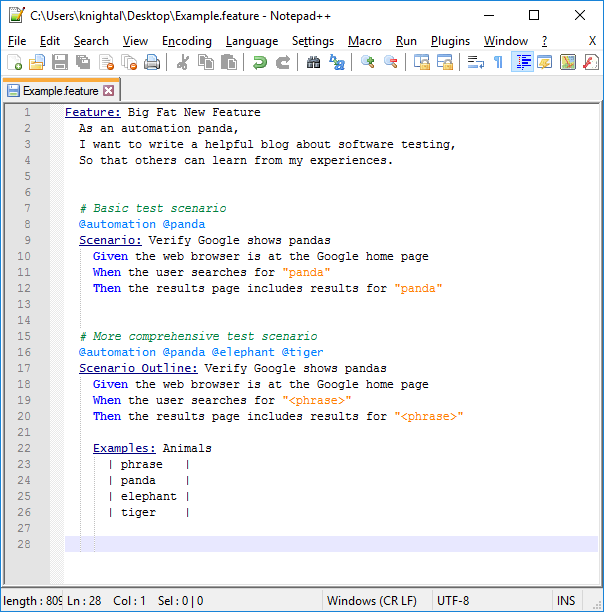
Below is a screen shot of an example feature file:

npp_gherkin
An example feature file using my Notepad++ UDL for Gherkin

(Note: These instructions are based on NotePad++ 7.9.1.)