Author: Andy Knight

I'm a software engineer who specializes in test automation.

Purist vs. Pragmatist

There’s often more than one way to solve a problem. Engineers tend to be pretty opinionated about solutions, too. Whenever I see disagreements in design, I typically notice two competing stances: the pragmatist and the purist. Identifying these approaches helps to understand how others think and fosters healthier team collaboration.

purist is one who focuses primarily on the correctness of a solution. They typically seek a systematic, comprehensive, and verifiable design. A pragmatist, however, favors practical, expedient solutions. They are okay with a solution so long as it works.

The table below gives some perspective on how these two perspectives may differ:

Purist Pragmatist
Focus more on what is correct Focus more on what is expedient
Spend more effort on design and the “big picture” Spend more effort on implementation
Very picky in code review Less picky in code review
Interested more in white-box code quality Interested more in black-box code quality
Favors strong design patterns, even if they are complicated Favors simpler design patterns, even if they have less-than-desirable consequences
Prefers to redesign than to hack Prefers to hack than to redesign
Good at handling long-term problems Good at handling short-term problems
Views software development as an art as well as an engineering practice Views development primarily as an engineering practice
Aligns well with academia Aligns well with business
In test automation, better for framework development In test automation, better for test case development

These descriptions are not absolute: many people fall somewhere between the poles of purist and pragmatist. However, most people tend to exhibit stronger tendencies in one direction.

Personally, I tend to be a purist. If I need to get a job done, I feel shameful if I cannot afford the time to do it fully properly. However, I often find myself working with pragmatists. That’s not a bad thing – I recognize the value in each perspective. There is much to learn from both sides!

Django Settings for Different Environments

The Django settings module is one of the most important files in a Django web project. It contains all of the configuration for the project, both standard and custom. Django settings are really nice because they are written in Python instead of a text file format, meaning they can be set using code instead of literal values.

Settings must often use different values for different environments. The DEBUG setting is a perfect example: It should always be True in a development environment to help debug problems, but it should never be True in a production environment to avoid security holes. Another good example is the DATABASES setting: Development and test environments should not use production data. This article covers two good ways to handle environment-specific settings.

Multiple Settings Modules

The simplest way to handle environment-specific settings is to create a separate settings module for each environment. Different settings values would be assigned in each module. For example, instead of just one mysite.settings module, there could be:

mysite
`-- mysite
    |-- __init__.py
    |-- settings_dev.py
    |-- settings_prod.py
    `-- settings_test.py

For the DEBUG setting, mysite.settings_dev and mysite.settings_test would contain:

DEBUG = True

And mysite.settings_prod would contain:

DEBUG = False

Then, set the DJANGO_SETTINGS_MODULE environment variable to the name of the desired settings module. The default value is mysite.settings, where “mysite” is the name of the project. Make sure to set this variable wherever the Django site is run. Also make sure that the settings module is available in PYTHONPATH.

More details on this approach are given on the Django settings page.

Using Environment Variables

One problem with multiple settings modules is that many settings won’t need to be different between environments. Duplicating these settings then violates the DRY principle (“don’t repeat yourself”). A more advanced approach for handling environment-specific settings is to use custom environment variables as Django inputs. Remember, the settings module is written in Python, so values can be set using calls and conditions. One settings module can be written to handle all environments.

Add a function like this to read environment variables:

# Imports
import os
from django.core.exceptions import ImproperlyConfigured

# Function
def read_env_var(name, default=None):
    if not value:
       raise ImproperlyConfigured("The %s value must be provided as an env variable" % name)
    return value

Then, use it to read environment variables in the settings module:

# Read the secret key directly
# This is a required value
# If the env variable is not found, the site will not launch
SECRET_KEY = read_env_var("SECRET_KEY")

# Read the debug setting
# Default the value to False
# Environment variables are strings, so the value must be converted to a Boolean
DEBUG = read_env_var("DEBUG", "False") == "True"

To avoid a proliferation of required environment variables, one variable could be used to specify the target environment like this:

# Read the target environment
TARGET_ENV = read_env_var("TARGET_ENV")

# Set the debug setting to True only for production
DEBUG = (TARGET_ENV == "prod")

# Set database config for the chosen environment
if TARGET_ENV == "dev":
    DATABASES = { ... }
elif TARGET_ENV == "prod":
    DATABASES = { ... }
elif TARGET_ENV == "test":
    DATABASES = { ... }

Managing environment variables can be pesky. A good way to manage them is using shell scripts. If the Django site will be deployed to Heroku, variables should be saved as config vars.

Conclusion

These are the two primary ways I recommend to handle different settings for different environments in a Django project. Personally, I prefer the second approach of using one settings module with environment variable inputs. Just make sure to reference all settings from the settings module (“from django.conf import settings”) instead of directly referencing environment variables!

Django Projects in PyCharm Community Edition

JetBrains PyCharm is one of the best Python IDEs around. It’s smooth and intuitive – a big step up from Atom or Notepad++ for big projects. PyCharm is available as a standalone IDE or as a plugin for its big sister, IntelliJ IDEA. The free Community Edition provides basic features akin to IntelliJ, while the licensed Professional Edition provides advanced features such as web development and database tools. The Professional Edition isn’t cheap, though: a license for one user may cost up to $199 annually (though discounts and free licenses may be available).

This guide shows how to develop Django web projects using PyCharm Community Edition. Even though Django-specific features are available only in PyCharm Professional Edition, it is still possible to develop Django projects using the free version with help from the command line. Personally, I’ve been using the free version of PyCharm to develop a small web site for a side business of mine. This guide covers setup steps, basic actions, and feature limitations based on my own experiences. Due to the limitations in the free version, I recommend it only for small Django projects or for hobbyists who want to play around. I also recommend considering Visual Studio Code as an alternative, as shown in my article Django Projects in Visual Studio Code.

Prerequisites

This guide focuses specifically on configuring PyCharm Community Edition for Django development. As such, readers should be familiar with Python and the Django web framework. Readers should also be comfortable with the command line for a few actions, specifically for Django admin commands. Experience with JetBrains software like PyCharm and IntelliJ IDEA is helpful but not required.

Python and PyCharm Community Edition must be installed on the development machine. If you are not sure which version of Python to use, I strongly recommend Python 3. Any required Python packages (namely Django) should be installed via pip.

Creating Django Projects and Apps

Django projects and apps require a specific directory layout with some required settings. It is possible to create this content manually through PyCharm, but it is recommended to use the standard Django commands instead, as shown in Part 1 of the official Django tutorial.

> django-admin startproject newproject
> cd newproject
> django-admin startapp newapp

Then, open the new project in PyCharm. The files and directories will be visible in the Project Explorer view.

PyCharm - New Django Project

The project root directory should be at the top of Project Explorer. The .idea folder contains IDE-specific config files that are not relevant for Django.

Creating New Files and Directories

Creating new files and directories is easy. Simply right-click the parent directory in Project Explorer and select the appropriate file type under New. Files may be deleted using right-click options as well or by highlighting the file and typing the Delete or Backspace key.

PyCharm - Create File

Files and folders are easy to visually create, copy, move, rename, and delete.

Django projects require a specific directory structure. Make sure to put files in the right places with the correct names. PyCharm Community Edition won’t check for you.

Writing New Code

Double-click any file in Project Explorer to open it in an editor. The Python editor offers all standard IDE features like source highlighting, real-time error checking, code completion, and code navigation. This is the main reason why I use PyCharm over a simpler editor for Python development. PyCharm also has many keyboard shortcuts to make actions easier.

PyCharm - Python Editor

Nice.

Editors for other file types, such as HTML, CSS, or JavaScript, may require additional plugins not included with PyCharm Community Edition. For example, Django templates must be edited in the regular HTML editor because the special editor is available only in the Professional Edition.

PyCharm - HTML Editor

Workable, but not as nice.

Running Commands from the Command Line

Django admin commands can be run from the command line. PyCharm automatically refreshes any file changes almost immediately. Typically, I switch to the command line to add new apps, make migrations, and update translations. I also created a few aliases for easier file searching.

> python manage.py makemigrations
> python manage.py migrate
> python manage.py makemessages -l zh
> python manage.py compilemessages
> python manage.py test
> python manage.py collectstatic
> python manage.py runserver

Creating Run Configurations

PyCharm Community Edition does not include the Django manage.py utility feature. Nevertheless, it is possible to create Run Configurations for any Django admin command so that they can be run in the IDE instead of at the command line.

First, make sure that a Project SDK is set. From the File menu, select Project Structure…. Verify that a Project SDK is assigned on the Project tab. If not, then you may need to create a new one – the SDK should be the Python installation directory or a virtual environment. Make sure to save the new Project SDK setting by clicking the OK button.

PyCharm - Project Structure

Don’t leave that Project SDK blank!

Then from the Run menu, select Edit Configurations…. Click the plus button in the upper-left corner to add a Python configuration. Give the config a good name (like “Django: <command>”). Then, set Script to “manage.py” and Script parameters to the name and options for the desired Django admin command (like “runserver”). Set Working directory to the absolute path of the project root directory. Make sure the appropriate Python SDK is selected and the PYTHONPATH settings are checked. Click the OK button to save the config. The command can then be run from Run menu options or from the run buttons in the upper-right corner of the IDE window.

PyCharm - Run Config

Run configurations should look like this. Anything done at the command line can also be done here.

PyCharm - Run View

When commands are run, the Run view appears at the bottom of the IDE window to show console output.

Special run configurations are particularly useful for the “test” and “runserver” commands because they enable rudimentary debugging. You can set breakpoints, run the command with debugging, and step through the Python code. If you need to interact with a web page to exercise the code, PyCharm will take screen focus once a breakpoint is hit. Even though debugging Django templates is not possible in the free version, debugging the Python code can help identify most problems. Be warned that debugging is typically a bit slower than normal execution.

PyCharm - Debugging

Debugging makes Django development so much easier.

I typically use the command line instead of run configurations for other Django commands just for simplicity.

Version Control Systems

PyCharm has out-of-the-box support for version control systems like Git and Subversion. VCS actions are available under the VCS menu or when right-clicking a file in Project Explorer. PyCharm can directly check out projects from a repository, add new projects to a repository, or automatically identify the version control system being used when opening a project. Any VCS commands entered at the command line will be automatically reflected in PyCharm.

PyCharm - VCS Menu

PyCharm’s VCS menu is initially generic. Once you select a VCS for your project, the options will be changed to reflect the chosen VCS. For example, Git will have options for “Fetch”, “Pull”, and “Push”.

Personally, I use Git with either GitHub or Atlassian Bitbucket. I prefer to do most Git actions like graphically through PyCharm, but occasionally I drop to the command line when I need to do more advanced operations (like checking commit IDs or forcing hard resets). PyCharm also has support for .gitignore files.

Python Virtual Environments

Creating virtual environments is a great way to manage Python project dependencies. Virtual environments are especially useful when deploying Django web apps. I strongly recommend setting up a virtual environment for every Python project you develop.

PyCharm can use virtual environments to run the project. If a virtual environment already exists, then it can be set as the Project SDK under Project Structure as described above. Select New…Python SDKAdd Local, and set the path. Otherwise, new virtual environments can be created directly through PyCharm. Follow the same process to add a virtual environment, but under Python SDK, select Create VirtualEnv instead of Add Local. Give the new virtual environment an appropriate name and path. Typically, I put my virtual environments either all in one common place or one level up from my project root directory.

PyCharm - New VirtualEnv

Creating a new virtual environment is pretty painless.

Databases

Out of the box, PyCharm Community Edition won’t give you database tools. You’re stuck with third-party plugins, the command line, or external database tools. This isn’t terrible, though. Since Django abstracts data into the Model layer, most developers rarely need to directly interact with the underlying database. Nevertheless, the open-source Database Navigator plugin provides support in PyCharm for the major databases (Oracle, MySQL, SQLite, PostgreSQL).

Limitations

The sections above show that PyCharm Community Edition can handle Django projects just like any other Python projects. This is a blessing and a curse, because advanced features are available only in the Professional Edition:

  • Django template support
  • Inter-project navigation (view to template)
  • Better code completion
  • Identifier resolution (especially class-to-instance fields)
  • Model dependency graphs
  • manage.py utility console
  • Database tools

The two features that matter most to me are the template support and the better code completion. With templates, I sometimes make typos or forget closing tags. With code completion, not all options are available because Django does some interesting things with model fields and dynamically-added attributes. However, all these missing features are “nice-to-have” but not “need-to-have” for me.

Conclusion

I hope you found this guide useful! Feel free to enter suggestions for better usage in the comments section below. You may also want to look at alternatives, such as Visual Studio Code or PyDev.

Easier Grep for Django Projects

Grep is a wonderful UNIX command line tool that searches for text in plain-text files. It can search one file or many, and its search phrase may be a regular expression. Grep is an essential tool for anyone who uses UNIX-based systems.

Grep is also useful when programming. Let’s face it: Sometimes, it’s easier to grep when searching for text rather than using fancy search tools or IDE features. I find this to be especially true for languages with a dynamic or duck type system like Python because IDEs cannot always correctly resolve links. Grep is fast, easy, and thorough. I use grep a lot when developing Django web projects because Django development relies heavily upon the command line.

The main challenge with grep is filtering the right files and text. In a large project, false positives will bloat grep’s output, making it harder to identify the desired lines. Specifically in a Django project, files for migrations, language translations, and static content may need to be excluded from searches.

I created a few helpful aliases for grepping Django projects:

alias grep_dj='grep -r --exclude="*.pyc" --exclude="*.mo" --exclude="*.bak"'
alias grep_djx='grep_dj --exclude="*.po" --exclude="*/migrations/*"'

The alias “grep_dj” does a recursive directory search, excluding compiled files (.pyc for Python and .mo for language) and backup files (.bak, which I often use for development database backups). The alias “grep_djx” further excludes language messages files (.po) and migrations.

To use these aliases, simply run the alias commands above at the command line. They may also be added to profile files so that they are created for every shell session. Then, invoke them like this:

> cd /path/to/django/project
> grep_djx "search phrase" *

Other grep options may be added, such as case-ignore:

> grep_djx -i "another phrase" *

These aliases are meant purely for the convenience of project-wide text searching. If you need to pinpoint specific files, then it may be better to use the raw grep command. You can also tweak these aliases to include or exclude other files – use mine simply as an example.

Copying File Paths from Finder in macOS

My personal laptop is a 13” Macbook Pro. Since I do a lot of software development work on my Mac, I often need to copy file paths. Unfortunately, it’s not easy to get file paths directly from Finder. Newer versions of macOS no longer include the path in the “Get Info” window. It is possible to get file paths from Terminal, either using “cd” and “ls” commands or by dragging files from Finder, but using Terminal is not always convenient.

Recently, I discovered how to make it easy. Using Automator, I added a “Copy Path” action to the right-click (or “secondary-click”) menu that will copy the absolute file path to the clipboard! This makes it very easy to get file paths directly from Finder. I learned this method by reading an OS X Daily article, and since it was so useful, I decided to share it here.

My Mac

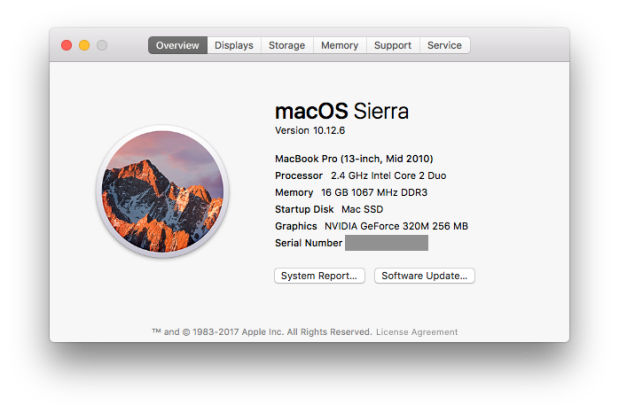
The following steps were run on my personal Mac, which has the following specs:

Current Mac Specs

It’s older than today’s kindergartners, but it still works reasonably well. I upgraded to 16GB memory and SSD storage.

The Steps

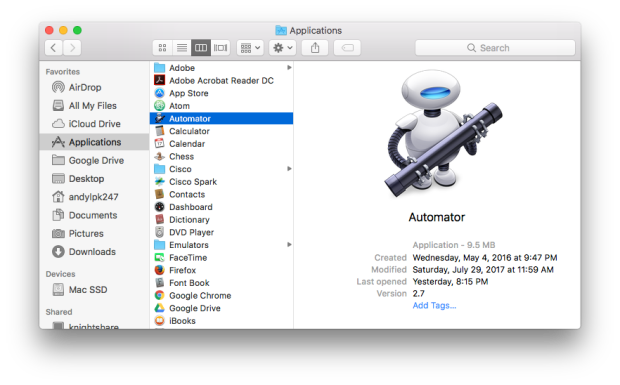
Launch Automator. (It’s in the Applications folder.)

1 - Automator.png

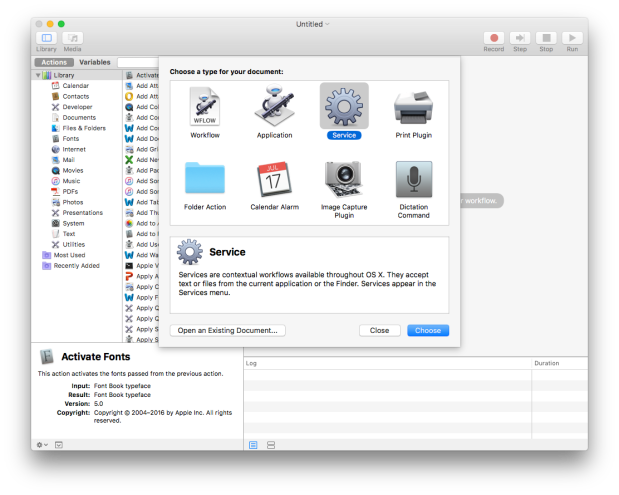
Create a new service by navigating to File -> New and selecting Service from the dialog box.

2 - New Service.png

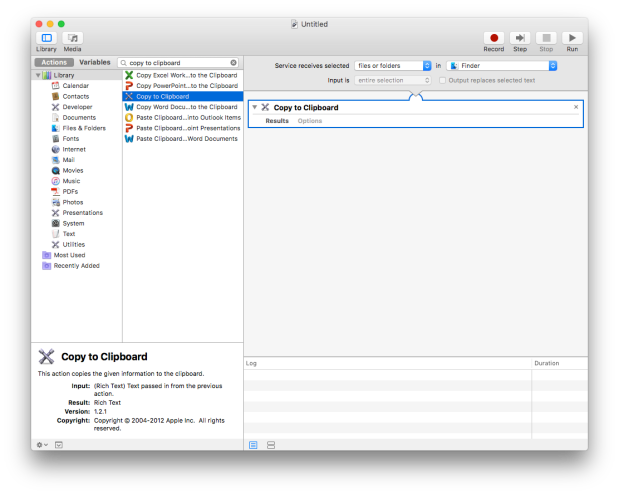
Under Actions, search for “Copy to Clipboard”, and drag it to the right side of the panel. Set “Service receives selected” to “files or folders” and “in” to “Finder”.

3 - Copy to Clipboard.png

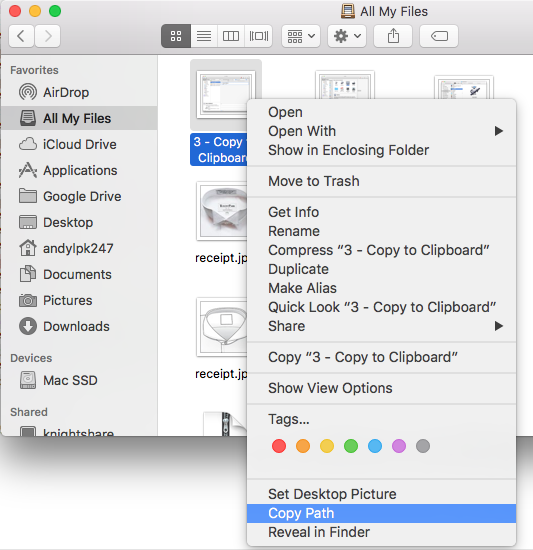
Save the service with a name like “Copy Path”. Close Automator and open Finder. Right-click (or “secondary-click”) on any file – you should see the name of the new service as an available action. When you select it, the absolute file path is copied to the clipboard! You can then paste it (Cmd-V) into any text area.

4 - Copy Path

This new action has been very helpful to me while programming. I hope you also find it helpful!

BDD 101: Test Data

How should test data be handled in a behavior-driven test framework? This is a common question I hear from teams working on BDD test automation. A better question to ask first is, What is test data? This article will explain different types of test data and provide best practices for handling each. The strategies covered here can be applied to any BDD test framework. (Check the Automation Panda BDD page for the full table of contents.)

Types of Test Data

Personally, I hate the phrase “test data” because its meaning is so ambiguous. For functional test automation, there are three primary types of test data:

  1. Test Case Values. These are the input and expected output values for test cases. For example, when testing calculator addition “1 + 2 = 3”, “1” and “2” would be input values, and “3” would be the expected output value. Input values are often parameterized for reusability, and output values are used in assertions.
  2. Configuration Data. Config data represents the system or environment in which the tests run. Changes in config data should allow the same test procedure to run in different environments without making any other changes to the automation code. For example, a calculator service with an addition endpoint may be available in three different environments: development, test, and production. Three sets of config data would be needed to specify URLs and authentication in each environment (the config data), but 1 + 2 should always equal 3 in any environment (the test case values).
  3. Ready State. Some tests require initial state to be ready within a system. “Ready” state could be user accounts, database tables, app settings, or even cluster data. If testing makes any changes, then the data must be reverted to the ready state.

Each type of test data has different techniques for handling it.

Test Case Values

There are 4 main ways to specify test case values in BDD frameworks, ranging from basic to complex.

In The Specs

The most basic way to specify test case values is directly within the behavior scenarios themselves! The Gherkin language makes it easy – test case values can be written into the plain language of a step, as step parameters, or in Examples tables. Consider the following example:

Scenario Outline: Simple Google searches
  Given a web browser is on the Google page
  When the search phrase "<phrase>" is entered
  Then results for "<phrase>" are shown
  
  Examples: Animals
    | phrase   |
    | panda    |
    | elephant |
    | rhino    |

The test case value used is the search phrase. The When and Then steps both have a parameter for this phrase, which will use three different values provided by the Examples table. It is perfectly suitable to put these test case values directly into the scenario because the values are small and descriptive.

Furthermore, notice how specific result values are not specified for the Then step. Values like “Panda Express” or “Elephant man” are not hard-coded. The step wording presumes that the step definition will have some sort of programmed mechanism for checking that result links relate to the search phrase (likely through regular expression matching).

Key-Value Lookup

Direct specification is great for small sets of simple values, but one size does not fit all needs. Key-value lookups are appropriate when test data is lengthier. For example, I’ve often seen steps like this:

Given the user navigates to "http://www.somewebsite.com/long/path/to/the/profile/page"

URLs, hexadecimal numbers, XML blocks, and comma-separated lists are all the usual suspects. While it is not incorrect to put these values directly into a step parameter, something like this would be more readable:

Given the user navigates to the "profile" page

Or even:

Given the user navigates to their profile page

The automation would store URLs in a lookup table so that these new steps could easily fetch the URL for the profile page by name. These steps are also more declarative than imperative and better resist changes in the underlying environment.

Another way to use key-value lookup is to refer to a set of values by one name. Consider the following scenario for entering an address:

Scenario Outline: Address entry
  Given the profile edit page is displayed
  When the user sets the street address to "<street>"
  And the user sets the second address line to "<second>"  
  And the user sets the city to "<city>"
  And the user sets the state to "<state>"
  And the user sets the zipcode to "<zipcode>"
  And the user sets the country to "<country>"
  And the user clicks the save button
  Then ...

  Examples: Addresses
    | street | second | city | state | zipcode | country |
    ...

An address has a lot of fields. Specifying each in the scenario makes it very imperative and long. Furthermore, if the scenario is an outline, the Examples table can easily extend far to the right, off the page. This, again, is not readable. This scenario would be better written like this:

Scenario Outline: Address entry
  Given the profile edit page is displayed
  When the user enters the "<address-type>" address
  And the user clicks the save button
  Then ...

  Examples: Addresses
    | address-type |
    | basic        |
    | two-line     |
    | foreign      |

Rather than specifying all the values for different addresses, this scenario names the classifications of addresses. The step definition can be written to link the name of the address class to the desired values.

Data Files

Sometimes, test case values should be stored in data files apart from the specs or the automation code. Reasons could be:

  • The data is simply too large to reasonably write into Gherkin or into code.
  • The data files may be generated by another tool or process.
  • The values are different between environments or other circumstances.
  • The values must be selected or switched at runtime (without re-compiling code).
  • The files themselves are used as payloads (ex: REST request bodies or file upload).

Scenario steps can refer to data files using the key-value lookup mechanisms described above. Lightweight, text-based, tabular file formats like CSV, XML, or JSON work the best. They can parsed easily and efficiently, and changes to them can easily be diff’ed. Microsoft Excel files are not recommended because they have extra bloat and cannot be easily diff’ed line-by-line. Custom text file formats are also not recommended because custom parsing is an extra automation asset requiring unnecessary development and maintenance. Personally, I like using JSON because its syntax is concise and its parsing tools seem to be the simplest in most programming languages.

External Sources

An external dependency exists when the data for test case values exists outside of the automation code base. For example, test case values could reside in a database instead of a CSV file, or they could be fetched from a REST service instead of a JSON file. This would be appropriate if the data is too large to manage as a set of files or if the data is constantly changing.

As a word of caution, external sources should be used only if absolutely necessary:

  1. External sources introduce an additional point-of-failure. If that database or service goes down, then the test automation cannot run.
  2. External sources degrade performance. It is slower to get data from a network connection than from a local machine.
  3. Test case values are harder to audit. When they are in the specs, the code, or data files, history is tracked by version control, and any changes are easy to identify in code reviews.
  4. Test case values may be unpredictable. The automation code base does not control the values. Bad values can fail tests.

External sources can be very useful, if not necessary, for performance / stress / load / limits testing, but it is not necessary for the vast majority of functional testing. It may be convenient to mock external sources with either a mocking framework like Mockito or with a dummy service.

Configuration Data

Config data pertain to the test environments, not the test cases. Test automation should never contain hard-coded values for config data like URLs, usernames, or passwords. Rather, test automation should read config data when it launches tests and make references to the required values. This should be done in Before hooks and not in Gherkin steps. In this way, automated tests can run on any configuration, such as different test environments before being released to production.

Config data can be stored in data files or accessed through some other dependency. (Read the previous section for pros and cons of those approaches.) The config to use should be somehow dynamically selectable when tests run. For example, the path to the config file to use could be provided as a command line argument to the test launch command.

Config data can be used to select test values to use at runtime. For example, different environments may need different test value data files. Conversely, scenario tagging can control what parts of config data should be used. For example, a tag could specify a username to use for the scenario, and a Before hook could use that username to fetch the right password from the config data.

For efficiency, only the necessary config data should be accessed or read into memory. In many cases, fetching the config data should also be done once globally, rather than before each test case.

Ready State

All scenarios have a starting point, and often, that starting point involves data. Setup operations must bring the system into the ready state, and cleanup operations must return the system to the ready state. Test data should leave no trace – temporary files should be deleted and records should be reverted. Otherwise, disk space may run out or duplicate records may fail tests. Maintaining the ready state between tests is necessary for true test independence.

During the Test Run

Simple setup and cleanup operations may be done directly within the automation. For example, when testing CRUD operations, records must be created before they can be retrieved, updated, or deleted. Setup would create a record, and cleanup would guarantee the record’s deletion. If the setup is appropriate to mention as part of the behavior, then it should be written as Given steps. This is true of CRUD operations: “Given a record has been created, When it is deleted, …”. If multiple scenarios share this same setup, then those Given steps should be put into a Background section.

However, sometimes setup details are not pertinent to the behavior at hand. For example, perhaps fresh authentication tokens must be generated for those CRUD calls. Those operations should be handled in Before hooks. The automation will take care of it, while the Gherkin steps can focus exclusively on the behavior.

No matter what, After hooks must do cleanup. It is incorrect to write final Then steps to do cleanup. Then steps should verify outcomes, not take more actions. Plus, the final Then steps will not be run if the test has a failure and aborts!

External Preparation

Some data simply takes too long to set up fresh for each test launch. Consider complicated user accounts or machine learning data: these are things that can be created outside of the test automation. The automation can simply presume that they exist as a precondition. These types of data require tool automation to prepare. Tool automation could involve a set of scripts to load a database, make a bunch of service calls, or navigate through a web portal to update settings. Automating this type of setup outside of the test automation enables engineers to more easily replicate it across different environments. Then, tests can run in much less time because the data is already there.

However, this external preparation must be carefully maintained. If any damage is done to the data, then test case independence is lost. For example, deleting a user account without replacing it means that subsequent test runs cannot log in! Along with setup tools, it is important to create maintenance tools to audit the data and make repairs or updates.

Advice for Any Approach

Use the minimal amount of test data necessary to test the functionality of the product under test. More test data requires more time to develop and manage. As a corollary, use the simplest approach that can pragmatically handle the test data. Avoid external dependencies as much as possible.

To minimize test data, remember that BDD is specification by example: scenarios should use descriptive values. Furthermore, variations should be reduced to input equivalence classes. For example, in the first scenario example on this page, it would probably be sufficient to test only one of those three animals, because the other two animals would not exhibit any different searching behavior.

Finally, be cautioned against randomization in test data. Functional tests are meant to be deterministic – they must always pass or fail consistently, or else test results will not be reliable. (Not only could this drive a tester crazy, but it would also break a continuous integration system.) Using equivalence classes is the better way to cover different types of inputs. Use a unique number counting mechanism whenever values must be unique.

For handling unpredictable test data, check out Unpredictable Test Data.

BDD‑‑; Collaboration without Automation

In the previous post, I described the tradeoffs of using a BDD test automation framework without the full BDD process. But, what about the opposite? What if a team wants to adopt BDD practices without a test framework to support it? Again, behavior-driven practices are beneficial apart from automation, but not without shortcomings.

The Power of Process

BDD should be a refinement, not an overhaul, of Agile software development. All of the problems BDD solves are simply aspects of the development process that must be solved anyway. BDD simply provides formal practices for solving them uniformly. Consider how BDD addresses the following problems:

Problem Solution
Biz, dev, and test roles are siloed and do not talk together much. BDD brings these three roles together in Three Amigos meetings.
Acceptance criteria are missing or poorly defined, wasting in-sprint time. Acceptance criteria are formalized as specifications using Gherkin.
Product features are hard to explain. Scenarios describe individual behaviors in plain language.
Team members have open questions or conflicting views about behaviors. Example Mapping efficiently unifies a team’s understanding and identifies areas for further refinement.
Edge cases are overlooked during testing. Well-defined behavior scenarios capture specifications by example early in development.

All of these problems can be solved through better, behavior-driven practices, and none of them pertain to test automation.

Spec-Less Automation

BDD process improvements don’t necessarily need a BDD framework for test automation. Any test framework could still automate scenario steps. The major difference is that there would be no mechanism to translate Gherkin lines into method/function calls: The automation engineer would simply need to program test cases the “good old-fashioned way.” It would not be much different from translating any other procedure-driven test cases into code.

The weakness of this approach is that specifications are not strongly linked to the test automation. The end-to-end development process is less efficient because behavior scenarios must essentially be rewritten into automation code, rather than becoming part of the automation code. There is also a higher risk that automated test cases won’t cover the actual intention of the test steps. Review and maintenance are more difficult because engineers must always cross-examine the automation code with the Gherkin to make sure they align. All of these problems make it harder to shift left with QA work.

The lack of a behavior-driven test framework is also a double-edged sword for Gherkin steps. On one hand, steps do not need to be scrutinized as strongly in review, since automation code does not directly depend upon them. It is not critical to reuse steps word-for-word or to worry about parameterization. However, sloppy steps can lead to miscommunication and will make adopting a BDD test framework in the future very difficult.

Better Than Nothing

Just like for automation without collaboration, using BDD practices without using a BDD test framework does improve the development process. There aren’t really any disadvantages because the process problems must be solved anyway. A “BDD‑‑;” situation (that’s a postfix decrement, to denote that automation did not follow collaboration) isn’t ideal, but at least it’s better than nothing.

‑‑BDD; Automation without Collaboration

Does it make sense to use a BDD test automation framework on a team that does not follow a Behavior-Driven Development process? I’ve faced this questions a few times recently. Although some BDD benefits will be missing, the answer is still yes, BDD test automation frameworks are still useful apart from a full BDD process. This article covers strengths and weaknesses to explain why.

Strengths

BDD test frameworks force tests to be behavior-driven, not procedure-driven. Behavior-driven tests focus on individual behaviors, making them concise and comprehensible. Impertinent factors are removed from test cases. Imperative details are specified only when necessary. Test reports are more descriptive, and test results are more meaningful. Tests written without a behavior-driven framework are more likely to become long, unnecessarily complicated, and fragile.

BDD test frameworks also provide inherent structure with steps. Steps are the basic building blocks of test cases, regardless of the type of test automation framework used. While almost all run-of-the-mill test frameworks (like JUnit, xUnit.net, or pytest) provide structure to write separate, independent test cases (usually as methods or functions), they lack structure to write separate test case steps. Typically, programmers end up writing test case logic directly into the test methods/functions, or they write ad hoc helper methods/functions/classes to get the job done. This approach often lacks consistency (especially when multiple engineers contribute to the automation code), and thus reusability suffers and duplication creeps in. Gherkin steps are like guide rails for test cases.

Gherkin steps provide easy reusability for rapid development. In a mature automation code base, new test cases can be written using a few short lines of pre-existing steps. And pre-existing steps can be trusted to work because they’ve been tested before. Parametrized steps enable even greater reuse.

Gherkin steps are self-documenting because they are written in plain English. This makes tests easier to do many things:

  • to write, because it provides an outline for the test in plain language
  • to review, because others less familiar with the feature can quickly understand concise scenarios
  • to maintain, because problems can be pinpointed
  • to explain, because non-technical people can’t read code

Much like any other test frameworks, BDD frameworks integrate with other testing packages and design patterns. For example, it is common to use a BDD framework with Selenium WebDriver and the Page Object Model to do Web UI testing. Other common packages for needs like logging, assertions, and REST API calls also work well with BDD frameworks.

Finally, BDD test frameworks open the door to shifting left. They can be the starting point for QA-led BDD. Demonstrating the value in behavior-driven automation can open interest in Three Amigos collaboration, which can then lead to more process improvements and better software quality.

Weaknesses

BDD test frameworks require extra development overhead at first. They aren’t as simple to use as unit-like test frameworks. It also takes a lot of practice to write good Gherkin. I’ve talked with engineers (typically developers) who see the feature file layer as unnecessary “plaster” over test cases. Without full team collaboration and cooperation, the justification for BDD diminishes.

Strict behavior independence may also make execution time less efficient. While steps may be reused, common setup operations must be run for each test. CRUD operations illustrate this point well. In a BDD framework, each operation (create, retrieve, update, delete) would be covered by a separate test scenario. However, the operations are interdependent: a test must create a thing before it can delete the thing. Thus, the delete scenario will borrow some logic from the create scenario. A procedure-driven test could more efficiently stack steps into one test case like this: create, retrieve, update, retrieve, delete, retrieve. Assertions would be interleaved with operations. This one test case would cover multiple behaviors, but it would save execution time by avoiding repeated creations for setup and deletions for cleanups. Many times, people have even asked me if there is a way to sequence Gherkin scenarios together to achieve the same effect! (This is not possible, and it would violate test independence.)

If BDD frameworks are used without a BDD process, then BDD could become pigeonholed as a “QA thing,” forever banished to the realm of the far right (the opposite of shift left, not the political spectrum). This could raise barriers to collaboration if not handled properly.

Furthermore, the lack of the full BDD means that many BDD benefits will go missing. Miscommunications could still easily happen because biz and dev would not be involved in defining behavior scenarios. Delivery deadlines could still be missed because testing and automation cannot readily shift left. Out of the 12 major benefits of BDD, the first 4 would be lost.

Conclusion

Overall, I think the advantages of BDD test automation frameworks outweigh the disadvantages for most above-unit functional testing needs, regardless of whether or not a team uses a full BDD process. Ideally, a team would embrace full-BDD, but that’s not always reality. A “‑‑BDD;” situation (that’s a prefix decrement, to note that collaboration was missing before automation) can still be seen as a glass half-full.

Who Should Lead BDD?

Behavior-driven development offers great benefits: better communication, easier test automation, and higher code quality. There are many ways for a team to start doing BDD, and naturally, someone needs to stand up and lead the effort. In my experience, adopting BDD is its own process. An evangelist converts team leaders, training sessions are given, and Gherkinized acceptance criteria start being automated. However, not everyone will embrace the changes, especially those across different role types. And big changes take time. Rome wasn’t built in a day, and neither will be a mature, effective BDD process.

This post covers three possible ways to lead BDD adoption, each from one of the Three Amigos roles. Any role can lead the charge, but each will have its unique struggles. These possibilities are advisory but not necessarily prescriptive. If you want to move your team into BDD, use these three approaches as guidelines for crafting a plan that best meets your needs. And, of course, the advice in Winning Support for BDD pertains to all approaches. Furthermore, as you read these approaches, put yourselves in the shoes of roles other than your own, so you can better understand the struggles each role faces.

Note: The approaches below presume that the underlying software development process is Agile Scrum. Nevertheless, they may be tweaked and applied to other processes, like Waterfall or Kanban.

The Starting Point

The starting point for all three approaches below is a “traditional” Agile sprint – one that is not (yet) behavior-driven. Product owners write user stories, developers implement the solutions, and testers test the deliverables. The diagram below shows the the main flow of sprint work in this type of sprint, and it will serve as the basis for illustrating BDD adoption:

Traditional Sprint

The overall flow of a “traditional,” non-behavior-driven Agile sprint. Ceremonies like planning, review, and retrospective should still happen, but the are left out of this diagram to put emphasis on parts affected by BDD.

QA-Led BDD

Circumstances

The most common approach I’ve seen is QA-led BDD adoption, because testers arguably have the most to gain. It is most applicable when the Three Amigos roles (biz, dev, and test) are well-defined and separate. The impetus for QA to lead BDD adoption could be that developers deliver code too late to adequately test and automate within a sprint, or it could be that the QA team is struggling to scale their test automation development. There may also be resistance to BDD from biz and dev roles.

Steps

The sensible path for QA is to start all the way to the right and progressively shift left. This means that the starting point would be test automation. Start by building a solid automation code base. Pick a well-supported BDD framework like Cucumber, SpecFlow, or behave, and start adding scenarios and step definitions. Select scenarios for core product features rather than the latest sprint stories, so that the code base will be populated with the most basic, useful steps. Once the automation code reaches a “critical mass” for step reusability, QA can then proactively classify new test scenarios as automated or manual. Automated tests become easier and easier to write, giving QA more time to be exploratory with manual testing. Ideally, all manual testing would become exploratory.

Then, it’s time to start shifting left. At this point, all Gherkin steps would be in the automation code only, so set up a tool like Pickles to expose the steps to all team members as living documentation. QA should then schedule Three Amigos meetings with biz and dev to proactively discuss user story expectations. In those meetings, QA should start demonstrating how to write acceptance criteria in Gherkin, which then expedites testing. A big win would be if a QA engineer could write a new scenario using only pre-existing, pre-automated steps and then run it successfully on the spot.

Once biz and dev folks are convinced of BDD’s benefits, encourage them to participate in writing Gherkin. When they get comfortable, encourage product owners to write acceptance criteria in Gherkin when they write user stories, and hold Three Amigos meetings before sprint planning as part of grooming. Convince them that for them to help write Gherkin scenarios is a process efficiency for the whole team.


This slideshow requires JavaScript.

Struggles

Shifting left is never easy, especially when team members are hardened into their roles. That’s why QA must write both really good test automation and really good Gherkin scenarios. Success should speak for itself once QA delivers good automation fast. Furthermore, QA must be clear that BDD is not merely a test tool, it’s a process that requires a paradigm shift. Otherwise, BDD could be easily pigeonholed to be a “QA thing.”

Dev-Led BDD

Circumstances

There are a few reasons that could push developers to lead BDD. On some Agile teams, there’s no distinction between dev and QA roles: all team members are software engineers responsible for both developing and testing the software. Or, developers may not be satisfied with the testing effort. Maybe too many bugs are escaping the sprint, or maybe automation isn’t getting done in time. Or, perhaps the product owner is not happy with the deliverables and putting pressure on the team to do better. Whatever the circumstance, developers are more than capable of winning with BDD.

Steps

The best way for developers to start is to set up Three Amigos meetings, to stop the game of telephone between biz and test. In those meetings, start translating acceptance criteria into Gherkin. Then, start helping out with test automation – that may mean anything from offering advice to QA to building the framework from scratch. Then, start pushing left and right to get biz and test on board with BDD.


This slideshow requires JavaScript.

Struggles

It may be difficult for developers to work on test automation because they may lack either the expertise or the time to devote to good test automation. Automation is a specialized discipline, and it takes time and diligence to build up expertise to do it right. I’ve seen very skilled developers haughtily build very shabby automation frameworks.

Developers must also be careful to not be too technical, or else biz and test roles may reject BDD for being too complicated or beyond their abilities. Furthermore, some teams may be resistant to developing test automation. For example, automation work may be “starved” for points because it is underestimated or similarly starved for time because it is deemed lower in priority to other work.

Biz-Led BDD

Circumstances

BDD is designed to bring technical and business roles together into healthier collaboration, and biz folks can certainly lead BDD adoption as successfully as more technical folks can. Major reasons for biz to take the lead could be if development is perpetually running behind schedule, if deliverables don’t meet the original requirements, or if software bugs are rampant.

Steps

For biz roles, “shift left” could be better called “pull left.” Start by writing solid user stories and Gherkin acceptance criteria. Focus on good Gherkin that is readable and reusable. Then, introduce BDD as a refinement to the Agile process, highlighting its benefits. Initiate Three Amigos meetings to make sure that you are communicating the right things to dev and test. Once collaboration is going well, suggest BDD automation as a way to expedite dev and test work. If acceptance criteria are all Gherkinized, then developing BDD automation would be a natural extension.


This slideshow requires JavaScript.

Struggles

In my experience, biz roles (specifically product owners) tend to be the most hesitant about BDD. They often see writing Gherkin as a burdensome requirement rather than a way to help their team. Or, they may fear that BDD is “too technical” for them. It may also be difficult for them to pitch BDD automation to the team. To be successful, biz roles need to step outside their comfort zone to win supporters from dev and test.

Process paradigm shifts can be hard, especially on teams that are already overwhelmed with work. Some people just don’t like change. Process and automation change can also be a big challenge if QA is outsourced (which is common).

Side-By-Side Comparison

Here’s the TL;DR:

Role Circumstances Steps Struggles
QA
  • Code is delivered too late to test and automate
  • Automation development is not scaling
  1. Build a solid BDD automation framework
  2. Demonstrate automation success
  3. Set up Three Amigos meetings during the sprint
  4. Start writing Gherkin scenarios with biz and dev as part of grooming
  • Showing that BDD is a whole development process, not just a QA thing
  • Getting the team to truly shift left
Dev
  • No separation of dev and QA roles
  • Too many bugs are escaping the sprint
  • Pressure from biz to do better
  1. Initiate better collaboration through Three Amigos and Gherkin
  2. Push right by helping QA with testing and automation
  3. Push left by helping biz write better acceptance criteria
  • Humbly learning good automation practices
  • Dedicating time for automation and more meetings
Biz
  • Missed deadlines
  • Deliverables not matching expectations
  • Too many bugs
  1. Write acceptance criteria in good Gherkin
  2. Set up Three Amigos meetings to review Gherkin
  3. Pitch BDD automation
  • Learning semi-technical things
  • Pushing all the way to automation

Conclusion

These are just three general approaches intended to show how BDD is for everyone. If you have other approaches, please describe them in the comment section below! Whatever the approach, make sure to demonstrate that BDD helps everyone, or else people may feel forced into corners and reject BDD for bad reasons. And remember, software quality is not just QA’s responsibility; it is everyone’s responsibility.

Winning Support for BDD

Adopting behavior-driven development practices can greatly improve software quality and productivity, but like any big change, it will have opponents along with supporters. I’ve met resistance from all roles: testers, developers, product owners, and managers. And some people can be stubborn. As with any proposal, the best way to win support is not just to tell the benefits but to demonstrate them. Below are five major ways to demonstrate the benefits of BDD.

Make it a Refinement, not an Overhaul

I remember talking with a scrum master one time about challenges his team faced with testing and automation. The user stories his team wrote were a mess: they may or may not have had acceptance criteria, and the product owner would often ask for features to be scrapped or redone after a sprint or two. The team basically gave up on automated testing due to feature flux. Naturally, I proposed BDD to him, suggesting that it could help drive better features through formalization. However, this scrum master balked at the idea: “My team is stretched so thin right now, there’s no way we can overhaul our process right now.”

Clearly, the team had a serious problem, but they weren’t willing to try any solution deemed too “big.” The scrum master’s perception was that BDD would be a disruptive change that would hurt them more than help them. In cases like this, it is best to present BDD as a refinement of Agile, and not an overhaul of it. Agile says user stories should have acceptance criteria; BDD says acceptance criteria should be formalized. Agile says that the definition of done should include test automation; BDD says automation is a natural extension of the acceptance criteria. There’s nothing in Agile that BDD undoes, and there are shortcomings in Agile that BDD solves.

Write Good Gherkin

There is a big difference between Gherkin and good Gherkin. Anyone can add BDD buzzwords to existing test procedures, but effective BDD needs a paradigm shift. Unfortunately, bad Gherkin can ruin many of the benefits BDD can bring. For example, imperative steps will frustrate product owners, and mixed point-of-view will confuse testers. Nothing will ever be truly perfect, but it is important to strive for good Gherkin from the start, especially when the first behavior scenarios will often be used as examples for future scenarios.

Start the Automation Snowball

BDD and automation go together like peas and carrots. Not only can test automation shift left (since Gherkin scenarios are both acceptance criteria and tests), but steps can be implemented once and reused by any scenarios. When the first BDD scenarios are written, obviously all steps are new steps. As sprints pass, though, many common steps will likely be reused. I’ve even written new scenarios without adding any new steps!

Test automation is often the last thing to be done for a story, if it’s even reached at all. The inherent step reusability helps BDD automation get done sooner. It may take a while to build up useful, reusable steps in the code base, but they will cause an “automation snowball” once they are there. Imagine telling your team that the test automation is already done once a scenario is written in Gherkin!

Take Baby Steps

Rome wasn’t built in a day, and neither will a mature BDD process be. People take time to adjust to new paradigms. Start out slow, and do it right. Train the team how to write good Gherkin. Try a few stories one sprint, rather than taking on the whole backlog. For a product-owner-led approach, start with Gherkinizing acceptance criteria for a sprint or two before attempting any automation. Alternatively, for a test-led approach, work on the automation framework first, and then start to shift the scenario writing left to the developers and then to the product owners once the snowball gets bigger.

It’s okay if things aren’t perfect at first. Learn the lessons and iterate for improvement. Take baby steps!

Highlight how Everyone Wins

BDD is truly a win/win for everyone. It’s not a way to shuffle responsibilities or push around busywork, it’s a way to make a team more interdependent upon each other. Each role in the Three Amigos is empowered to do the right things, with support from each other in lock-step. Consider how BDD process changes help each role work together better:

Role New Responsibility Interdependent Benefit
Product Owner Learn to express requirements in a more formalized, slightly techy way Better assurance that features will be what they actually want, be working correctly, and be protected against future regressions
Developer Contribute more to grooming and test planning Less likely to develop the wrong thing or to be “held up” by testing
Tester Build and learn a new automation framework Automation will snowball, allowing them to meet sprint commitments and focus extra time on exploratory testing
Everyone Another meeting or two Better communication and fewer problems


Nobody on an Agile team can rightly say, “BDD isn’t useful to me.” Software quality is everyone’s responsibility, and BDD is a great way to improve it.