automation

Pipe Character Escape for Gherkin Tables

For the first time today, I had to write a Gherkin behavior scenario in which table text needed to use the pipe character “|”. I wanted a generic step that would find and click web page links by name, and one of the link names had the pipe in it! The first version of the step I wrote looked like this:

When the user follows the links:
  | link              |
  | Category          |
  | Sub-Category      |
  | Index|Description |

Naturally, this step didn’t parse – the “|” was parsed as a table delimiter instead of the intended link text. I could have rewritten the step to search for partial link text, or I could have done a key-value lookup, but I wanted to keep the step simple and direct.

The solution was simple: escape the pipe character “|” with a backslash character “\”. Easy! Thanks, StackOverflow! The updated table looks like this:

When the user follows the links:
 | link               |
 | Category           |
 | Sub-Category       |
 | Index\|Description |

“\|” works for both step tables and scenario outline example tables. It looks like it is fairly standard for test frameworks that use Gherkin. I verified that Cucumber-JVM and SpecFlow support it, and it looks like Cucumber for Ruby does as well. It looks like behave will support it in 1.2.6.

After learning this trick, I updated the BDD 101: The Gherkin Language page.

Note that backslash escape sequences won’t work for quotes in Gherkin steps. Quotes in steps are merely conventions and not part of the Gherkin language standard.

The Airing of Grievances: BDD

Behavior-Driven Development – one of my favorite blog topics. When done right, it’s a wonderful way to foster better collaboration and automation. When it’s not… well, let’s just say I got a lot of problems with bad BDD practices, and now you’re gonna hear about it!

PROCESS

Treating BDD as a Tool and Not as a Process

BDD is a process – it is a set of tools and practices designed to help teams deliver better software. BDD is not just a test automation framework; the framework is just one of the tools that support BDD. Heck, the word “development” is in the name!

Complaining that Gherkin is Too Technical

Really? Really!? Gherkin is basically just plain language with some buzzwords mixed in! It is specifically designed for non-technical people to handle it! It is not a full-fledged programming language – it is essentially a simple format for behavior specification that automation frameworks can easily parse. The steps are meant to be read like plain English (or any other spoken language) so that better collaboration can happen. If Gherkin is “too technical” for you, then I hate to know what isn’t.

No Buy-In from All Roles

The three major roles on an Agile team, a.k.a the “Three Amigos,” are biz, dev, and test (regardless of fancy names or assignments). For BDD to work well, all three role types must embrace it. Otherwise, collaboration will suffer. BDD is not just a QA thing, it’s for everyone. Biz gets better features in shorter time because requirements were communicated better. Dev wastes less time figuring out what biz wants and gets tests faster. Test can start automating right away since test scenarios are defined from the start in Gherkin. Everybody wins if everybody contributes.

No Three Amigos Meetings

Three Amigos meetings are like dietary fiber supplements: they help a team stay regular with collaboration, or else development gets constipated as engineers start building crap instead of the intended behaviors. Then the crap gets blocked up as the team must rework it, meaning it could be another sprint before there’s a healthy flush of new features. Open conversations in regularly scheduled Three Amigos meetings would have avoided the whole obstruction.

Forcing QA to Write All Behavior Scenarios

BDD is not just QA thing – it is for all roles. Pigeonholing the responsibility of writing behavior scenarios onto QA is not only unfair, it is anti-collaborative. The whole reason for writing scenarios in plain language with Gherkin is to let everyone contribute to feature behavior. Scenarios are primarily about capturing behavior, not writing tests. If tests were the main focus, then engineers could just write test cases using traditional automation frameworks directly in general purpose programming languages like Java or Python. BDD offers the benefits of process efficiency and shifting left when the whole team helps to write behavior scenarios.

GHERKIN

Bad Gherkin

Only you can prevent bad Gherkin. Or I can – via rejected code reviews.

Typos, Poor Grammar, and Inconsistent Formatting

Gherkin needs to be readable. Steps with typos, poor grammar, and inconsistent formatting will still run fine for test automation, but they make it tough to understand the behaviors they describe. Sometimes, they can even make the meaning ambiguous.

No Double-Quotes Around Step Parameters

How do you know if something is a step parameter? “Double quotes” make it easy. However, Gherkin does not enforce double quotes around parameters. It is merely by programmer’s convention, but it’s a really helpful convention indeed.

No Tags

Tags make it super easy to filter scenarios at runtime. No tags? Good luck remembering long paths and names at runtime, or running related scenarios across different feature files together.

More Than 120 Characters per Line

Any longer is too much to comprehend. Either write the step more concisely, or split it apart. Plus, the line may go off the edge of the screen.

More Than 10 Steps per Scenario

Again, any longer is too much to comprehend. Scenarios should be short and sweet – they should concisely describe behavior. Too many steps means the scenario is too imperative or covers more than one behavior.

Multiple Behaviors per Scenario

Scenarios should not have multiple personality disorder: one scenario, one behavior. Don’t break the Cardinal Rule of BDD! So many people break this rule when they first start BDD because they are locked into procedure-driven thinking. Then, when tests fail, nobody knows exactly what behavior is the culprit. One scenario, one behavior.

Out-of-Order Step Types

Givens, Whens, and Thens each serve a specific, ordered purpose: Given some initial state, When actions are taken, Then verify an expected outcome. Jumbling them up ruins their meaning. Furthermore, duplicate When-Then pairs indicate multiple behaviors per scenario. And don’t just reassign step types to skirt the strict-ordering rule. Do it right – put integrity into the steps!

Gigantic Tables

Have you ever seen an Examples table with 13 columns? Or maybe 517 rows? I have. The horror, the horror! Tables that big make scenarios lose any semblance of specification-by-example. Make sure table rows and columns are actually needed. Use key-value lookups if the data is too gritty.

Being Imperative Rather Than Declarative

Given I’m logged into the app, when I click here, and I click there, and I type P, and I type L, and I type E, and I type A, and I type S, and I type E, and I type D, and I type O, and I type N, and I type T, and I type W, and I type R, and I type I, and I type T, and I type E, and I type S, and I type C, and I type E, and I type N, and I type A, and I type R, and I type I, and I type O, and I type S, and I type L, and I type I, and I type K, and I type E, and I type T, and I type H, and I type I, and I type S, then go directly to jail, and do not pass GO, and do not collect $200. Steps should focus more on what than how.

Prefixing Existing Test Procedure Steps with Gherkin Buzzwords

Let’s just take our existing test procedures from a tool like HP QualityCenter or ALM and put the words “Given,” “When,” and “Then” in front of every step. Ta-da! We’re now doing BDD! …WRONG!! I kid you not, I have see this happen. These people clearly never took BDD 101. It hurts to see.

AUTOMATION

Unorganized Step Definitions

Programmers like to throw their step definition methods anywhere. Add ’em to an unrelated existing class? Create a whole new class for only two new steps? Mix up the types? Who cares! Don’t bother to alphabetize them, either. Well, that’s how tech debt happens. That’s how duplicate steps get written, because originals can’t be found. Imagine a library without the Dewey Decimal System – that’s what an unorganized step def collection will be.

Putting Cleanup Code in Then Steps

Cleanup code belongs in After hooks, where it will be run no matter what fails during the scenario. Writing Then steps to do cleanup not only breaks step type integrity, the cleanup code will not run if a previous step aborts!

Catching and Burying All Exceptions

Here’s something I see all the time in automation code (and not just for BDD):

// FYI - This is Java, but the same thing can happen in any language
@When("^do something$")
public void doSomething() throws Throwable {
  try {
    callStuff();
  }
  catch (Exception e) {
    System.out.println(e.getMessage());
  }
}

The entirety of a step (or even a whole test) is surrounded by a try-catch that catches every exception. THIS STEP CAN NEVER REGISTER A FAILURE! Even if there was a failed assertion or, worse, an exception that ought to abort the test, it will get caught and buried with not much more than a slight whimper in the log. In this case, the test will carry forth to the next step, which will probably not work, either. I’ve seen projects with this sort of exception handling around every single step definition. In modern test frameworks, the framework will catch all exceptions at the highest level, register the test as failed, and move on safely to the next test. There is no need to catch any exception, unless the test can be recovered.

Changing Steps Without Testing Affected Scenarios

Sharing steps is a wonderful thing, but changing steps without testing all scenarios that use them is a terrible thing. I’ve seen people change step text or step def code and test only their new scenarios. Meanwhile, in the continuous integration environment, a dozen other tests using those steps started failing. (Hell, I’ve seen people push code that doesn’t even compile, but that’s another grievance.)

Multiple Names for the Same Step

Just because you can do something doesn’t mean you should. Different names for the same step may be useful for readability, but please keep the name variants limited.

No Dependency Injection

Dependency injection is the best way to share objects in an automation framework. (Singletons work well, too, but DI allows more careful control of scope.) Many frameworks like Cucumber-JVM even integrate with existing DI frameworks like PicoContainer and Spring. DON’T MAKE NON-CONSTANT VARIABLES GLOBAL! DON’T BLINDLY MAKE THINGS “STATIC” JUST TO SHARE THEM! Globals (or “statics” in Java/C# like languages) are dangerous: they can be easily misused, they are a nightmare to trace, and they can break multithreaded execution. Just use the appropriate design pattern: dependency injection.

The Airing of Grievances: Selenium WebDriver

Selenium WebDriver is the de facto standard for Web UI automation. It’s a great tool, but like anything good, it can also be misused. And that’s where I have grievances. I got a lot of problems with Selenium WebDriver abuses, and now you’re gonna hear about it!

WebDriver “Unit Tests”

“WebDriver unit tests” are like square circles – definitionally, they are logical fallacies. In my books, a unit test must be white box, meaning it has direct access to the product code. However, Web UI tests using WebDriver are inherently black box tests because they are interacting with an actively running website. Thus, they must be above-unit tests by definition. Don’t call them unit tests!

Making Every Test a Web Test

NO! The Testing Pyramid is vital to a healthy overall testing strategy. Web tests are great because they test a website in the ways a user would interact with it, but they have a significant cost. As compared to lower-level tests, they are more fragile, they require more development resources, and they take much more time to run. Browser differences may also affect testing. Furthermore, problems in lower level components should be caught at those lower levels! Sure, HTTP 400s and 500s will appear at the web app layer, but they would be much faster to find and fix with service layer tests. Different layers of testing mitigate risk at their optimal returns-on-investment.

No WebDriver Cleanup

Every WebDriver instance spawns a new system process for “driving” web browser interactions. When the test automation process completes, the WebDriver process may not necessary terminate with it. It is imperative that test automation quits the WebDriver instance once testing is complete. Make sure cleanup happens even when abortive exceptions occur! Otherwise, zombie WebDriver processes may continue on the test machine, causing any number of problems: locked files and directories, high memory usage, wasted CPU cycles, and blocked network ports. These problems can cripple a system and even break future test runs, especially on shared testing machines (like Jenkins nodes). Please, only you can stop the zombie apocalypse – always quit WebDriver instances!

Using “Close” Instead of “Quit”

Regardless of programming language, the WebDriver class has both “close” and “quit” methods. “Close” will close the current browser tab or window, while “quit” will close all windows and terminate the WebDriver process. Make sure to quit during final cleanup. Doing only a close may result in zombie WebDriver processes. It’s a rookie mistake.

Not Optimizing Setup/Cleanup with Service Calls

Web tests are notoriously slow. Whenever you can speed them up, do it! Some tests can be optimized by preparing initial state with service calls. For example, let’s say a user visiting a car dealership website needs to have favorite cars pre-selected for a comparison page test. Rather than navigating to a bunch of car pages and clicking a “favorite” icon, make a setup routine that calls a service to select favorites. Not all tests can do this sort of optimization, but definitely do it for those that can!

Web Elements with No ID

Developers, we need to talk – give every significant element a unique ID. PLEASE! WebDriver calls are so much easier to write and so much more robust to run when locator queries can use IDs instead of CSS selectors or XPaths. Let’s pick ID names during our Three Amigos meetings so that I can program the tests while you develop the features. Determining what elements are import should be easy based on our wireframes. You will save us automators so much time and frustration, since we won’t need to dig through HTML and wonder why our XPaths don’t work.

Changing Web Elements Without Warning

Hey, another thing, developers – don’t change the web page structure without telling us! WebDriver locator queries will break if you change the web elements. Even a seemingly innocuous change could wipe out hundreds of tests. Automation effort is non-trivial. Changes must be planned and sized with automation considerations in mind.

Not Using the Page Object Model

The Page Object Model is a widely-used design pattern for modeling a web page (or components on a web page) as an object in terms of its web elements and user interactions with it. It abstracts Web UI interactions into a common layer that can be reused by many different tests. (The Screenplay pattern, also good, is an evolution of the Page Object Model; tutorial here.) Not using the Page Object Model is Selenium suicide. It will result in rampant code duplication.

Demonizing XPath

XPaths have long been criticized for being slower than CSS selectors. That claim is outdated baloney. In many cases, XPaths outperform CSS selectors – see here, here, and here. Another common complaint is that XPath syntax is more complicated than CSS selector syntax. Honestly, I think they’re about the same in terms of learning curve. XPaths are also more powerful that CSS selectors because they can uniquely pinpoint any element on the page.

Inefficient Web Element Access

Web element IDs make access extremely efficient. However, when IDs are not provided, other locator query types are needed. It is always better to use locator queries to pinpoint elements, rather than to get a list of elements (or even a parent/child chain) to traverse using programming code. For example, I often see code reviews in which an XPath returns a list of results with text labels, and then the programming code (C# or Java or whatever) has a for loop that iterates over each element in the list and exits when the element with the desired label is found. Just add “[text()=’desired text’]” or “[contains(text(), ‘desired text’)]” to the XPath! Use locator queries for all they’re worth.

Interacting with Web Elements Before the Page is Ready

Web UI test automation is inherently full of race conditions. Make sure the elements are ready before calling them, or else face a bunch of “element not found” exceptions. Use WebDriver waits for efficient waiting. Do not use hard sleeps (like Java’s Thread.sleep).

Untuned Timeouts

WebDriver calls need timeouts, or else they could hang forever if there is a problem. (Check online docs for default timeout values.) Timeout value ought to be tuned appropriately for different test environments and different websites. Timeouts that are too short will unnecessarily abort tests, while timeouts that are too long will lengthen precious test runtime.

The Airing of Grievances: Test Automation Code

More grievances! Test code ought to be developed with the same high standards as product code, but often it is neglected. That bothers me so much, and it costs teams a significant amount of time and money through its bad consequences. I got a lot of problems with bad test automation code, and now you’re gonna hear about it!

Copypasta

Code duplication is code cancer. It is particularly rampant in test automation because test steps are often repetitive. That’s no excuse, however, to allow it. Use better programming practices, or face my code review rejections!

Hard-Coded Configuration Data

Automation should be able to run on any environment without hassle. Don’t hard-code URLs, usernames, passwords, and other config-specific values! Read them in as inputs or config files. Nothing is more frustrating than switching environments but – surprise! – not running with the correct values.

Re-reading Inputs for Every Single Test

Config files and input values should not change during a test suite run. So, don’t repeatedly read them! That’s inefficient. Read them once, and hold them in memory in a centrally-accessible location.

Leaving Temporary Files or Settings

Clean up your mess! Don’t leave temporary files or settings after a test completes. Not doing proper cleanup can harm future tests. Files can also build up and eventually run the system out of storage space. It’s a Boy Scout principle: Leave No Trace!

Incorrect Test Results

Test results need integrity to be trusted. Watch out for false positives and false negatives. If there’s a problem during a test, handle it – don’t ignore it. Don’t skip assertion calls. Business decisions are made based on test results.

Uninformative Failure Messages

Here’s one: “Failed.” That tells me nothing. Why did the test fail? Was something missing from a web page? Was there an unexpected exception? Did a service call return 500? TELL ME! Otherwise, I need to waste time rerunning and even debugging the test. The failure may also be intermittent. Tell me what the problem is right when it happens.

Making Assertion Calls in Automation Support Code

Every automated test case must make assertions to verify goodness or badness of system conditions. But, as a best practice, those assertion calls should be written only in the test case code – not in support code like page objects or framework-level classes. Assertions are test-specific, while support code is generic. Support code should simply give system state, while test cases use assertions to validate system state. If support code has assertion calls, then it is far less reusable and traceable.

Treating Boolean Methods like Assertions

This is an all-too-common rookie mistake. Boolean methods simply return a true/false value. They do not (or, as least according to the previous grievance, should not) contain assertion calls. However, I’ve seen many code reviews where programmers call a Boolean method but do nothing with the result. Whoops!

Burying Exceptions

Exceptions mean problems. Test automation is meant to expose problems. Don’t blindly catch all exceptions, log a message, and continue on with a test like nothing’s wrong. Let the exception rise! Most modern test frameworks will catch all exceptions at the test case level, automatically report them as failures, and safely move on to the next test. There is no need to catch exceptions yourself if they ought to abort the test, anyway – that adds a lot of unnecessary code. Catch exceptions only if they are recoverable!

No Automatic Recovery

True automation means no manual intervention. An automation framework should have built-in ways to automatically recover from common problems. For example, if a network connection breaks, automatically attempt to reconnect. If a test fails, retry it. If too many failures happen, either end the run early or pause for some time. And make sure recovery mechanisms are built into the framework, rather than appearing as copypasta throughout the codebase. The purpose of retries (especially for tests) is not to blindly run tests until they turn from red to green, but rather to overcome unexpected interruptions and also to gather more data to better understand failure reasons. Interruptions will happen – handle them when they do. And be sure to log any failures that do happen so that the reasons may be investigated.

No Logging

Please leave a helpful trail of log messages. Tracing through automation code can be difficult after a failure, especially when you’re not the original author. Logging helps everyone quickly get to the root cause of failures. It also really helps to create reproduction scenarios. If I can copy the log from a failing tests into a bug report and be done, then AMEN for an easy triage!

Hard Waits

Ain’t nobody got time for that! Automation needs to be fast, because time is money. Forcing Thread.sleep (or other such equivalent in your language of choice) shows either laziness or desperation. It unnecessarily wastes precious runtime. It also creates race conditions: what if the wait time ends before the thing is ready? Always use “smart” waits – actively and repeatedly check the system at short intervals for the thing to be ready, and abort after a healthy timeout value.

The Airing of Grievances: Test Automation Process

Test automation is a big deal for me. It is my chosen specialty within the broad field of software. When I see things done wrong, or when people just don’t get what it’s about, it really grinds my gears. I got a lot of problems with bad test automation processes, and now you’re gonna hear about it!

Saying “They’re Just Test Scripts”

Test automation is not just a bunch of test scripts: it is a full technology stack that requires design, integration, and expertise. Test automation development is a discipline. Saying it is just a bunch of test scripts is derogatory and demeaning. It devalues the effort test automation requires, which can lead to poor work item sizings and an “us vs. them” attitude between developers and QA.

Not Applying the Same Software Development Best Practices

Test automation is software development, and all the same best practices should thus apply. Write clean, well-designed code. Use version control with code reviews. Add comments and doc. Don’t get lazy because “they’re just test scripts” – wrong attitude!

Lip Service

Don’t say automation is important but then never dedicate time or resources to work on it. Don’t leave automation as a task to complete only if there’s time after manual testing is done. Make automation a priority, or else it will never get done! I once worked on an Agile team where automation framework stories were never included into the sprint because there weren’t “enough points to go around.” So, even though this company hired me explicitly to do test automation, I always got shunted into a manual testing scramble every sprint.

Confusing Test Automation with Deployment Automation

Test automation is the automation of test scenarios (for either functional or performance tests). Deployment automation is the automation of product build distribution and installation in a software environment. They are two different concerns. Cucumber is not Ansible.

Forcing 100% Automation

Some people think that automation will totally eliminate the need for any manual testing. That’s simply not true. Automation and manual testing are complementary. Automation should handle deterministic scenarios with a worthwhile return-on-investment to automate, while manual testing should focus on exploratory testing, user experience (UX), and tests that are too complicated to automate properly. Forcing 100% automation will make teams focus on metrics instead of quality and effectiveness.

Downsizing or Eliminating QA

Test automation doesn’t reduce or eliminate the need for testers. On the contrary, test automation requires even more advanced skills than old-school manual testing. There is still a need for testing roles, whether as a dedicated position or as shared collectively by a bunch of developers. The work done by that testing role just becomes more technical.

Saying Product Code and Test Code Must Use the Same Language

For unit tests, this is true, but for above-unit tests, it is simply false. Any general purpose programming language could be used to automate black-box tests. For example, Python tests could run against an Angular web app. A team may choose to use the same language for product and test code for simplicity, but it is not mandatory.

Not Classifying Test Types

Not all tests are the same. You can play buzzword bingo with all the different test type names: unit, integration, end-to-end, functional, performance, system, contract, exploratory, stress, limits, longevity, test-to-break, etc. Different tests need different tools or frameworks. Tests should also be written at the appropriate Testing Pyramid level.

Assuming All Tests Are Equal

Again, not all tests are the same, even within the same test type. Tests vary in development time, runtime, and maintenance time. It’s not accurate to compare individuals or teams merely on test numbers.

Not Prioritizing Tests to Automate

There’s never enough time to automate everything. Pick the most important ones to automate first – typically the core, highest-priority features. Don’t dilly-dally on unimportant tests.

Not Running Tests Regularly

Automated tests need to run at least once daily, if not continuously in Continuous Integration. Otherwise, the return-on-investment is just too low to justify the automation work. I once worked on a QA team that would run an automated test only once or twice during a 2-year release! How wasteful.

HP Quality Center / ALM

This tool f*&@$#! sucks. Don’t use it for automated tests. Pocket the money and just develop a good codebase with decent doc in the code, and rely upon other dashboards (like Jenkins or Kibana) for test reporting.

Software Testing Lessons from Luigi’s Mansion

How can lessons from Luigi’s Mansion apply to software testing and automation?

Luigi’s Mansion is a popular Nintendo video game series. It’s basically Ghostbusters in the Super Mario universe: Luigi must use a special vacuum cleaner to rid haunted mansions of the ghosts within. Along the way, Luigi also solves puzzles, collects money, and even rescues a few friends. I played the original Luigi’s Mansion game for the Nintendo GameCube when I was a teenager, and I recently beat the sequel, Luigi’s Mansion: Dark Moon, for the Nintendo 3DS. They were both quite fun! And there are some lessons we can apply from Luigi’s Mansion to software testing and automation.

#1: Exploratory Testing is Good

The mansions are huge – Luigi must explore every nook and cranny (often in the dark) to spook ghosts out of their hiding places. There are also secrets and treasure hiding in plain sight everywhere. Players can easily miss ghosts and gold alike if they don’t take their time to explore the mansions thoroughly. The same is true with testing: engineers can easily miss bugs if they overlook details. Exploratory testing lets engineers freely explore the product under test to uncover quality issues that wouldn’t turn up through rote test procedures.

#2: Expect the Unexpected

Ghosts can pop out from anywhere to scare Luigi. They also can create quite a mess of the mansion – blocking rooms, stealing items, and even locking people into paintings! Software testing is full of unexpected problems, too. Bugs happen. Environments go down. Network connections break. Even test automation code can have bugs. Engineers must be prepared for any emergency regardless of origin. Software development and testing is about solving problems, not about blame-games.

#3: Don’t Give Up!

Getting stuck somewhere in the mansion can be frustrating. Some puzzles are small, while others may span multiple rooms. Sometimes, a player may need to backtrack through every room and vacuum every square inch to uncover a new hint. Determination nevertheless pays off when puzzles get solved. Software engineers must likewise never give up. Failures can be incredibly complex to identify, reproduce, and resolve. Test automation can become its own nightmare, too. However, there is always a solution for those tenacious (or even hardheaded) enough to find it.


Want to see what software testing lessons can be learned from other games? Check out Gotta Catch ’em All! for Pokémon!

Gherkin Syntax Highlighting in Chrome

Google Chrome is one of the most popular web browsers around. Recently, I discovered that Chrome can edit and display Gherkin feature files. The Chrome Web Store has two useful extensions for Gherkin: Tidy Gherkin and Pretty Gherkin, both developed by Martin Roddam. Together, these two extensions provide a convenient, lightweight way to handle feature files.

Tidy Gherkin

Tidy Gherkin is a Chrome app for editing and formatting feature files. Once it is installed, it can be reached from the Chrome Apps page (chrome://apps/). The editor appears in a separate window. Gherkin text is automatically colored as it is typed. The bottom preview pane automatically formats each line, and clicking the “TIDY!” button in the upper-left corner will format the user-entered text area as well. Feature files can be saved and opened like a regular text editor. Templates for Feature, Scenario, and Scenario Outline sections may be inserted, as well as tables, rows, and columns.

Another really nice feature of Tidy Gherkin is that the preview pane automatically generates step definition stubs for Java, Ruby, and JavaScript! The step def code is compatible with the Cucumber test frameworks. (The Java code uses the traditional step def format, not the Java 8 lambdas.) This feature is useful if you aren’t already using an IDE for automation development.

Tidy Gherkin has pros and cons when compared to other editors like Notepad++ and Atom. The main advantages are automatic formatting and step definition generation – features typically seen only in IDEs. It’s also convenient for users who already use Chrome, and it’s cross-platform. However, it lacks richer text editing features offered by other editors, it’s not extendable, and the step def gen feature may not be useful to all users. It also requires a bit of navigation to open files, whereas other editors may be a simple right-click away. Overall, Tidy Gherkin is nevertheless a nifty, niche editor.

This slideshow requires JavaScript.

Pretty Gherkin

Pretty Gherkin is a Chrome extension for viewing Gherkin feature files through the browser with syntax highlighting. After installing it, make sure to enable the “Allow access to the file URLs” option on the Chrome Extensions page (chrome://extensions/). Then, whenever Chrome opens a feature file, it should display pretty text. For example, try the GoogleSearch.feature file from my Cucumber-JVM example project, cucumber-jvm-java-example. Unfortunately, though, I could not get Chrome to display local feature files – every time I would try to open one, Chrome would simply download it. Nevertheless, Pretty Gherkin seems to work for online SCM sites like GitHub and BitBucket.

Since Pretty Gherkin is simply a display tool, it can’t really be compared to other editors. I’d recommend Pretty Gherkin to Chrome users who often read feature files from online code repositories.

This slideshow requires JavaScript.


Be sure to check out other Gherkin editors, too!

Unpredictable Test Data

Test data is a necessary evil for testing and automation. It is necessary because tests simply can’t run without test case values, configuration data, and ready state (as detailed in BDD 101: Test Data). It is evil because it is challenging to handle properly. Test data may be even more dastardly when it is unpredictable, but thankfully there are decent strategies for handling unpredictability.

What is Unpredictable Test Data?

Test data is unpredictable when its values are not explicitly the same every time a test runs. For example, let’s suppose we are writing tests for a financial system that must obtain stock quotes. Mocking a stock quote service with dummy predictable data would not be appropriate for true integration or end-to-end tests. However, stock quotes act like random walks: they change values in real time, often perpetually. The name “unpredictable” could also be “non-deterministic” or “uncertain.”

Below are a few types of test data unpredictability:

  • Values may be missing, mistyped, or outside of expected bounds.
  • Time-sensitive data may change rapidly.
  • Algorithms may yield non-deterministic results (like for machine learning).
  • Data formats may change with software version updates.
  • Data may have inherent randomness.

Strategies for Handling Unpredictability

Any test data is prone to be unpredictable when it comes from sources external to the automation codebase. Test must be robust enough to handle the inherent unpredictability. Below are 5 strategies for safety and recovery. The main goal is test completion – pass or fail, tests should not crash and burn due to bad test data. When in doubt, skip the test and log warnings. When really in doubt, fail it as a last resort.

Automation’s main goal is to complete tests despite unpredictability in test data.

#1: Make it Predictable

Ask, is it absolutely necessary to fetch data from unpredictable sources? Or can they be avoided by using predictable, fake data? Fake data can be provided in a number of ways, like mocks or database copies. It’s a tradeoff between test reliability and test coverage. In a risk-based test strategy, the additional test coverage may not be worthwhile if all input cases can be covered with fake data. Nevertheless, unpredictable data sometimes cannot or should not be avoided.

#2: Write Defensive Assertions

When reading data, make assertions to guarantee correctness. Assertions are an easy way to abort a test immediately if any problems are found. Assertions could make sure that values are not null, contain all required pieces, and fit the expected format.

#3: Handle Healthy Bounds

Tests using unpredictable data should be able to handle acceptable ranges of values instead of specific pinpointed values. This could mean including error margins in calculations or using regular expressions to match strings. Assertions may need to do some extra preliminary processing to handle ranges instead of singular values. Any anomalies should be reported as warnings.

For the stock quote example, the following would be ways to handle healthy bounds:

  • Abort if the quote value is non-numeric or negative.
  • Warn if the value is $0 or greater than $1M.
  • Continue for values between $0 and $1M.

#4: Scrub the Data

Sometimes, data problems can be “scrubbed” away. Formats can be fixed, missing values can be populated, and given values can be adjusted or filtered. Scrubbing data may not always be appropriate, but if possible, it can mean a test will be completed instead of aborted.

#5: Do Retries

Data may need to be fetched again if it isn’t right the first time. Retries are applicable for data that changes frequently or is random. The automation framework should have a mechanism to retry data access after a waiting period. Set retry limits and wait times appropriately – don’t waste too much time. Retries should also be done as close to the point of failure as possible. Retrying the whole test is possible but not as efficient as retrying a single service call.

Final Advice

Unpredictable test data shouldn’t be a show-stopper – it just need special attention. Nevertheless, try to limit test automation’s dependence on external data sources.

Cucumber-JVM for Java

This post is a concise-yet-comprehensive overview of Cucumber-JVM for Java. It is an introduction, a primer, a guide, and a reference. If you are new to BDD, please learn about it before using Cucumber-JVM.

Introduction

cucumber-logo-d727c551ce-seeklogo-com

Cucumber is an open-source software test automation framework for behavior-driven development. It uses a business-readable, domain-specific language called Gherkin for specifying feature behaviors that become tests. The Cucumber project started in 2008 when Aslak Hellesøy released the first version of the Cucumber framework for Ruby.

Cucumber-JVM is the official port for Java. Every Gherkin step is “glued” to a step definition method that executes the step. The English text of a step is glued using annotations and regular expressions. Cucumber-JVM integrates nicely with other testing packages. Anything that can be done with Java can be handled by Cucumber-JVM. Cucumber-JVM is ideal for black-box, above-unit, functional tests.

[Update on 7/29/2018: As of version 3.0.0, Cucumber-JVM no longer supports JVM languages other than Java – namely Groovy, Scala, Clojure, and Gosu. Please read Cucumber-JVM is dropping support of JVM Languages on the official Cucumber blog. The Gherkin parser is also now written in Go instead of in Java.]

Example Projects

Github contains two Cucumber-JVM example projects for this guide:

The projects use Java, Apache Maven, Selenium WebDriver, and AssertJ. The README files include practice exercises as well.

Prerequisite Skills

To be successful with Cucumber-JVM for Java, the following skills are required:

Prerequisite Tools

Test machines must have the Java Development Kit (JDK) installed to build and run Cucumber-JVM tests. They should also have the desired build tool installed (such as Apache Maven). The build tool should automatically install Cucumber-JVM packages through dependency management.

An IDE such as JetBrains IntelliJ IDEA (with the Cucumber for Java plugin) or Eclipse (with the Cucumber JVM Eclipse Plugin) is recommended for Cucumber-JVM test automation development. Software configuration management (SCM) with a tool like Git is also strongly recommended.

Versions

Cucumber-JVM 2.0 was released in August 2017 and should be used for new Cucumber-JVM projects. Releases may be found under Maven Group ID io.cucumber. Older Cucumber-JVM 1.x versions may be found under Maven Group ID info.cukes.

Build Management

Apache Maven is the preferred build management tool for Cucumber-JVM projects. All Cucumber-JVM packages are available from the Maven Central Repository. Maven can automatically run Cucumber-JVM tests as part of the build process. Projects using Cucumber-JVM should follow Maven’s Standard Directory Layout. The examples use Maven. Gradle may also be used, but it requires extra setup.

Every Maven project has a POM file for configuration. The POM should contain appropriate Cucumber-JVM dependencies. There is a separate package for each JVM language, dependency injection framework, and underlying unit test runner. Since Cucumber-JVM is a test framework, its dependencies should use test scope. Check io.cucumber on the Maven site for the latest packages and versions.

Project Structure

Cucumber-JVM test automation has the same layered approach as other BDD frameworks:

BDD Automation Layers.png

The higher layers focus more on specification, while the lower layers focus more on implementation. Gherkin feature files and step definition classes are BDD-specific.

Cucumber-JVM tests may be included in the same project as product code or in a separate project. Either way, projects using Cucumber-JVM should follow Maven’s Standard Directory Layout: test code should be located under src/test.
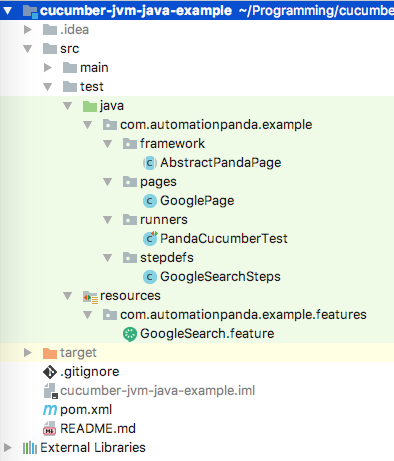
Cucumber-JVM Example Project

Screenshot of the example project from IntelliJ IDEA’s Project view.

Gherkin Feature Files

Gherkin feature files are text files that contain Gherkin behavior scenarios. They use the “.feature” extension. In a Maven project, they belong under src/test/resources, since they are not Java source files. They should also be organized into a sensible package hierarchy. Refer to other BDD pages for writing good Gherkin.
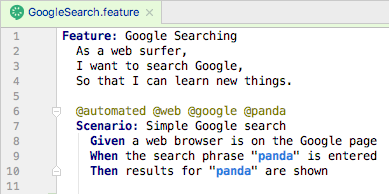
Gherkin Feature File

A feature file from the example projects, opened in IntelliJ IDEA.

Step Definition Classes

Step definition classes are Java classes containing methods that implement Gherkin steps. Step def classes are like regular Java classes: they have variables, constructors, and methods. Steps are “glued” to methods using regular expressions. Feature file scenarios can use steps from any step definition class in the project. In a Maven project, step defs belong in packages under src/test/java, and their class names should end in “Steps”.

The Basics

Below is a step definition class from the cucumber-jvm-java-example project, which uses the traditional method annotation style for step defs as part of the cucumber-java package. Each method should throw Throwable so that exceptions are raised up to the Cucumber-JVM framework.

package com.automationpanda.example.stepdefs;

import com.automationpanda.example.pages.GooglePage;
import cucumber.api.java.After;
import cucumber.api.java.Before;
import cucumber.api.java.en.Given;
import cucumber.api.java.en.Then;
import cucumber.api.java.en.When;
import org.openqa.selenium.WebDriver;
import org.openqa.selenium.chrome.ChromeDriver;

import static org.assertj.core.api.Assertions.assertThat;

public class GoogleSearchSteps {

  private WebDriver driver;
  private GooglePage googlePage;

  @Before(value = "@web", order = 1)
  public void initWebDriver() throws Throwable {
    driver = new ChromeDriver();
  }

  @Before(value = "@google", order = 10)
  public void initGooglePage() throws Throwable {
    googlePage = new GooglePage(driver);
  }

  @Given("^a web browser is on the Google page$")
  public void aWebBrowserIsOnTheGooglePage() throws Throwable {
    googlePage.navigateToHomePage();
  }

  @When("^the search phrase \"([^\"]*)\" is entered$")
  public void theSearchPhraseIsEntered(String phrase) throws Throwable {
    googlePage.enterSearchPhrase(phrase);
  }

  @Then("^results for \"([^\"]*)\" are shown$")
  public void resultsForAreShown(String phrase) throws Throwable {
    assertThat(googlePage.pageTitleContains(phrase)).isTrue();
  }

  @After(value = "@web")
  public void disposeWebDriver() throws Throwable {
    driver.quit();
  }
}

Alternatively, in Java 8, step definitions may be written using lambda expressions. As shown in the cucumber-jvm-java8-example project, lambda-style step defs are more concise and may be defined dynamically. The cucumber-java8 package is required:

package com.automationpanda.example.stepdefs;

import com.automationpanda.example.pages.GooglePage;
import cucumber.api.Scenario;
import cucumber.api.java8.En;
import org.openqa.selenium.WebDriver;
import org.openqa.selenium.chrome.ChromeDriver;

import static org.assertj.core.api.Assertions.assertThat;

public class GoogleSearchSteps implements En {

  private WebDriver driver;
  private GooglePage googlePage;

  // Warning: Make sure the timeouts for hooks using a web driver are zero

  public GoogleSearchSteps() {
    Before(new String[]{"@web"}, 0, 1, (Scenario scenario) -> {
      driver = new ChromeDriver();
    });
    Before(new String[]{"@google"}, 0, 10, (Scenario scenario) -> {
      googlePage = new GooglePage(driver);
    });
    Given("^a web browser is on the Google page$", () -> {
      googlePage.navigateToHomePage();
    });
    When("^the search phrase \"([^\"]*)\" is entered$", (String phrase) -> {
      googlePage.enterSearchPhrase(phrase);
    });
    Then("^results for \"([^\"]*)\" are shown$", (String phrase) -> {
      assertThat(googlePage.pageTitleContains(phrase)).isTrue();
    });
    After(new String[]{"@web"}, (Scenario scenario) -> {
      driver.quit();
    });
  }
}

Either way, steps from any feature file are glued to step definition methods/lambdas from any class at runtime:

Step Def Glue

Gluing a Gherkin step to its Java definition using regular expressions. IDEs have features to automatically generate definition stubs for steps.

For best practice, class inheritance should also be avoided – step bindings in superclasses will trigger DuplicateStepDefinitionException exceptions at runtime, and any step definition concern handled by inheritance can be handled better with other design patterns. Class constructors should be used primarily for dependency injection, while setup operations should instead be handled in Before hooks.

Hooks

Scenarios sometimes need automation-centric setup and cleanup routines that should not be specified in Gherkin. For example, web tests must first initialize a Selenium WebDriver instance. Step definition classes can have Before and After hooks that run before and after a scenario. They are analogous to setup and teardown methods from other test frameworks like JUnit. Hooks may optionally specify tags for the scenarios to which they apply, as well as an order number. They are similar to Aspect-Oriented Programming. After hooks will run even if a scenario has an exception or abortive assertion – use them for cleanup routines instead of Gherkin steps to guarantee cleanup runs.

The code snippet below shows Before and After hooks from the traditional-style example project. The order given to the Before hooks guarantees the web driver is initialized before the page object is created.

  @Before(value = "@web", order = 1)
  public void initWebDriver() throws Throwable {
    driver = new ChromeDriver();
  }

  @Before(value = "@google", order = 10)
  public void initGooglePage() throws Throwable {
    googlePage = new GooglePage(driver);
  }

  @After(value = "@web")
  public void disposeWebDriver() throws Throwable {
    driver.quit();
  }

Before and After hooks surround scenarios only. Cucumber-JVM does not provide hooks to surround the whole test suite. This protects test case independence but makes global setup and cleanup challenging. The best workaround is to use the singleton pattern with lazy initialization. The solution is documented in Cucumber-JVM Global Hook Workarounds.

Dependency Injection

Cucumber-JVM supports dependency injection (DI) as a way to share objects between step definition classes. For example, steps in different classes may need to share the same web driver instance. Cucumber-JVM supports many DI modules, and each has its own dependency package. As a warning, do not use static variables for sharing objects between step definition classes – static variables can break test independence and parallelization.

PicoContainer is the simplest DI framework and is recommended for most needs. Dependency injection hinges upon step definition class constructors. Without DI, step def constructors must not have parameters. With DI, PicoContainer will automatically construct each object in a step def constructor signature and pass them in when the step def object is constructed. Furthermore, the same object is injected into all step def classes that have its type as a constructor parameter. Objects that require constructor parameters should use a holder or caching class to provide the necessary arguments. Note that dependency-injected objects are created fresh for each scenario.

Below is a trivial example for how to apply dependency injection using PicoContainer to initialize the web driver in the example projects. (A more advanced example would read browser type from a config file and set the web driver accordingly.)

public class WebDriverHolder {
  private WebDriver driver;
  public WebDriver getDriver() {
    return driver;
  }
  public void initWebDriver() {
    driver = new ChromeDriver();
  }
}

public class GoogleSearchSteps {
  private WebDriverHolder holder;
  public GoogleSearchSteps(WebDriverHolder holder) {
    this.holder = holder;
  }
  @Before
  public void initWebDriver() throws Throwable {
    if (holder.getDriver() == null)
      holder.initWebDriver();
  }
}

Automation Support Classes

Automation support classes are extra classes outside of the Cucumber-JVM framework itself that are needed for test automation. They could come from the same test project, a separate but proprietary package, or an open-source package. Regardless of the source, they should fold into build management. They can integrate seamlessly with Cucumber-JVM. Step definitions should be very short because the bulk of automation work should be handled by support classes for maximum code reusability.

Popular open-source Java packages for test automation support are:

Page objects, file readers, and data processors also count as support classes.

Configuration Files

Configuration files are extra files outside of the Cucumber-JVM framework that provide environment-specific data to the tests, such as URLs, usernames, passwords, logging/reporting settings, and database connections. They should be saved in standard formats like CSV, XML, JSON, or Java Properties, and they should be read into memory once at the start of the test suite using global hook workarounds. The automation code should look for files at predetermined locations or using paths passed in as environment variables or properties.

Not all test automation projects need config files, but many do. Never hard-code config data into the automation code. Avoid non-text-based formats like Microsoft Excel so that version control can easily do diffs, and avoid non-standard formats that require custom parsers because they require extra development and maintenance time.

Running Tests

Cucumber-JVM tests may be run in a number of ways.

Using JUnit or TestNG

The cucumber-junit and cucumber-testng packages enable JUnit and TestNG respectively to run Cucumber-JVM tests. They require test runner classes that provide CucumberOptions for how to run the tests. A project may have more than one runner class. The example projects use the JUnit runner like this:

package com.automationpanda.example.runners;

import cucumber.api.CucumberOptions;
import cucumber.api.junit.Cucumber;
import org.junit.runner.RunWith;

@RunWith(Cucumber.class)
@CucumberOptions(
  plugin = {"pretty", "html:target/cucumber", "junit:target/cucumber.xml"},
  features = "src/test/resources/com/automationpanda/example/features",
  glue = {"com.automationpanda.example.stepdefs"})
public class PandaCucumberTest {
}

JUnit and TestNG runners can also be picked up by build management tools. For example, Maven will automatically run any runner classes named *Test.java during the test phase and *IT.java during the verify phase. Be sure to include the clean option to delete old test results. Avoid duplicate test runs by making sure runner classes do not cover the same tests – use tags to avoid duplicate coverage.

Using the Command Line Runner

Cucumber-JVM provides a CLI runner that can run feature files directly from the command line. To use it, invoke:

java cucumber.api.cli.Main

Run with “–help” to see all available options.

Using IDEs

Both JetBrains IntelliJ IDEA (with the Cucumber for Java plugin) and Eclipse (with the Cucumber JVM Eclipse Plugin) are great IDEs for Cucumber-JVM test development. They provide features for linking steps to definitions, generating definition stubs, and running tests with various options.

Cucumber Options

Cucumber options may be specified either in a runner class or from the command line as a Java system property. Set options from the command line using “-Dcucumber.options” – it will work for any java or mvn command. To see all available options, set the options to “–help”, or check the official Cucumber-JVM doc page.

The most useful option is probably the tags option. Selecting tags to run dynamically at runtime, rather than statically in runner classes, is very useful. In Cucumber-JVM 2.0, tag expressions use a basic English Boolean language:

@automated and @web
@web or @service
not @manual
(@web or @service) and (not @wip)

Older version of Cucumber-JVM used a more complicated syntax with tildes and commas.

Parallel Execution

Parallel test execution greatly reduces total start-to-end testing time. However, it requires additional machines to run tests, tools and config to handle parallel runs, and tests to be written to avoid collisions. As of version 4.0.0, Cucumber-JVM supports parallel execution out of the box. Previously, the most common way to do parallel test runs in Cucumber-JVM was to use a Maven plugin like the Cucumber-JVM Parallel Plugin or the Cucable plugin from Trivago.

[Update on 9/24/2018: Mentioned that Cucumber-JVM supports parallel execution starting with version 4.0.0.]

References

BDD 101: Unit, Integration, and End-to-End Tests

There are many types of software tests. BDD practices can be incorporated into all aspects of testing, but BDD frameworks are not meant to handle all test types. Behavior scenarios are inherently functional tests – they verify that the product under test works correctly. While instrumentation for performance metrics could be added, BDD frameworks are not intended for performance testing. This post focuses on how BDD automation works into the Testing Pyramid. Please read BDD 101: Manual Testing for manual test considerations. (Check the Automation Panda BDD page for the full table of contents.)

The Testing Pyramid

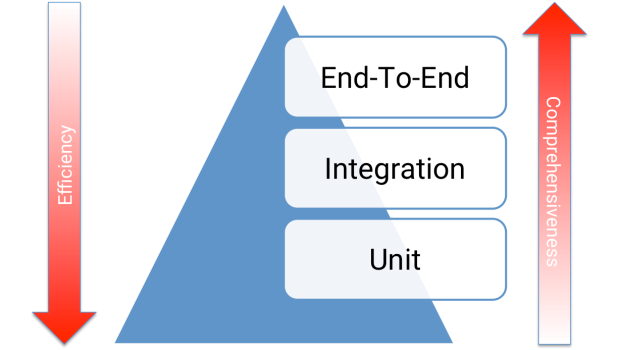
The Testing Pyramid is a functional test development approach that divides tests into three layers: unit, integration, and end-to-end.

  • Unit tests are white-box tests that verify individual “units” of code, such as functions, methods, and classes. They should be written in the same language as the product under test, and they should be stored in the same repository. They often run as part of the build to indicate immediate success or failure.
  • Integration tests are black-box tests that verify integration points between system components work correctly. The product under test should be active and deployed to a test environment. Service tests are often integration-level tests.
  • End-to-end tests are black-box tests that test execution paths through a system. They could be seen as multi-step integration tests. Web UI tests are often end-to-end-level tests.

Below is a visual representation of the Testing Pyramid:

The Testing Pyramid

The Testing Pyramid

From bottom to top, the tests increase in complexity: unit tests are the simplest and run very fast, while end-to-end require lots of setup, logic, and execution time. Ideally, there should be more tests at the bottom and fewer tests at the top. Test coverage is easier to implement and isolate at lower levels, so fewer high-investment, more-fragile tests need to be written at the top. Pushing tests down the pyramid can also mean wider coverage with less execution time. Different layers of testing mitigate risk at their optimal returns-on-investment.

Behavior-Driven Unit Testing

BDD test frameworks are not meant for writing unit tests. Unit tests are meant to be low-level, program-y tests for individual functions and methods. Writing Gherkin for unit tests is doable, but it is overkill. It is much better to use established unit test frameworks like JUnit, NUnit, and pytest.

Nevertheless, behavior-driven practices still apply to unit tests. Each unit test should focus on one main thing: a single call, an individual variation, a specific input combo; a behavior. Furthermore, in the software process, feature-level behavior specs draw a clear dividing line between unit and above-unit tests. The developer of a feature is often responsible for its unit tests, while a separate engineer is responsible for integration and end-to-end tests for accountability. Behavior specs carry a gentleman’s agreement that unit tests will be completed separately.

Integration and End-to-End Testing

BDD test frameworks shine at the integration and end-to-end testing levels. Behavior specs expressively and concisely capture test case intent. Steps can be written at either integration or end-to-end levels. Service tests can be written as behavior specs like in Karate. End-to-end tests are essentially multi-step integrations tests. Note how a seemingly basic web interaction is truly a large end-to-end test:

Given a user is logged into the social media site
When the user writes a new post
Then the user's home feed displays the new post
And the all friends' home feeds display the new post

Making a simple social media post involves web UI interaction, backend service calls, and database updates all in real time. That’s a full pathway through the system. The automated step definitions may choose to cover these layers implicitly or explicitly, but they are nevertheless covered.

Lengthy End-to-End Tests

Terms often mean different things to different people. When many people say “end-to-end tests,” what they really mean are lengthy procedure-driven tests: tests that cover multiple behaviors in sequence. That makes BDD purists shudder because it goes against the cardinal rule of BDD: one scenario, one behavior. BDD frameworks can certainly handle lengthy end-to-end tests, but careful considerations should be taken for if and how it should be done.

There are five main ways to handle lengthy end-to-end scenarios in BDD:

  1. Don’t bother. If BDD is done right, then every individual behavior would already be comprehensively covered by scenarios. Each scenario should cover all equivalence classes of inputs and outputs. Thus, lengthy end-to-end scenarios would primarily be duplicate test coverage. Rather than waste the development effort, skip lengthy end-to-end scenario automation as a small test risk, and compensate with manual and exploratory testing.
  2. Combine existing scenarios into new ones. Each When-Then pair represents an individual behavior. Steps from existing scenarios could be smashed together with very little refactoring. This violates good Gherkin rules and could result in very lengthy scenarios, but it would be the most pragmatic way to reuse steps for large end-to-end scenarios. Most BDD frameworks don’t enforce step type order, and if they do, steps could be re-typed to work. (This approach is the most pragmatic but least pure.)
  3. Embed assertions in Given and When steps. This strategy avoids duplicate When-Then pairs and ensures validations are still performed. Each step along the way is validated for correctness with explicit Gherkin text. However, it may require a number of new steps.
  4. Treat the sequence of behaviors as a unique, separate behavior. This is the best way to think about lengthy end-to-end scenarios because it reinforces behavior-driven thinking. A lengthy scenario adds value only if it can be justified as a uniquely separate behavior. The scenario should then be written to highlight this uniqueness. Otherwise, it’s not a scenario worth having. These scenarios will often be very declarative and high-level.
  5. Ditch the BDD framework and write them purely in the automation programming. Gherkin is meant for collaboration about behaviors, while lengthy end-to-end tests are meant exclusively for intense QA work. Biz roles will write behavior specs but will never write end-to-end tests. Forcing behavior specification on lengthy end-to-end scenarios can inhibit their development. A better practice could be coexistence: acceptance tests could be written with Gherkin, while lengthy end-to-end tests could be written in raw programming. Automation for both test sets could still nevertheless share the same automation code base – they could share the same support modules and even step definition methods.

Pick the approach that best meets the team’s needs.